

Sports API Hub creates individual pages for games, teams, players, and seasons. Each sport gets its own URL base, so basketball and baseball pages never overlap. Permalink settings are configured on the standard WordPress Permalinks page, where the plugin adds its own section.
Admin Menu: WordPress Settings > Permalinks (scroll to the bottom)
🔗 URL Structure
Every entity page follows a consistent three-part URL pattern:
/{sport-base}/{entity-type}/{slug}/Four entity types have frontend pages:
| Entity Type | Default Slug | Example URL |
|---|---|---|
| Game | game | /basketball/game/lakers-vs-celtics-2026-01-15/ |
| Team | team | /basketball/team/los-angeles-lakers/ |
| Player | player | /basketball/player/lebron-james/ |
| Season | season | /basketball/season/nba-2025-26/ |
Venues and managers are admin-only entities and do not have frontend pages.
Multi-Sport Examples
Each sport uses its own base slug, keeping URLs clean and separate:
| URL | What It Shows |
|---|---|
/basketball/game/lakers-vs-celtics-2026-01-15/ | A basketball game page |
/basketball/team/los-angeles-lakers/ | A basketball team page |
/baseball/game/yankees-vs-red-sox-2026-04-10/ | A baseball game page |
/baseball/player/aaron-judge/ | A baseball player page |
/cricket/team/mumbai-indians/ | A cricket team page |
/ice-hockey/season/nhl-2025-26/ | An ice hockey season page |
Customizing Slugs
The plugin adds a “Sports API Hub Permalinks” section to the bottom of the WordPress Permalinks settings page. Each enabled sport shows input fields for its entity type slugs.
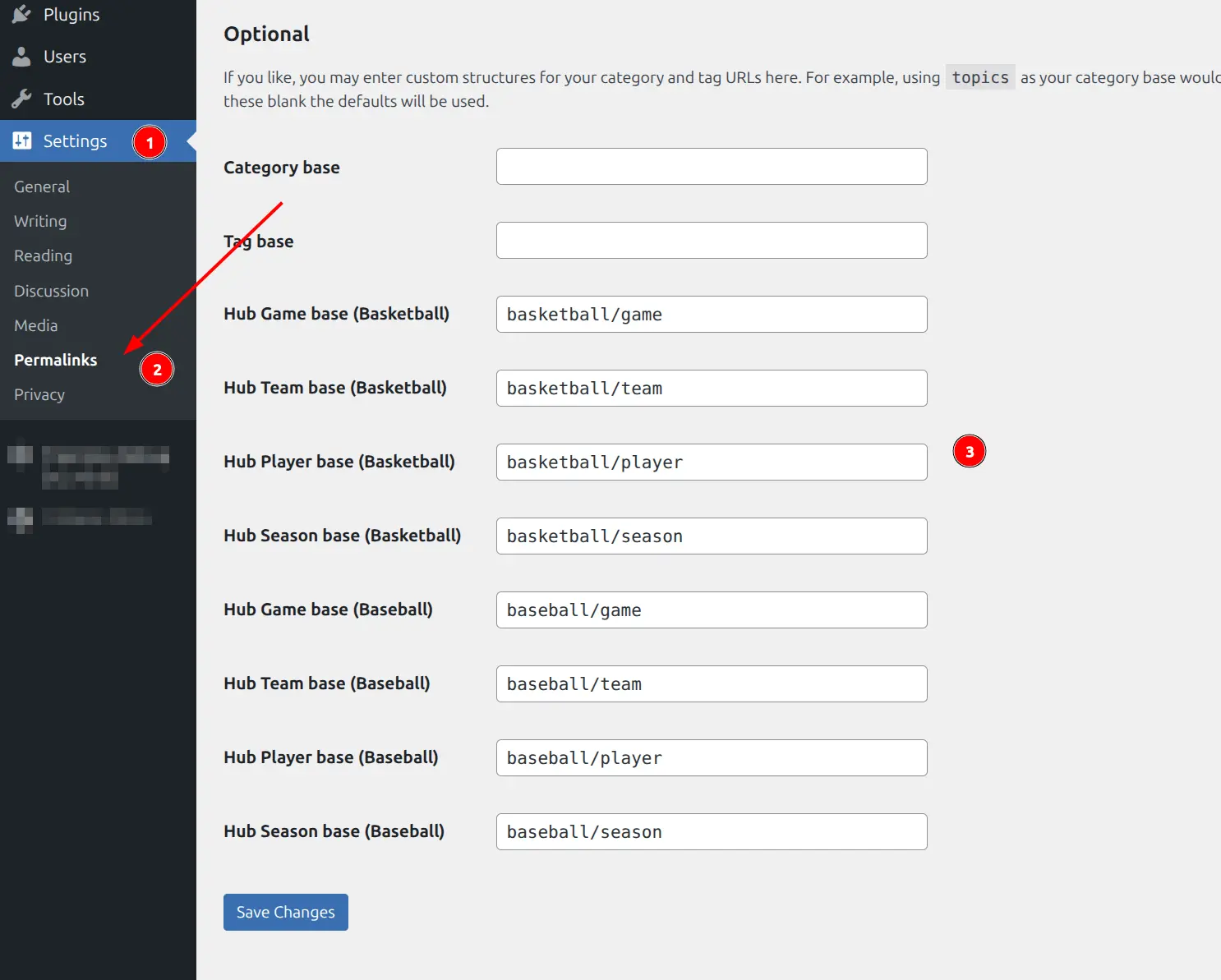
You can customize two parts of every URL:
Sport Base Slugs
Each sport has its own base slug that forms the first segment of the URL. Defaults match the sport name:
| Sport | Default Base | Example Custom Value |
|---|---|---|
| Basketball | basketball | nba, hoops |
| Baseball | baseball | mlb |
| Cricket | cricket | ipl |
| Rugby | rugby | rugby-union |
| Ice Hockey | ice-hockey | hockey, nhl |
| American Football | american-football | nfl, football |
| Handball | handball | — |
| Volleyball | volleyball | — |
For example, changing basketball to nba would change URLs from /basketball/team/... to /nba/team/....
Entity Type Slugs
The entity type portion of the URL (the second segment) is also customizable per sport:
| Entity | Default Slug | Example Custom Value |
|---|---|---|
| Game | game | match, event |
| Team | team | club, squad |
| Player | player | athlete |
| Season | season | competition |
Entity type slugs are configured per sport, so you could use match for basketball games and game for baseball games if needed.
⚙️ Saving Changes
After changing any permalink setting, click Save Changes at the bottom of the Permalinks page. This flushes the WordPress rewrite rules so the new URLs take effect immediately.
Important
If you skip saving, the new URLs will return 404 errors until the rewrite rules are flushed. Always click Save Changes after editing any slug.
Prerequisites
The plugin requires WordPress pretty permalinks to be enabled. If your site uses the “Plain” permalink structure (?p=123), entity pages will not work.
To enable pretty permalinks, go to WordPress Settings > Permalinks and select any structure other than “Plain” (Post name is recommended).
Troubleshooting
Entity pages return 404
The most common fix: go to WordPress Settings > Permalinks and click Save Changes (even without making any edits). This regenerates the rewrite rules.
Rewrite rules can become stale after:
- Changing permalink settings
- Activating or deactivating the plugin
- Switching themes
- Updating WordPress
URLs conflict with existing pages
If you have a WordPress page with the same slug as a sport base (e.g., a page called “basketball”), the plugin’s URLs may conflict. Rename either the WordPress page or the sport base slug to resolve the conflict.
Tip
If 404 errors persist after saving permalinks, check for conflicting pages or plugins that modify rewrite rules. Temporarily deactivating other plugins can help isolate the issue.
Related
- Plugin Settings — Display options and general behavior
- API Config — API key setup and provider selection
- Common Issues — Troubleshooting 404 errors and permalink conflicts