

Leagues and Seasons are the organizational backbone of the plugin. Every team, player, and game belongs to a season within a league.
API Hierarchy
The external API organizes data in a 4-level hierarchy:
Country (Category) → League → Group/Stage → SeasonExample:
USA → NBA → Eastern Conference → 2025/26
USA → NBA → Western Conference → 2025/26
USA → MLB → American League → 2026- League = the competition itself (NBA, MLB, Premier League)
- Season = a year-specific instance (NBA 2025/26)
- Group/Stage = subdivisions within a season (conferences, playoff rounds)
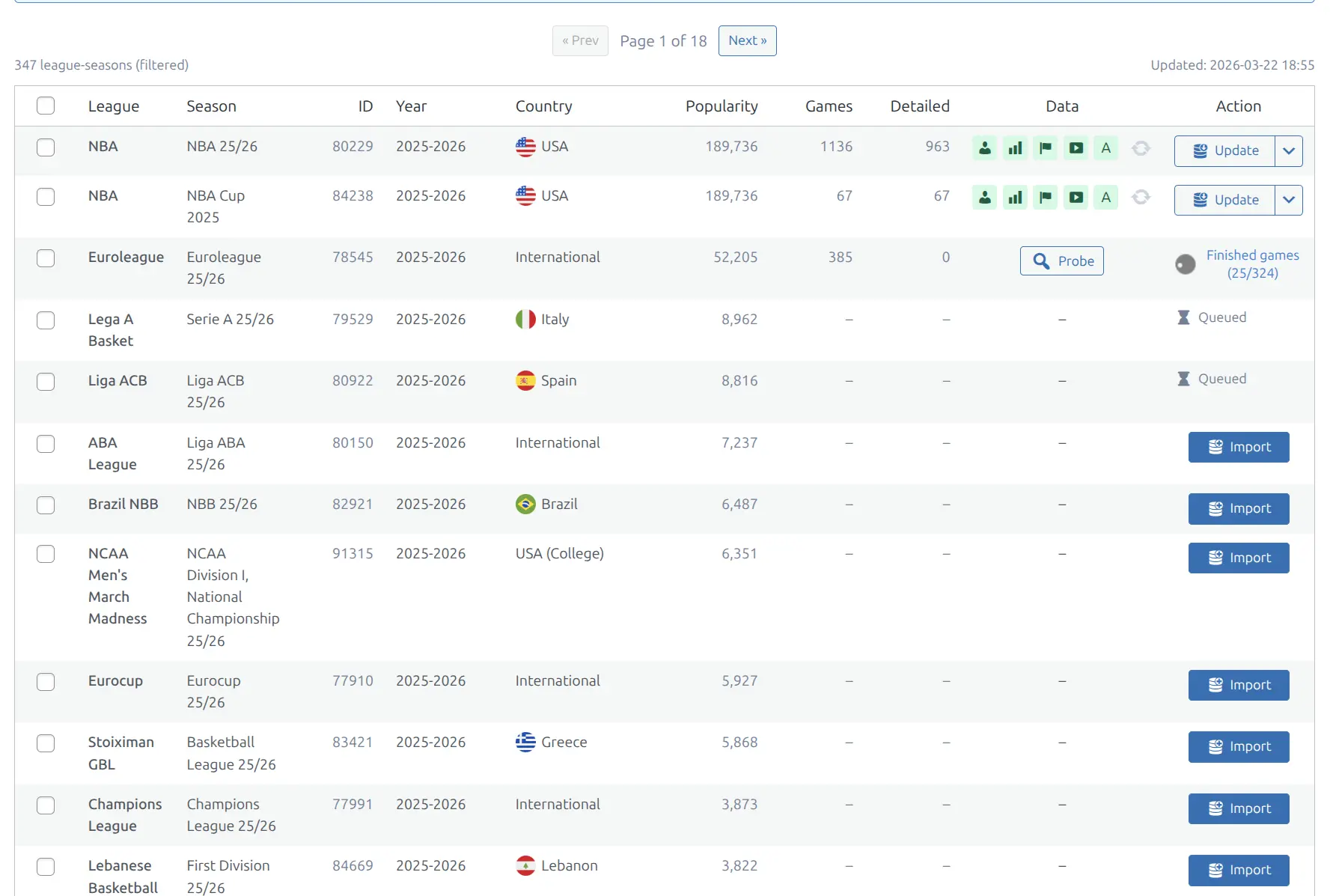
In the Import panel, you can browse leagues with their seasons, popularity, game counts, and capability badges:
Terminology
The API uses different names internally: “uniqueTournament” = League, “category” = Country, “tournament” = Group/Stage. The plugin maps these to familiar sports terminology.
Season Capabilities
Not all data is available for every league. Capabilities indicate which data endpoints return useful data for a given season:
| Badge | Capability | What It Provides |
|---|---|---|
| P | Player Stats | Per-game player statistics, box scores |
| T | Team Stats | Per-game team statistics comparison |
| E | Events | Play-by-play incidents, timeline |
| H | Highlights | Video highlight links (YouTube) |
How to Check Capabilities
- Go to API & Import > Import
- Find your imported season in the Browse panel
- Look at the Data column for colored badges
- Click Probe to auto-detect capabilities for a season
Capabilities are detected by probing — the plugin tests each endpoint with real data to determine what’s available. See Import Workflow for details.
🔗 Season Linking
Some leagues have subsidiary tournaments that belong to a parent season. For example, the NBA Cup is a mid-season tournament within the regular NBA season.
Season linking connects these subsidiary seasons to their parent:
- Parent season: The main competition (e.g., NBA 24/25)
- Child season: The subsidiary tournament (e.g., NBA Cup 2024)
When seasons are linked:
- Combined stats — player and team statistics merge parent + child season data automatically
- Career stats — child season rows fold into the parent season row
- Season pills — child seasons are hidden from season switchers (no duplicate pills)
- Game exclusions — specific games (e.g., Cup Finals) can be excluded from stat aggregations
In the Seasons admin list, linked seasons show a Parent column with a link icon pointing to the parent season.
📋 Managing Seasons
Seasons are imported automatically when you import a league hierarchy. Each imported season appears in Hub Data > Seasons.
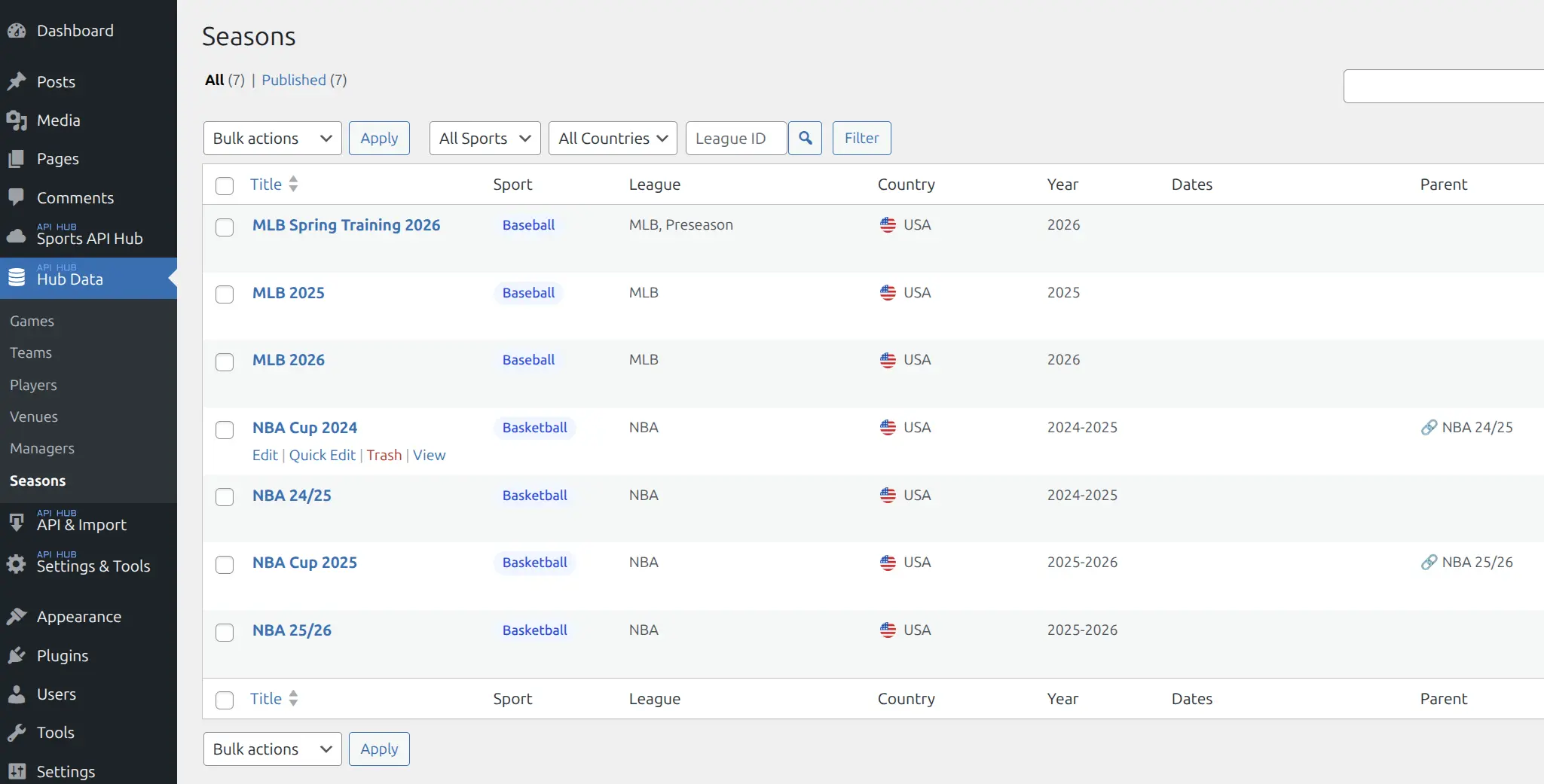
The admin list shows:
- Title — season name (e.g., “NBA 24/25”, “MLB 2025”)
- Sport — color-coded sport badge
- League — parent league name with group info
- Country — country flag
- Year — season year range
- Parent — link icon when season is linked to a parent
You can filter by sport, country, and league ID.
League Rankings
Leagues are automatically classified by importance (top leagues like NBA/MLB rank highest). This ranking affects the display order in season pills and league lists — major leagues appear first, minor leagues are grouped behind a “More leagues” toggle.
📚 Related
- Import Workflow — how to browse and import leagues
- Games — game data within seasons
- Sports — sport-by-sport capabilities
- Season Pages — frontend season page blocks