

Sports API Hub includes a dedicated Support page in the WordPress admin with everything you need to contact us: a pre-filled ticket subject, system info collection, and support hours.
Admin Menu: Sports API Hub > Support
Before Contacting Support
Many issues have straightforward solutions already documented. Before submitting a ticket, check these resources:
- FAQ — answers to the most common questions
- Common Issues — step-by-step solutions to frequent problems
- API Errors — understanding error codes and how to resolve them
The Support Page
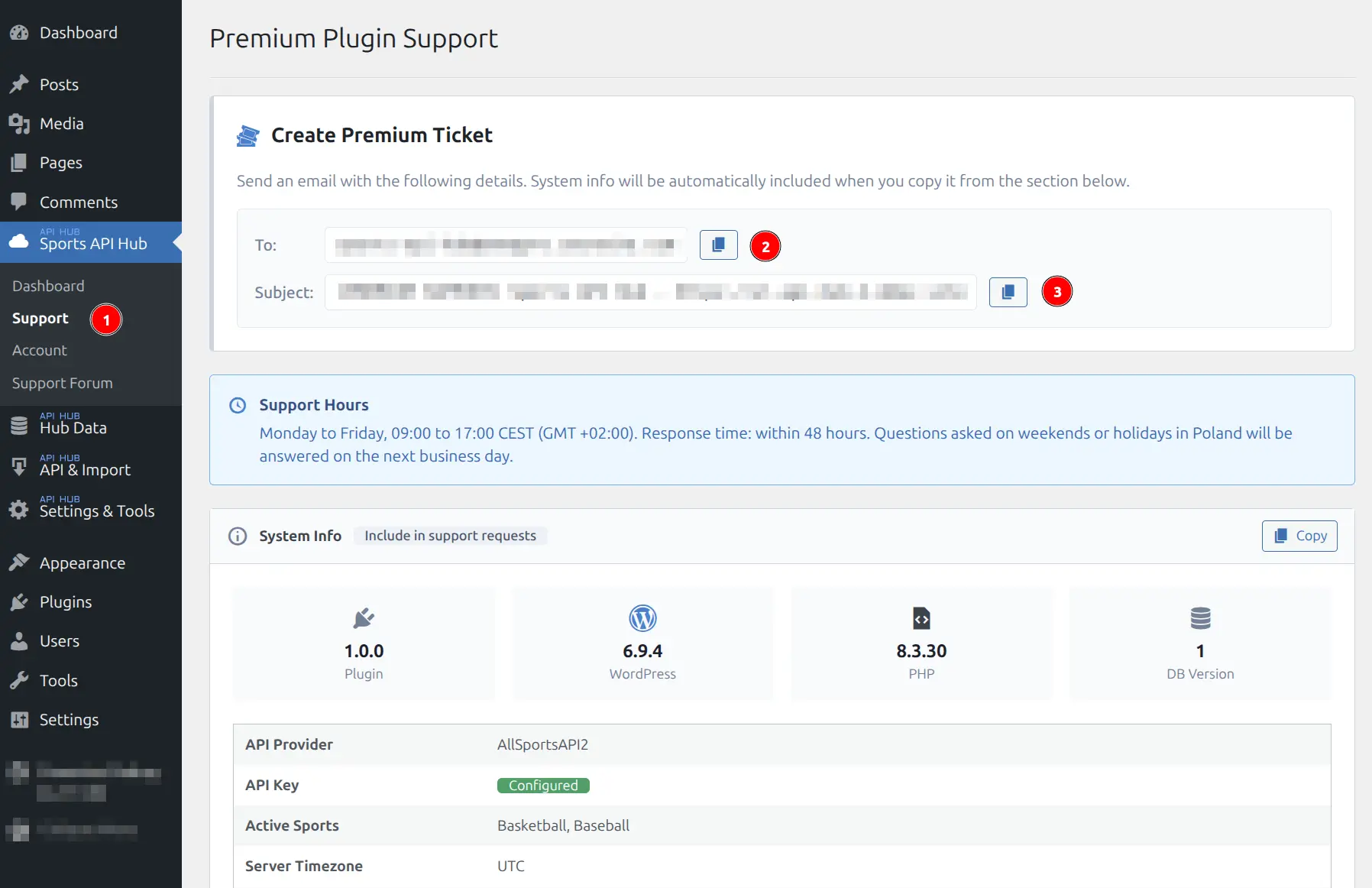
The Support page is your starting point for contacting us. It has three sections: Create Premium Ticket, Support Hours, and System Info.
Creating a Support Ticket
The Create Premium Ticket section provides the support email address and a pre-filled subject line that includes your site URL and plugin version. Use the copy buttons to quickly compose your email:
- Click the Copy button next to the To field to copy the support email address
- Click the Copy button next to the Subject field to copy the pre-filled subject line (includes your site URL and plugin version)
- Open your email client, paste the address and subject, then write your question or describe the issue in the email body
The pre-filled subject line helps us identify your site and plugin version immediately, which speeds up the support process.
What to Include in Your Ticket
The more detail you provide upfront, the faster we can help. A good support ticket includes:
- Description of the issue — what is happening and what you expected to happen instead
- Steps to reproduce — the exact sequence of actions that leads to the problem (e.g., “I go to Import, select NBA 2025/26, click Finished Details, and the task fails at batch 3”)
- URL where the issue occurs — a link to the specific page on your site
- Screenshot or screen recording — especially helpful for display issues or error messages
- System Info — copied from the Support page (see below)
System Info
The System Info section at the bottom of the Support page automatically collects key diagnostic details about your installation. Click the Copy button to copy everything to your clipboard, then paste it into your support email.
The collected information includes:
| Field | Example |
|---|---|
| Plugin version | 1.0.0 |
| WordPress version | 6.9.4 |
| PHP version | 8.3.30 |
| DB Version | 1 |
| API Provider | AllSportsAPI2 |
| API Key status | Configured / Not configured |
| Active Sports | Basketball, Baseball |
| Server Timezone | UTC |
Always Include System Info
Including the System Info in every support request saves a round-trip of back-and-forth. It takes one click to copy and helps us diagnose issues much faster.
Support Hours
| Detail | Value |
|---|---|
| Business hours | Monday — Friday, 09:00 — 17:00 CEST (GMT+02:00) |
| Response time | Within 48 hours |
| Weekends and holidays | Answered on the next business day |
Most tickets receive a response well within 48 hours. For urgent issues such as site-breaking bugs, mention the urgency in your email subject line.
What Support Covers
- Bug reports — these are handled with priority. If you have found a bug, report it and we will investigate
- Configuration help — assistance with plugin setup, API connection, import settings, and display options
- API connection issues — troubleshooting failed API requests, authentication errors, and rate limit problems
- Display and template questions — guidance on layout builder, shortcodes, CSS tokens, and template overrides
What Support Does Not Cover
- Custom theme development — building custom templates, writing custom CSS from scratch, or building features not included in the plugin
- Third-party plugin conflicts — we can provide basic guidance, but deep debugging of other plugins is outside our scope
- API provider issues — RapidAPI billing, API downtime, incorrect data from the API source, or API plan upgrades. These are managed through your RapidAPI Dashboard
Tips for Faster Resolution
- Include System Info — always paste the System Info from the Support page
- Provide a URL — link to the exact page where the issue occurs
- Describe expected vs. actual behavior — “I expected the standings to show 30 teams, but only 15 appear”
- Attach a screenshot — a picture is worth a thousand words, especially for layout or display issues
- Check the documentation first — many common issues are covered in the FAQ and Common Issues pages
No WordPress.org Forum
Sports API Hub is a paid plugin and does not have a support forum on WordPress.org. All support is handled through the email ticket system described on this page.
Related
- FAQ — common questions and answers
- Common Issues — self-service troubleshooting guides
- API Errors — API error code reference and solutions
- Licensing & Updates — license activation, transfers, and managing updates