

When you import a season, the plugin runs a series of tasks in sequence. Each task fetches a specific type of data from the API: league structure, game schedules, player stats, standings, and more. Tasks are queued automatically and execute one at a time in the Import panel.
This page covers all 12 import tasks, what they fetch, how many API calls they use, and when you should run them.
Admin Menu: API & Import > Import
📋 Task Overview
There are three categories of tasks:
- Per-season tasks (10) — run for each selected season in the import modal
- Standalone tasks (2) — run independently from the import modal via dedicated buttons
Tasks run client-side in a queue. After selecting seasons and clicking Import, the plugin queues the appropriate tasks and processes them sequentially. Progress bars and status indicators show the current state of each task.
If a task encounters an error on a single item (e.g., one game fails to fetch), it logs the error and skips to the next item. The remaining items continue processing. Only a daily API rate limit error stops the entire queue.
API Calls Summary
Each task uses a different number of API calls. Use this table to estimate API usage before importing.
| Task | API Calls | Notes |
|---|---|---|
| Hierarchy | ~5 | Categories + leagues + seasons |
| Fixtures | 1 per page (30 games/page) | Pages through all games automatically |
| Teams | 1 per team | 30 teams = 30 calls |
| Finished Details | 1-5 per game | Depends on enabled sub-options |
| Re-update | 1-5 per game | Same as Finished Details |
| Rosters | 1 per team | 30 teams = 30 calls |
| Standings | 1 per season | Single call |
| Cup Trees | 1 per season | Single call |
| Kickoff | 1 per page (30 games/page) | Non-finished games only |
| Highlights | 1 per game | 10 games per batch |
| Fetch Odds | 1 per date | Bulk endpoint, all games on a date |
| Fetch Teams | 1 per team | Batch team metadata update |
🔗 Task Dependencies
Tasks must run in a specific order. The plugin enforces this automatically when you select multiple tasks in the import modal, but it helps to understand the dependencies:
- Hierarchy must run first — it creates the league and season structure that all other tasks depend on
- Fixtures must run before Finished Details — games need to exist before their details can be fetched
- Teams should run after Fixtures but before Finished Details — team metadata (including league assignment) is needed for accurate stats processing
- Rosters should run after Fixtures — teams need to exist before their player lists can be fetched
- All other tasks (Standings, Cup Trees, Kickoff, Highlights) can run in any order after Fixtures
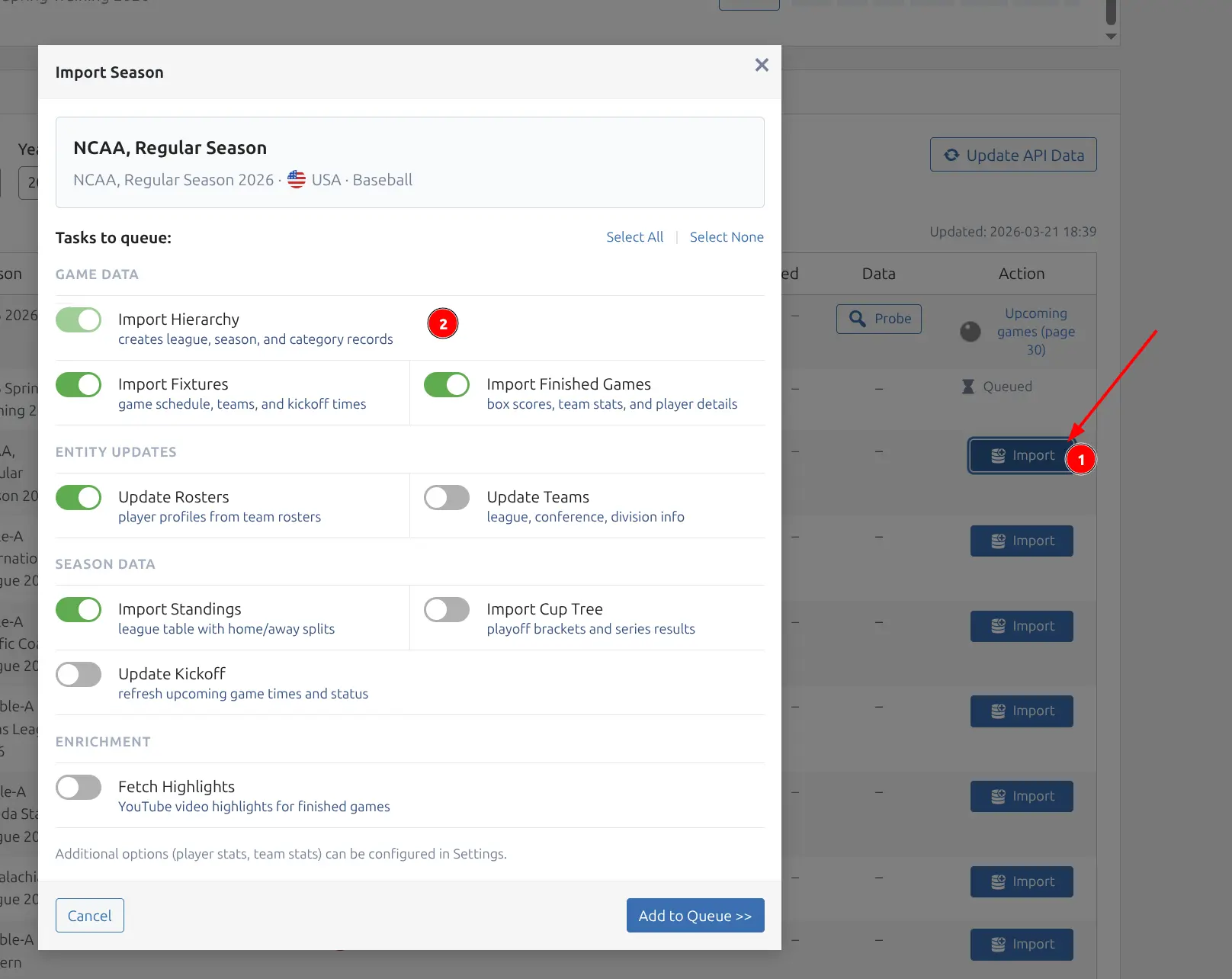
Per-Season Tasks
These 10 tasks run for each season you select in the import modal. Check the ones you need, then click Import to queue them.
1. Hierarchy
Imports the foundational structure from the API: categories (countries), leagues (unique tournaments), and seasons.
Why it matters: This must run first. All other tasks depend on the league and season structure being in place. Without hierarchy data, the plugin has no context for where games, teams, and players belong.
API calls: Approximately 5 (categories list, league details, season list). The exact count depends on how many leagues you are importing.
Creates: Category, League, and Season entities in the database.
When to run: Once during initial setup, or when you want to discover new seasons for an already-imported league (e.g., a new NBA season becomes available).
2. Fixtures
Imports upcoming and scheduled games from the API. Also imports past games that have not yet been fetched. This task creates the game schedule that all other game-related tasks build upon.
API calls: 1 per page (30 games per page, zero-indexed pagination). A season with 1,230 games requires approximately 41 API calls. The API returns a hasNextPage flag to signal whether more pages exist — the task pages through all available games automatically.
Creates: Game entities with import_status = 0 (fixture — schedule data only). Also creates Team and Venue entities if they do not already exist in the database.
When to run: During initial import and periodically to pick up newly scheduled games (playoffs, postponed matches, rescheduled fixtures).
3. Teams
Fetches detailed team metadata that is not available from basic game data. This includes team colors (primary and secondary), short names, abbreviations, venue details, manager information, and other display data.
API calls: 1 per team. For a league with 30 teams, this uses 30 API calls.
What it updates: Team colors, short names, venue assignments, manager assignments, and the team_data JSON column with additional metadata.
Why the order matters: This task runs after Fixtures but before Finished Details. The team’s league assignment is set during this task, and league-wide statistics queries depend on that assignment being in place. Running Finished Details before Teams can result in incomplete league-level stats.
When to run: After the initial Fixtures import. Re-run if you notice missing team colors or outdated metadata.
4. Finished Details
This is where the bulk of your statistical data comes from. The task fetches full game details for finished games that have not yet been detailed — scores, box scores, team stats, play-by-play, and video highlights.
What it fetches per game:
| Data | API Calls | Controlled By |
|---|---|---|
| Match context (scores, status, periods) | 1 | Always fetched |
| Lineups / Box scores | +1 | Sub-option: Lineups |
| Team statistics | +1 | Sub-option: Team Statistics |
| Incidents / Play-by-play | +1 | Sub-option: Incidents |
| Highlights / Videos | +1 | Sub-option: Highlights |
API calls per game: 1 to 5, depending on which sub-options are enabled in API & Import > API Config.
Batch size: 5 games at a time. The plugin processes 5 games, then moves to the next batch.
Import status change: Games move from 0 (fixture) to 5 (detailed) after successful processing. Only games with import_status = 0 are targeted.
When to run: After games have been played. Background Sync can automate this so you do not need to run it manually.
5. Re-update
Re-fetches details for games that have already been detailed, without changing their import status. This lets you refresh data without losing the game’s processed state.
Use cases:
- A game’s box score was corrected by the league after initial import
- You enabled a new sub-option (e.g., Incidents) and want to backfill data for already-imported games
- API data was temporarily incomplete and you want to refresh it
API calls: Same as Finished Details (1-5 per game, depending on sub-options).
Two modes:
- Batch re-update — processes all detailed games in the selected season (available as a task in the import modal)
- Single-game re-update — available as a row action in Hub Data > Games. Use the row actions dropdown on any game to trigger a re-update for just that game
When to run: On demand, when you suspect data needs refreshing. Also available as a quick action on individual seasons.
6. Rosters
Fetches the current roster (player list) for each team in the selected season.
API calls: 1 per team. For a league with 30 teams, this runs 30 sequential steps.
Creates: Player entities for any new players found. Updates existing player data including jersey number, position, and roster status.
Batch size: 1 team per step — each team’s roster is fetched individually.
Staleness check: The task uses a 24-hour staleness window. If a team’s roster was fetched within the last 24 hours, it is skipped to avoid unnecessary API calls.
When to run: After importing fixtures (so teams exist). Run periodically to catch trades, signings, and roster moves during the season.
7. Standings
Fetches league standings (win-loss records, points, rankings) and stores them as JSON in the season record.
API calls: 1 per season.
Data stored: Full standings table including conference/division groupings, tiebreaker data, and home/away splits where available (e.g., Basketball, Volleyball).
When to run: Regularly during an active season. Background Sync handles this automatically when enabled.
8. Cup Trees
Fetches knockout/playoff bracket data for tournament-style competitions.
API calls: 1 per season.
Data stored: Bracket structure with matchups, series scores, round names, and advancement paths. Used by the bracket shortcode and layout builder block.
When to run: During playoffs or knockout stages. Not needed for regular-season leagues without elimination rounds.
9. Kickoff
Updates kickoff times, game status, and venue information for non-finished games. This catches schedule changes that happen after the initial fixtures import.
API calls: 1 per page (30 games per page, same pagination as Fixtures).
What it updates: Start timestamp, game status, and venue assignment for games that have not yet been detailed.
When to run: Before game day to ensure your schedule is current, or after reports of postponements and venue changes.
10. Highlights
Finds finished games that do not yet have a video highlight and fetches YouTube video data from the API. When a valid YouTube video is found, the video ID is stored with the game for display in highlight blocks and shortcodes.
API calls: 1 per game.
Batch size: 10 games per batch.
Video validation: The plugin verifies each YouTube video is still available by checking the thumbnail. Dead or removed videos are filtered out automatically.
When to run: After finished games have been imported. Highlights are typically available a few hours after games end. The Highlights sub-option in Finished Details also fetches highlights during the details import — this standalone task is for backfilling games that were imported before highlights became available.
Standalone Tasks
These tasks run independently from the per-season import modal. They have dedicated buttons on the Import page.
11. Fetch Odds
Fetches betting odds (moneyline, spread) for upcoming games. Unlike other tasks, Fetch Odds is cross-season and date-based — it fetches odds for all games on a given date, regardless of which season they belong to.

API calls: 1 per date. The bulk endpoint returns odds for all games on that date in a single call.
How it works: The task finds dates with upcoming games within the configured lookahead window and fetches odds for each date. The lookahead window (3, 7, 14, 21, or 28 days) is configured in Plugin Settings under the Odds section.
Auto-refresh: When the Auto-Refresh option is enabled in Plugin Settings, a daily cron job fetches odds automatically. The manual Fetch Odds button is for on-demand refreshes.
When to run: Before game day, or whenever you want fresh odds data. Odds change frequently, so running this closer to game time gives more accurate lines.
12. Fetch Teams
A batch team metadata update that works the same as the per-season Teams task but runs as a standalone operation. Useful for refreshing team data across multiple seasons at once.
API calls: 1 per team.
When to run: When team branding, colors, or venue assignments change. Less frequent than other tasks — typically once at the start of a new season.
🏷️ Import Sub-Options
The sub-options in API & Import > API Config control what data the Finished Details and Re-update tasks fetch. Each enabled sub-option adds 1 API call per game.
| Sub-Option | Default | What It Enables |
|---|---|---|
| Lineups / Box Scores | On | Player-level stats per game, box score tables, player game logs |
| Team Statistics | On | Team stat comparison blocks, team stats bars |
| Incidents / Play-by-Play | On | Scoring timeline, game flow charts |
| Highlights / Videos | Off | YouTube video embeds on game pages |
Tip
Start with Lineups and Team Statistics enabled. Add Incidents only if you plan to use play-by-play timelines or game flow charts. Highlights availability varies by league — probe the season first to check.
Import Status Lifecycle
Each game has an import status that tracks how much data has been fetched. This status determines which tasks will process the game.
| Status | Value | Meaning | Set By |
|---|---|---|---|
| Fixture | 0 | Schedule data only — date, teams, venue | Fixtures task |
| Detailed | 5 | Full game details imported — box scores, stats, incidents | Finished Details task |
| Rechecked | 10 | Re-verified by background sync | Background Sync |
The Finished Details task only processes games with import_status = 0. The Re-update task processes games with import_status >= 5 and preserves their current status value — it refreshes data without resetting the lifecycle.
Season Capabilities
After importing or probing a season, capability badges appear next to the season name. These badges indicate which API endpoints return data for that season and determine which sub-options will produce results.
| Badge | Meaning | Required For |
|---|---|---|
| P (Person) | Player Stats / Lineups available | Box scores, player game logs, player averages |
| T (Chart) | Team Statistics available | Team stat comparison blocks |
| E (Flag) | Events / Incidents available | Play-by-play timeline, game flow charts |
| H (Video) | Highlights available | YouTube video highlights |
If a capability badge is not lit (grayed out), the corresponding sub-option will not produce any data for that season. For example, if the E badge is gray, enabling the Incidents sub-option will not generate timeline data for that league.
Note
Capabilities are auto-detected during the first import. You can also manually probe a season’s capabilities from the Import page to check what data is available before committing to a full import.
⚡ Quick Actions
Each season row on the Import page has a quick action dropdown — a shortcut for running individual tasks without opening the full import modal. This is useful for maintenance and targeted updates.
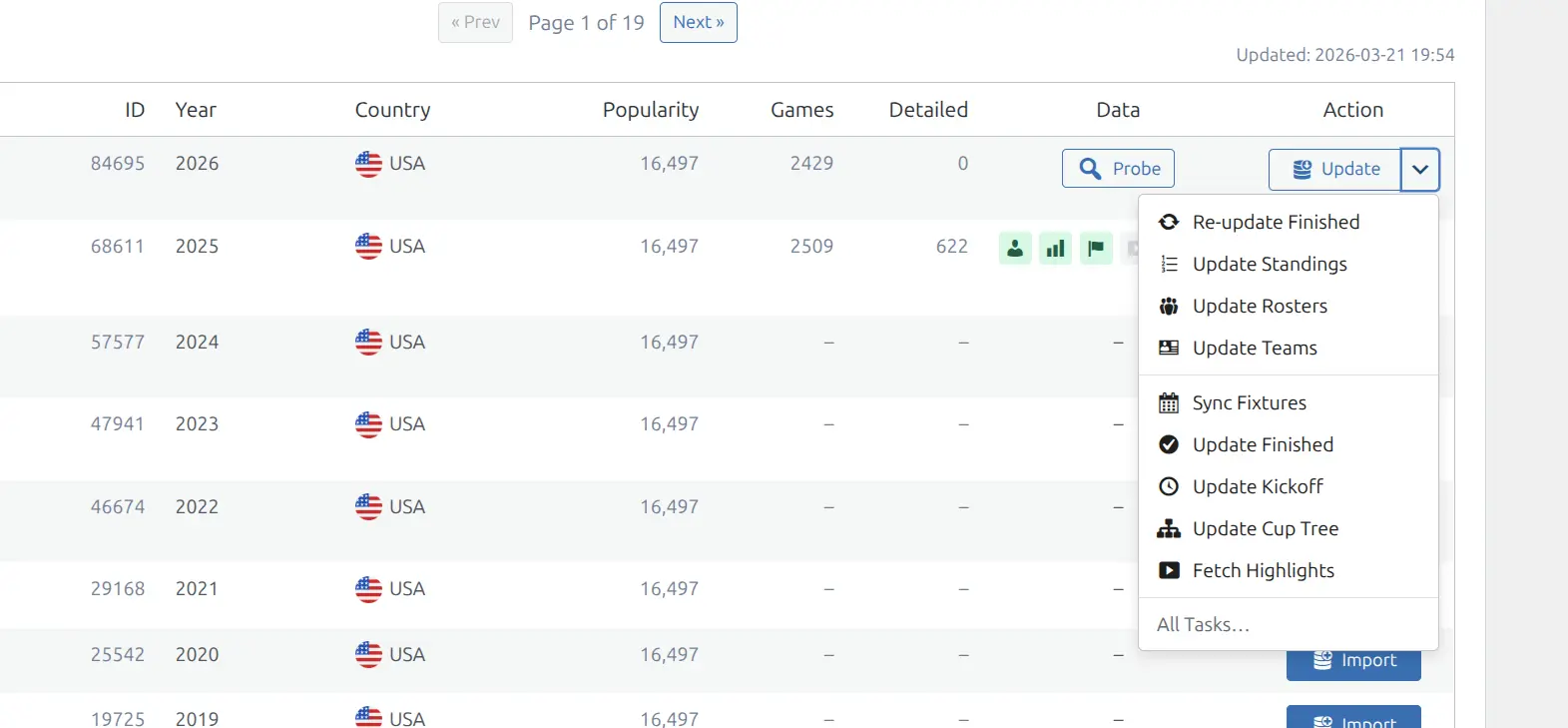
Available quick actions:
| Quick Action | Runs Task |
|---|---|
| Sync Fixtures | Fixtures |
| Teams | Teams |
| Update Finished | Finished Details |
| Re-update | Re-update |
| Rosters | Rosters |
| Standings | Standings |
| Cup Tree | Cup Trees |
| Kickoff | Kickoff |
| Highlights | Highlights |
Quick actions queue the selected task immediately for that specific season — no modal or additional confirmation needed.
Recommended Task Order
For a new league import, the recommended order is:
- Hierarchy — sets up league structure
- Fixtures — imports the game schedule and creates teams
- Teams — fetches team colors, metadata, and league assignment
- Finished Details — imports stats for completed games
- Rosters — imports player lists for each team
- Standings — fetches current standings
- Cup Trees — if applicable, fetches bracket data
- Kickoff — verifies upcoming game schedules
- Highlights — backfills video highlights for finished games
- Fetch Odds — fetches betting lines for upcoming games
After the initial import, use Background Sync to keep data current automatically, or run individual tasks manually via quick actions as needed.
Related
- Import Workflow — How to use the Import page and browse leagues
- Background Sync — Automatic scheduled updates
- API Usage — Rate limits and cost estimation
- API Config — Configure import sub-options and API settings
- Import & Sync — Section overview
- Settings — Plugin settings reference