

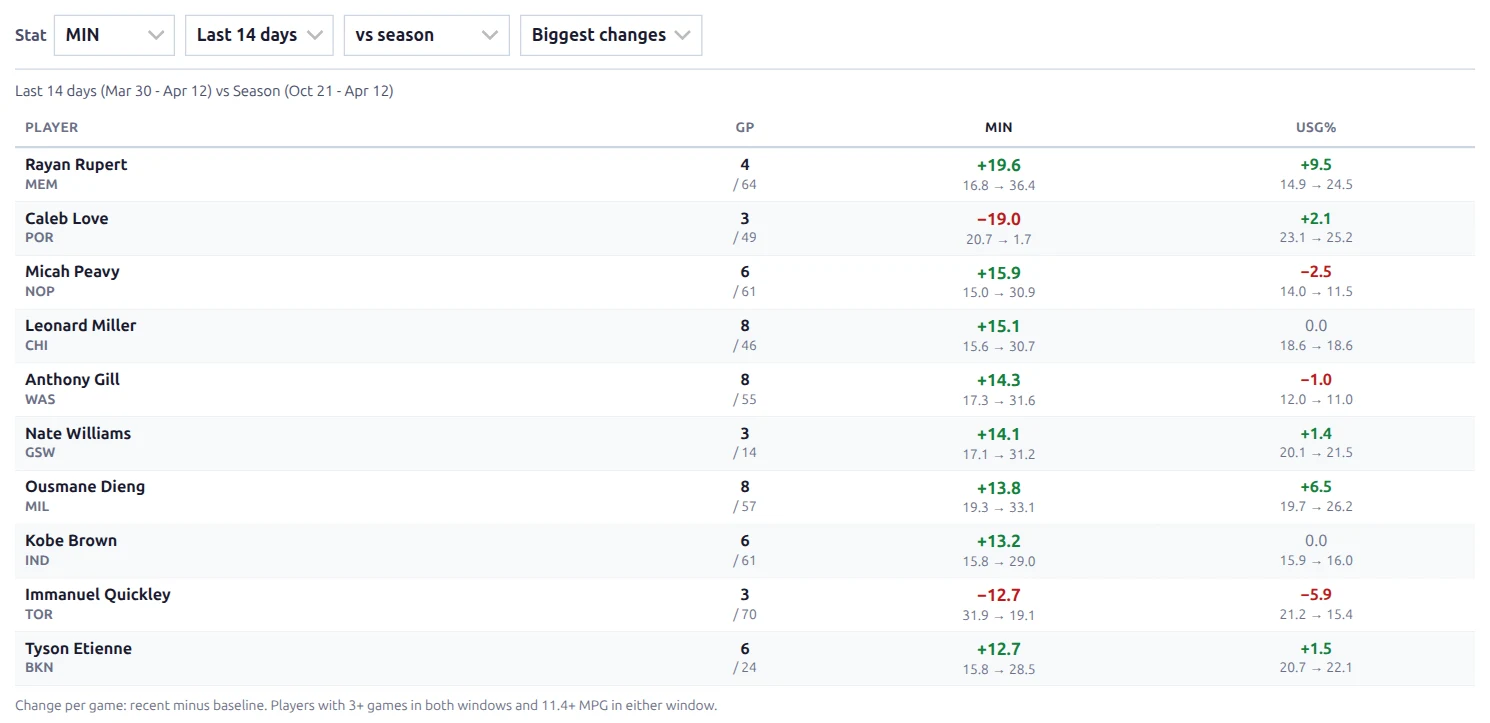
The [anwphub-trends] shortcode answers “whose role is growing right now?” It compares each player’s last 7 or 14 days with their season (or their last 30 days) and ranks the league by the change in one stat: minutes, usage, points and more.
🏀 Basketball only. It’s built from the box scores of finished games, which the normal game import already saves.
🚀 Basic Usage
Add the shortcode with a season:
[anwphub-trends season_id="80229"]This shows the 20 biggest changes in minutes per game, last 14 days vs the season. Build it at Settings & Tools > Shortcodes > Role Trends with a live preview.
Four dropdowns above the table let visitors change the view without reloading the page:
| Dropdown | Options |
|---|---|
| Stat | MIN, USG%, PTS, 3PA, STL+BLK, TS% |
| Recent window | Last 7 days, Last 14 days |
| Baseline | vs season, vs last 30 days |
| Sort | Biggest changes, Rising, Falling |
The shortcode attributes set what visitors see first.
⚙️ Attributes
| Attribute | Default | Description |
|---|---|---|
season_id | (required) | Season ID |
sport_id | 1 | Sport ID. Basketball (1) only for now |
stat | min | Ranked stat: min (minutes), usg_pct (usage rate), pts (points), tpa (3-point attempts), stocks (steals + blocks), ts_pct (true shooting) |
recent_days | 14 | Recent window: 7 or 14 days |
baseline | season | What the recent window is compared with: season or 30d (last 30 days) |
sort | movers | movers (biggest change either way), gainers (only players who rose, biggest rise first), decliners (only players who fell, biggest drop first) |
min_games | 3 | Games a player needs in both windows to be listed (1-20) |
limit | 20 | Most players listed (1-50) |
class | (empty) | Extra CSS class on the wrapper |
📊 Reading the Table
The line above the table names both windows with their dates, for example “Last 14 days (Mar 30 – Apr 12) vs Season (Oct 21 – Apr 12)”.
| Column | Description |
|---|---|
| Player | The player, with their team below. After a trade it’s the new team |
| GP | Games played: recent window / baseline |
| The ranked stat | Always the first stat column |
| MIN | Minutes per game, for context |
| USG% | Usage rate: the share of team plays the player finished while on the court (shots, free throws, turnovers) |
Each stat cell shows the change on top (+19.6) and the two values below it (16.8 → 36.4, baseline → recent). Green means up, red means down. When MIN or USG% is the ranked stat, it isn’t repeated.
How the Windows Work
- Both windows end on the day of the latest finished game (US Eastern date). On a finished season, the table shows its final weeks instead of going empty.
- The baseline includes the recent window. “Last 14 days vs season” compares the last 2 weeks with the whole season so far.
- Regular season only, when the season has a playoff split.
- Counting stats are per game. USG% and TS% are rates over the whole window.
Who Is Listed
Deep-bench players swing wildly over a few games, so the table filters them out:
- At least
min_gamesgames (default 3) in both windows. - Enough minutes in either window. The limit is 30% of the minutes of the league’s busiest regular, so it adjusts to the data.
“Either window” matters: a bench player who jumps from 9 to 25 minutes is exactly the breakout you want to see, so they stay in. A player who stays low in both windows drops out. The legend under the table shows the numbers in use, for example “Players with 3+ games in both windows and 11.4+ MPG in either window”.
Early in the Season
For the first 3 weeks, “the season” is about the same as “the last 14 days”, so a season baseline would show almost no change. Until the season has 21 days of games, a season baseline compares with the league’s previous season instead. The window label names that season, for example “Last 14 days (Oct 21 – Nov 3) vs NBA 25/26 (too early for this season)”. Rookies have no previous season, so they drop out until the switch.
The 30-day baseline never switches seasons.
Tip
Import the previous NBA season too. Without it, the early weeks compare the new season with itself, and the changes stay close to zero until about week 3.
Examples
Rising usage, last 14 days vs last 30 days:
[anwphub-trends season_id="80229" stat="usg_pct" baseline="30d" sort="gainers" limit="10"]Who stopped shooting threes this week:
[anwphub-trends season_id="80229" stat="tpa" recent_days="7" sort="decliners" limit="10"]A stricter sample (5+ games in each window):
[anwphub-trends season_id="80229" min_games="5"]Text Overrides
Dropdown options, window labels, the legend and the empty-state messages can be changed in Settings & Tools > Translations. Search for trends. MIN and PTS share the basketball stat labels, and USG% and STL+BLK share the With / Without labels.
🆘 Troubleshooting
| Message or problem | What it means |
|---|---|
| Nothing shows | The shortcode needs season_id |
| “Role Trends supports basketball only for now” | sport_id is set to another sport. Visitors see nothing; this notice is shown to editors only |
| “No finished games this season yet” | The season has no imported box scores. Run the finished games import |
| “No player meets the minimums in this window” | Too few games in the recent window, for example right after the All-Star break. Try the 14-day window or a lower min_games |
📚 Related
- With / Without shortcode – who steps up when a player sits
- Schedule Grid shortcode – games per week, back-to-backs and rest
- Player Pages – the splits block has a Starter / Bench tab for basketball
- All shortcodes