

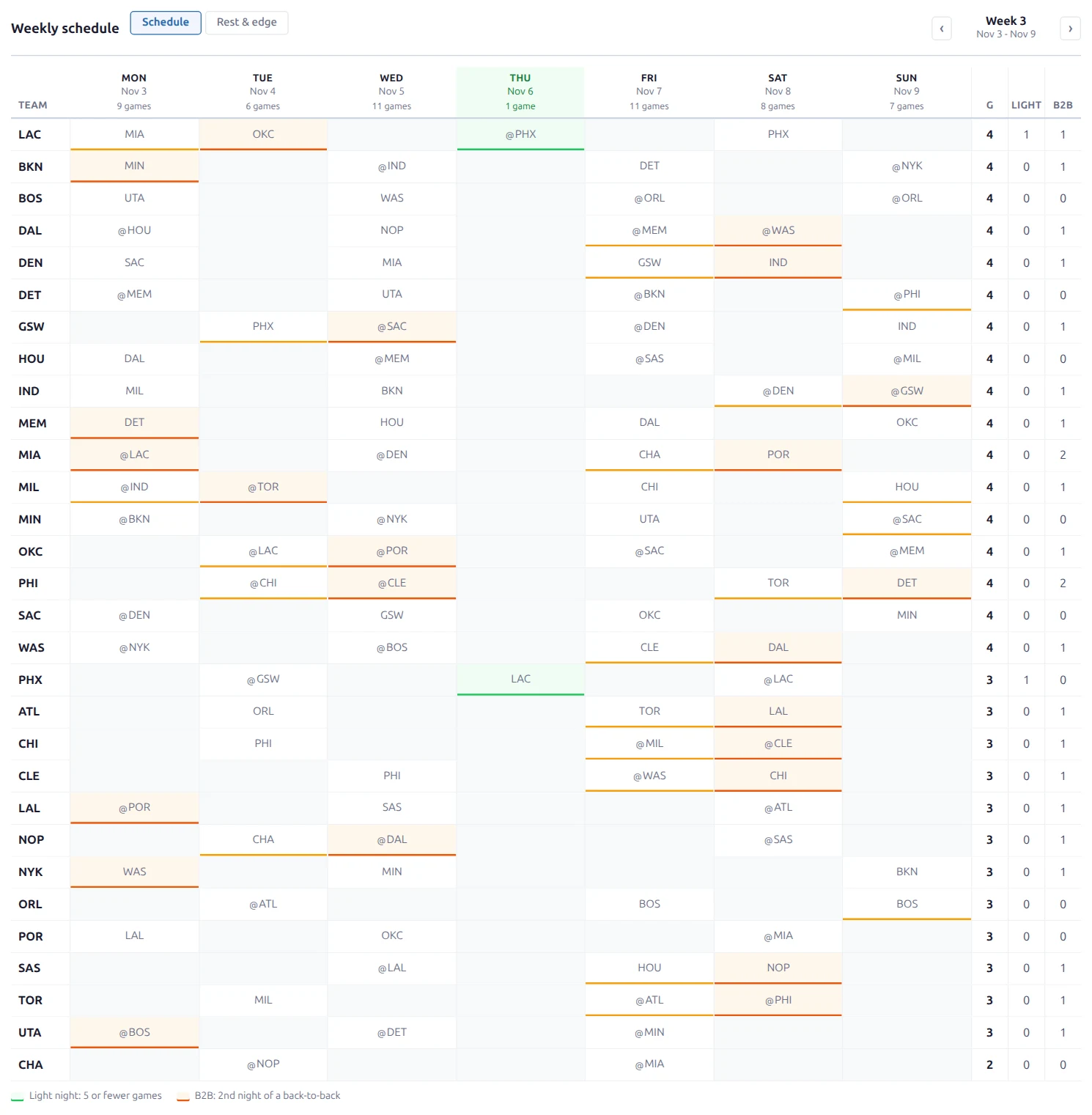
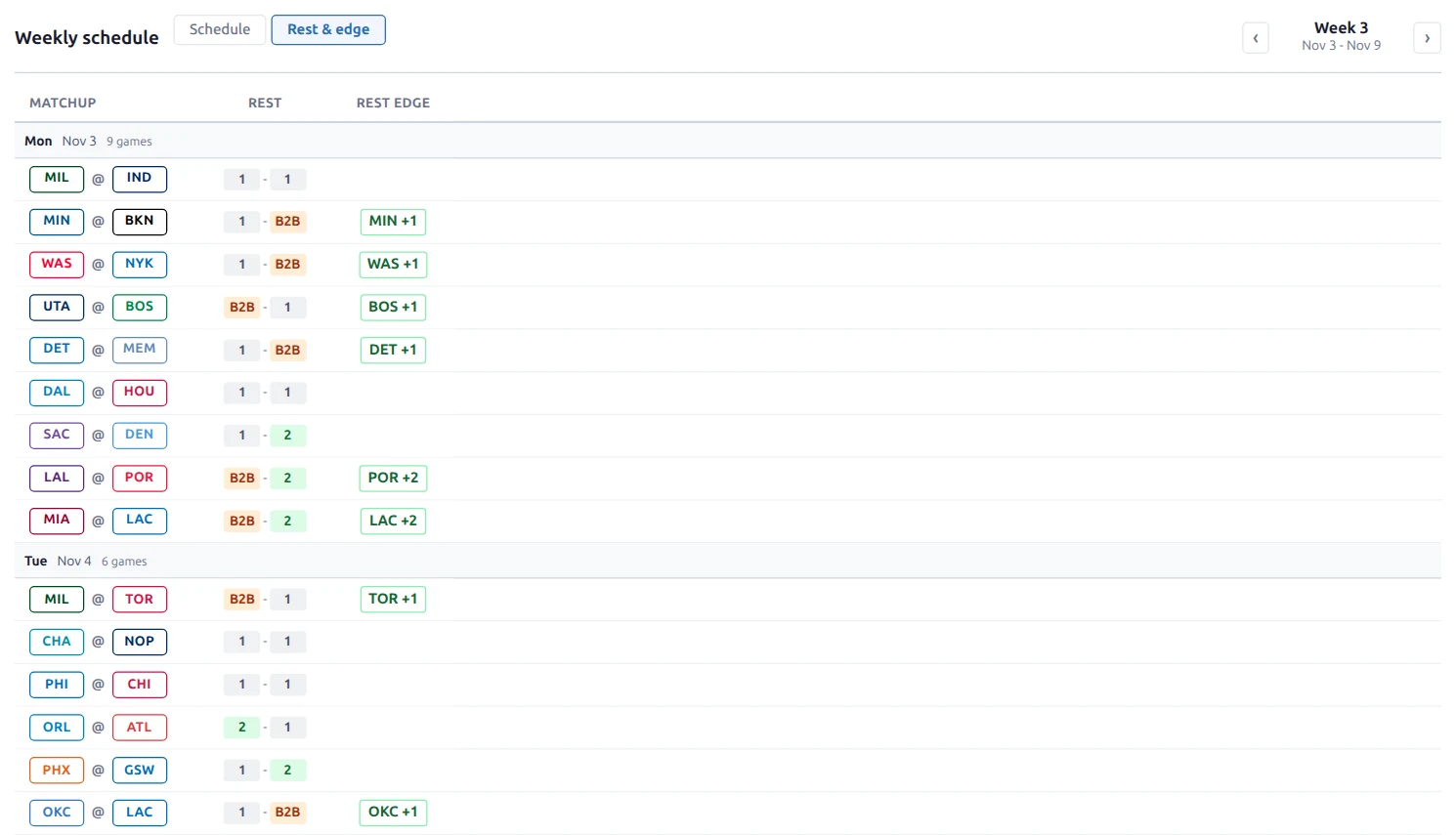
The [anwphub-schedule-grid] shortcode shows one week of a season at a glance: which teams play on which night, how many games each team has, which nights are light, and who is on a back-to-back. A second view lists every game with each team’s rest days and the rest edge.
It reads only the imported schedule, so it works for every sport and from the first day of the season. No stats are needed.
🚀 Basic Usage
Add the shortcode with a sport and a league:
[anwphub-schedule-grid sport_id="1" league_id="132"]This shows the current week of the NBA’s current season. With league_id, the grid moves on to the next season by itself, so you can set it once and leave it. Use season_id instead to pin one season. If you set both, the season wins.
You can also build it visually at Settings & Tools > Shortcodes > Schedule Grid with a live preview.
Visitors move between weeks with the arrows next to the week label (“Week 3”, “Nov 3 – Nov 9”). They switch views with the Schedule and Rest & edge pills.
⚙️ Attributes
| Attribute | Default | Description |
|---|---|---|
sport_id | (required) | Sport ID (1 = Basketball, 2 = Baseball, 5 = Ice Hockey, 6 = American Football) |
league_id | (empty) | League ID. Shows the league’s current season. Set this or season_id |
season_id | (empty) | Season ID. Pins the grid to one season |
view | grid | The view shown first: grid (teams x days) or rest (one row per game). Visitors can switch |
week | (empty) | Any date in the week to show first (YYYY-MM-DD). Empty = the current week |
light_threshold | (empty) | Most games a night can have and still count as light. Empty = half the busiest night of that week |
team_display | (text) | How teams are shown: empty = text code (BOS), badge-outlined, badge-filled, logo. Applies to both views |
class | (empty) | Extra CSS class on the wrapper |
Without sport_id plus a league or a season, the shortcode prints nothing.
Schedule View
One row per team that plays that week, sorted by games, then by light-night games. Each day column shows the opponent, with @ for an away game. The header shows the number of games league-wide on each night.
| Column | Description |
|---|---|
| Team | The team. Stays visible while the table scrolls sideways on phones |
| Mon – Sun | The opponent that night. Light-night cells and the 2nd night of a back-to-back are highlighted |
| G | Games this week |
| Light | Games on light nights |
| B2B | Back-to-backs this week. Hidden in narrow containers |
A light night is a night with few games, like a Thursday with 4 games in a week whose busiest night has 11. By default the limit is half the busiest night of that week, so it fits any league’s slate size. A legend under the table shows the number in use (“Light night: 5 or fewer games”).
Rest & Edge View
One row per game, grouped by day. It answers “who is tired tonight?”
| Column | Description |
|---|---|
| Matchup | The two teams, in your sport’s usual order (Away @ Home for US leagues) |
| Rest | Days off before the game for each team, in the same order. B2B = 2nd night of a back-to-back. 3 or more days show as 3+ |
| Rest edge | The better-rested team and its advantage, for example “MIN +1” |
| ML | Moneyline odds for both teams. Only shown when odds exist (see below) |
A team gets the rest edge when its opponent is on the 2nd night of a back-to-back and it isn’t. Otherwise it needs at least 2 more days of rest than its opponent. Small gaps, like 1 day vs 2 days, show no edge.
The ML column appears when Show Odds is on and at least one game that week has a moneyline price for both teams. Games without prices get an empty cell. By default only upcoming games have prices. Prices follow the odds format the visitor picked elsewhere on your site.
Days Follow US Eastern Time
Weeks run Monday to Sunday, and every game is placed on its US Eastern date. A 10:30 PM Eastern tip-off stays on the night it was played instead of moving to the next day, so back-to-backs and rest days match what US fans see on TV schedules.
Examples
NHL week, opening on the rest view:
[anwphub-schedule-grid sport_id="5" league_id="234" view="rest"]A fixed week of a past season, with team logos:
[anwphub-schedule-grid sport_id="1" season_id="80229" week="2025-11-03" team_display="logo"]A stricter light night (4 games or fewer):
[anwphub-schedule-grid sport_id="1" league_id="132" light_threshold="4"]Tip
Text codes are the easiest to read in the schedule view. A full NBA week has 100+ cells, and badges or logos in every cell compete with the light-night and back-to-back highlights. Logos work well in the rest view.
What Counts as a Game
- Linked seasons are included. NBA Cup group games are part of the NBA season’s week, so a Cup night isn’t empty.
- Postponed and canceled games are left out. They don’t count toward slates, rest days or back-to-backs.
- Doubleheaders (baseball) show both games in one cell. The second game has 0 rest days but isn’t a back-to-back.
- Only teams with a game that week are listed. In the playoffs, eliminated teams drop out.
Text Overrides
The column headers, view pills (“Schedule”, “Rest & edge”), week label, legend (“Light night”) and the empty state (“No games this week”) can be changed in Settings & Tools > Translations. Search for schedule_grid.
🆘 Troubleshooting
Nothing shows on the page. Check that the shortcode has sport_id and a league_id or season_id.
The grid shows last season’s final weeks. The new season isn’t imported yet. Today’s week falls after the end of the last imported season, so the grid shows that season’s last week. Import the new season’s fixtures and it moves on.
“No games this week”. The season has no imported games in that week, for example the NHL’s Olympic break. With league_id, it also shows when a new season has been added but its fixtures aren’t imported yet. Import the fixtures, or pin the old season with season_id until then.
No ML column. Turn on Show Odds in Plugin Settings and import odds for upcoming games. Past games don’t show prices by default.
📚 Related
- All shortcodes
- With / Without shortcode – who steps up when a player sits
- Role Trends shortcode – whose role is growing or shrinking
- Plugin Settings – odds display