

Sports API Hub automatically converts game dates and times to each visitor’s local timezone. The server stores and renders all timestamps in UTC. When a page loads, a lightweight JavaScript module detects the visitor’s timezone using the browser’s Intl.DateTimeFormat API and updates all date and time elements on the page.
A visitor in New York sees “7:30 PM ET” while a visitor in London sees “12:30 AM GMT” for the same game — with zero manual configuration.
How It Works
- The server renders dates and times in UTC with special CSS hook classes.
- On page load, JavaScript detects the visitor’s timezone via
Intl.DateTimeFormat. - All elements with hook classes are updated to display the local date and time.
- No cookies, no user accounts, no settings required from the visitor.
The conversion is instant and uses built-in browser APIs available in all modern browsers. There are no external dependencies and no additional HTTP requests.
🚀 Enabling Timezone Conversion
Navigate to Settings & Tools > Settings in your WordPress admin.
- Open the Display section.
- Find the Automatic Timezone toggle.
- Enable the toggle and save settings.
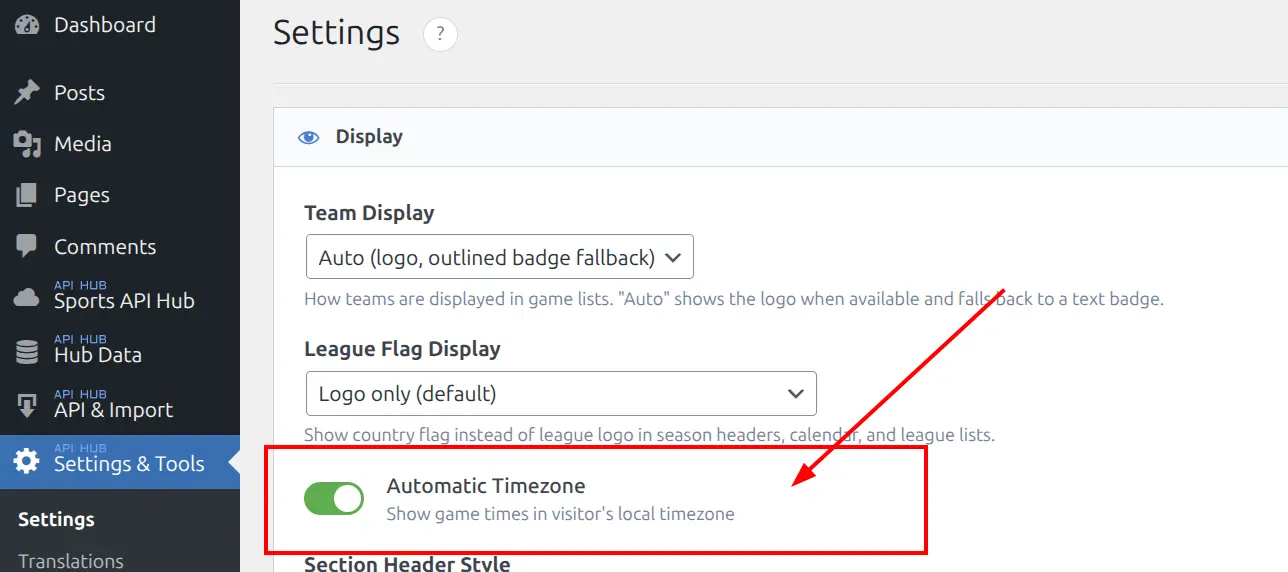
Once enabled, timezone conversion applies automatically to all frontend output: game pages, game cards, shortcodes, layout builder blocks, and live score updates.
What Gets Converted
Timezone conversion applies to all date and time displays across the plugin:
| Element | Example (UTC) | Example (US Eastern) |
|---|---|---|
| Game header kickoff time | 02:30 | 9:30 PM |
| Game header date | Mar 7, 2026 | Mar 6, 2026 |
| Game card date & time | Mar 7, 02:30 | Mar 6, 9:30 PM |
| Shortcode game listings | Mar 7, 02:30 | Mar 6, 9:30 PM |
| Game peek hover cards | Mar 7, 02:30 | Mar 6, 9:30 PM |
| Team calendar dates | Mar 7 | Mar 6 |
Late-night UTC games that fall on the previous day in the visitor’s timezone will show the correct local date.
Caching Compatibility
Because timezone conversion happens entirely in the visitor’s browser (client-side), it works correctly with all caching setups:
- Page cache plugins (WP Super Cache, W3 Total Cache, LiteSpeed, etc.) — cached HTML contains UTC values; JavaScript converts them on load.
- CDN caching — same cached page served worldwide; each visitor sees their local time.
- Object cache — no impact; timezone is a display-layer feature.
There is no need for cache exclusions or special configuration.
⚙️ Technical Details for Theme Developers
The plugin uses three CSS hook classes to mark elements for conversion:
| Class | Purpose |
|---|---|
ahub-tz-date | Date elements (converted to local date format) |
ahub-tz-time | Time elements (converted to local time format) |
ahub-tz-init | Internal marker added by JS after conversion (prevents re-processing) |
Templates use ahub-tz-date and ahub-tz-time classes on date/time elements, along with a data-ahub-game-datetime attribute on a parent container that provides the UTC timestamp. If you create custom template overrides, include these classes and the data attribute to ensure timezone conversion continues to work.
💡 Notes
- No visitor configuration needed. The browser provides the timezone automatically.
- Disabled by default. If you prefer to show times in your server’s timezone, leave the toggle off.
- Live scores compatible. Timezone conversion also applies to live score polling updates — newly fetched scores maintain correct local times.
- Zero dependencies. The conversion script is lightweight and uses only native browser APIs.
📚 Related
- Plugin Settings — where the timezone toggle is located
- Game Pages — game date and time display
- Shortcodes — shortcode date and time display