

Shortcode: [sl-teams-stats]
Display ranked team statistics with flexible filtering and calculation options.
Overview
The Teams Stats shortcode creates a ranked table of teams based on any configured statistic. You can display totals, averages per game, or find minimum/maximum values. Filter by tournament, league, season, or date range, and optionally show only home or away performance.
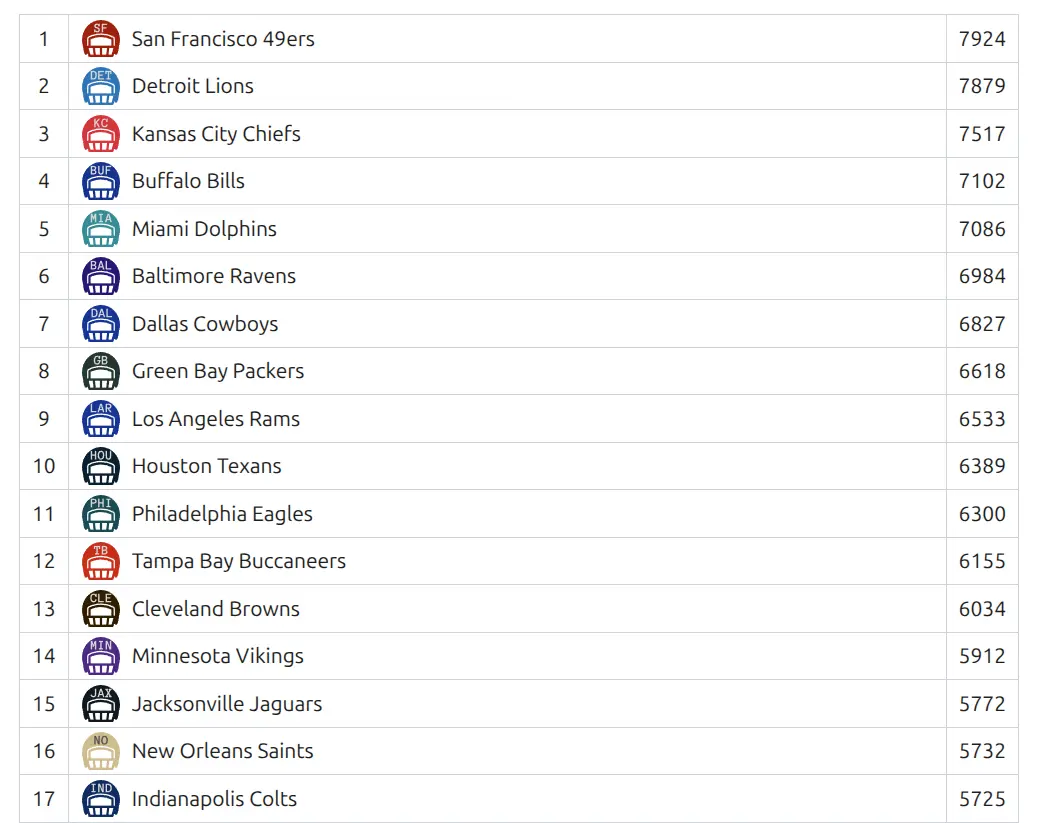
Use Cases
- Show team offensive rankings (points scored, yards gained)
- Display defensive statistics (points allowed, tackles)
- Compare home vs away performance for teams
- Create “Top 5” sidebar widgets with team leaders
- Track season-long or tournament-specific team stats
Using the Shortcode Builder
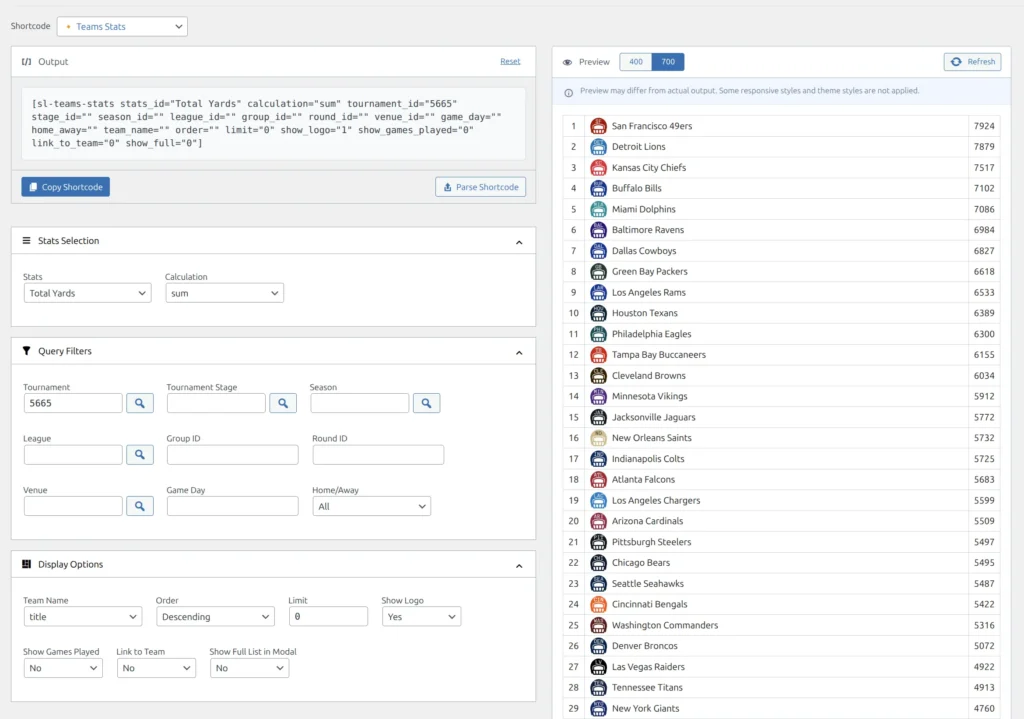
The easiest way to create the shortcode is through the visual Shortcode Builder:
- Go to Sports Leagues > Shortcodes
- Select Teams Stats from the dropdown
- Choose the statistic you want to display
- Set your filters (tournament, season, etc.)
- Configure display options
- Copy the generated shortcode
Parameters
Stats Selection
| Parameter | Type | Default | Description |
|---|---|---|---|
stats_id | String | (required) | The team statistic to display (configured in Sport Configurator) |
calculation | String | sum | How to calculate: sum, min, max, or avg_game |
digits | Integer | 0 | Decimal places for calculated values (useful with avg_game) |
Query Filters
| Parameter | Type | Default | Description |
|---|---|---|---|
tournament_id | Integer | – | Filter by tournament ID |
stage_id | Integer | – | Filter by tournament stage ID |
season_id | Integer | – | Filter by season ID |
league_id | Integer | – | Filter by league ID |
group_id | Integer | – | Filter by standing group ID |
round_id | Integer | – | Filter by round ID |
venue_id | Integer | – | Filter by venue ID |
game_day | Integer | – | Filter by specific game day number |
home_away | String | – | Filter by game location: home or away (empty = all) |
date_from | String | – | Start date filter (YYYY-MM-DD format) |
date_to | String | – | End date filter (YYYY-MM-DD format) |
days_offset | Integer | – | Dynamic date offset from today (negative = past) |
days_offset_to | Integer | – | Dynamic end date offset from today |
Display Options
| Parameter | Type | Default | Description |
|---|---|---|---|
order | String | – | Sort order: empty (descending) or ASC (ascending) |
team_name | String | – | Team name format: empty (full name), abbr (short name), code |
limit | Integer | 0 | Maximum teams to display (0 = all) |
show_logo | Integer | 1 | Show team logo: 1 (yes) or 0 (no) |
show_games_played | Integer | 0 | Show games played column: 1 (yes) or 0 (no) |
link_to_team | Integer | 0 | Make team name clickable: 1 (yes) or 0 (no) |
show_full | Integer | 0 | Show “View All” link for modal: 1 (yes) or 0 (no) |
hide_header | Integer | 1 | Hide table header row: 1 (yes) or 0 (no) |
custom_header | String | – | Custom header text above the table |
custom_header_tag | String | – | HTML tag for custom header (e.g., h3, h4) |
max_width | String | – | Maximum table width (CSS value) |
min_width | String | – | Minimum table width (CSS value) |
class | String | – | Additional CSS classes for the wrapper |
Examples
Basic Tournament Stats
Display total yards for all teams in a tournament:
[sl-teams-stats stats_id="Total Yards" tournament_id="5665"]Average Per Game
Show points per game with one decimal place:
[sl-teams-stats stats_id="Points" tournament_id="5665" calculation="avg_game" digits="1" show_games_played="1"]Top 5 Teams
Display top 5 with links and a “View All” option:
[sl-teams-stats stats_id="Total Yards" tournament_id="5665" limit="5" link_to_team="1" show_full="1"]Home Performance Only
Show stats from home games only:
[sl-teams-stats stats_id="Points" tournament_id="5665" home_away="home"]Season Stats with Short Names
Display league stats using abbreviated team names:
[sl-teams-stats stats_id="Points" league_id="12" season_id="45" team_name="abbr"]Lowest Values (Ascending Order)
Show teams with fewest points allowed (best defense):
[sl-teams-stats stats_id="Points Allowed" tournament_id="5665" order="ASC" limit="10"]