

AI Writer is a premium feature that generates professional game reviews and match predictions using artificial intelligence. Whether you need comprehensive post-game analysis or data-driven predictions for upcoming matches, AI Writer streamlines the content creation process.
Overview
AI Writer supports two content types:
- Game Reviews – Generate comprehensive match analysis for finished games
- Match Predictions – Create data-driven predictions for upcoming games based on historical data
Each content type works in two modes:
- Generate AI – Uses OpenAI API to generate content directly within WordPress
- Export JSON – Export structured game data for use with external AI tools (ChatGPT, Claude, Perplexity, DeepSeek, etc.)
Requirements
| Requirement | Details |
|---|---|
| PHP Version | 8.2 or higher (required for OpenAI SDK) |
| Plugin Version | Sports Leagues Premium v0.14.0+ |
| OpenAI API Key | Required only for direct AI generation mode |
Getting Started
AI Writer follows a simple three-step workflow:
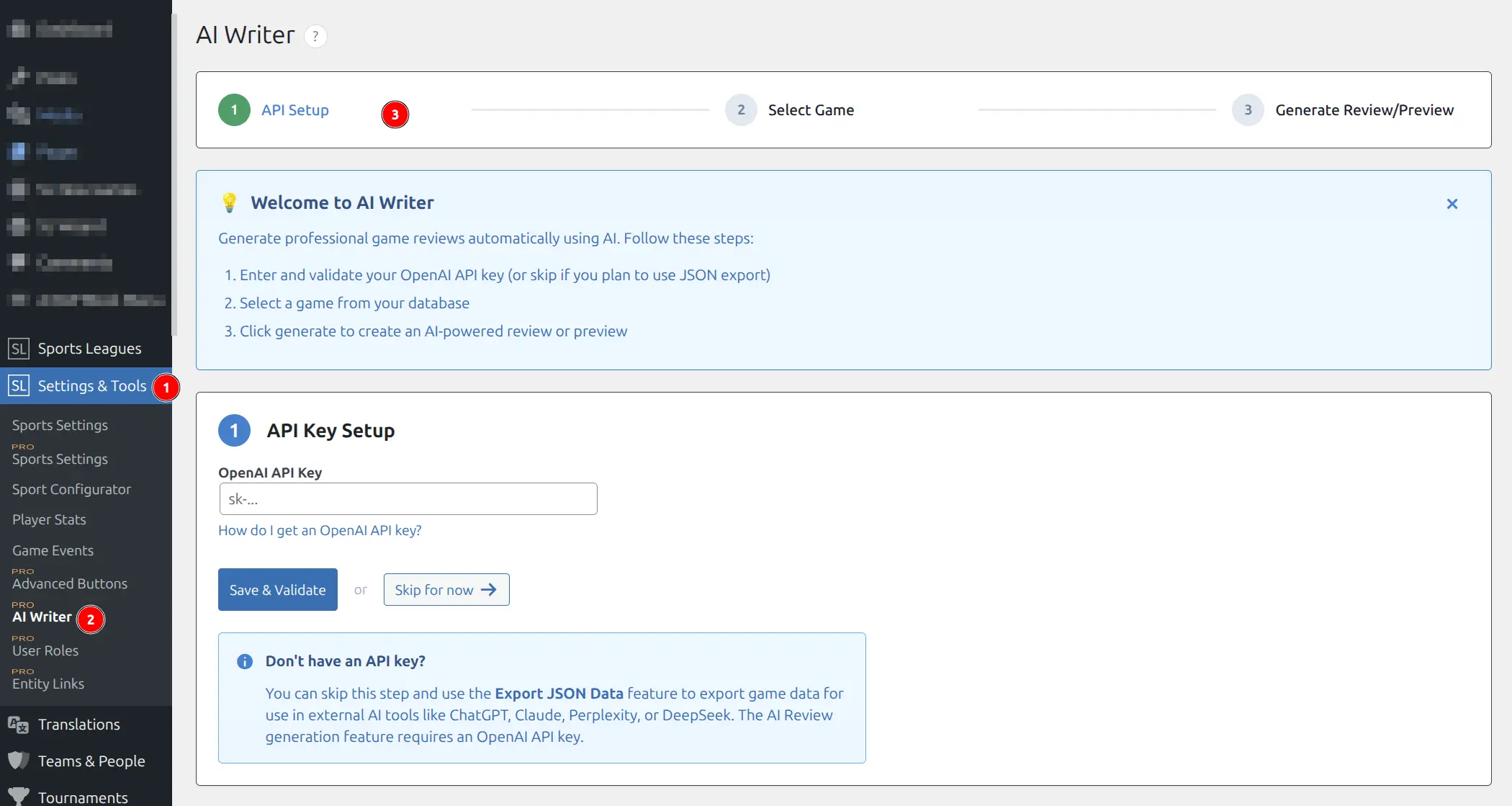
Step 1: API Setup
- Navigate to Sports Leagues > AI Writer in WordPress admin
- Enter your OpenAI API key and click Save & Validate
- If you prefer using external AI tools, click Skip for now
Tip
You can skip API setup entirely and use Export JSON mode. This lets you paste game data into ChatGPT, Claude, or any AI tool you already have access to.
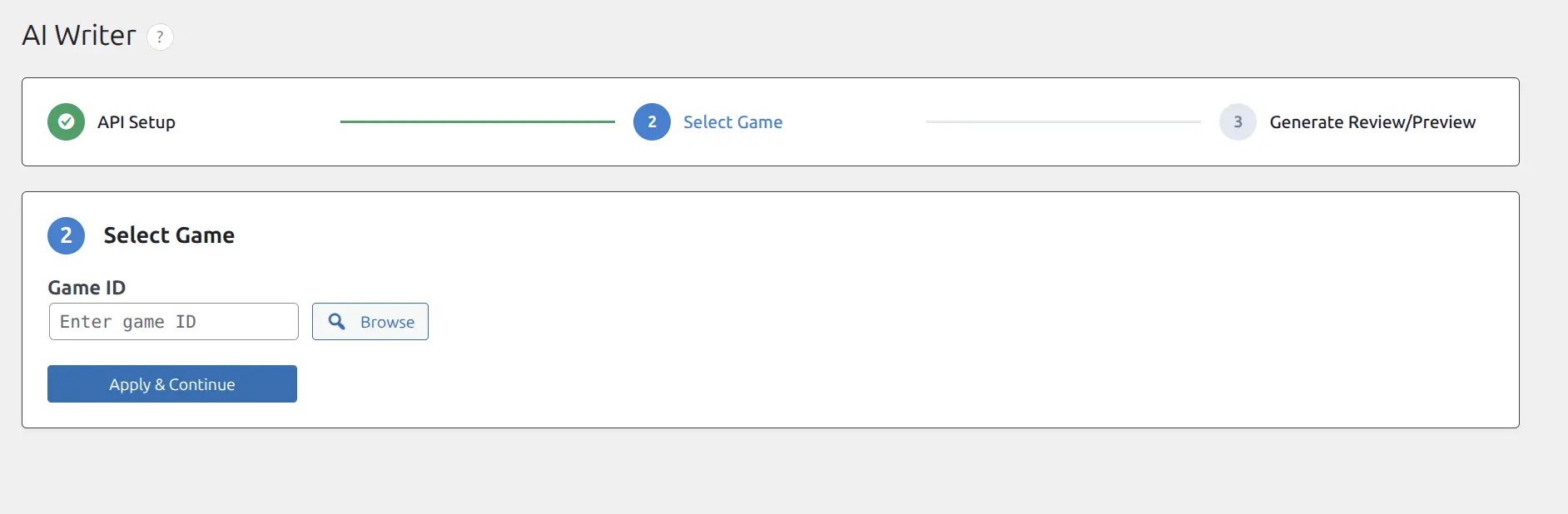
Step 2: Select Game
- Enter a Game ID directly in the input field, or
- Click Browse to search and select a game from your database
- Click Apply & Continue
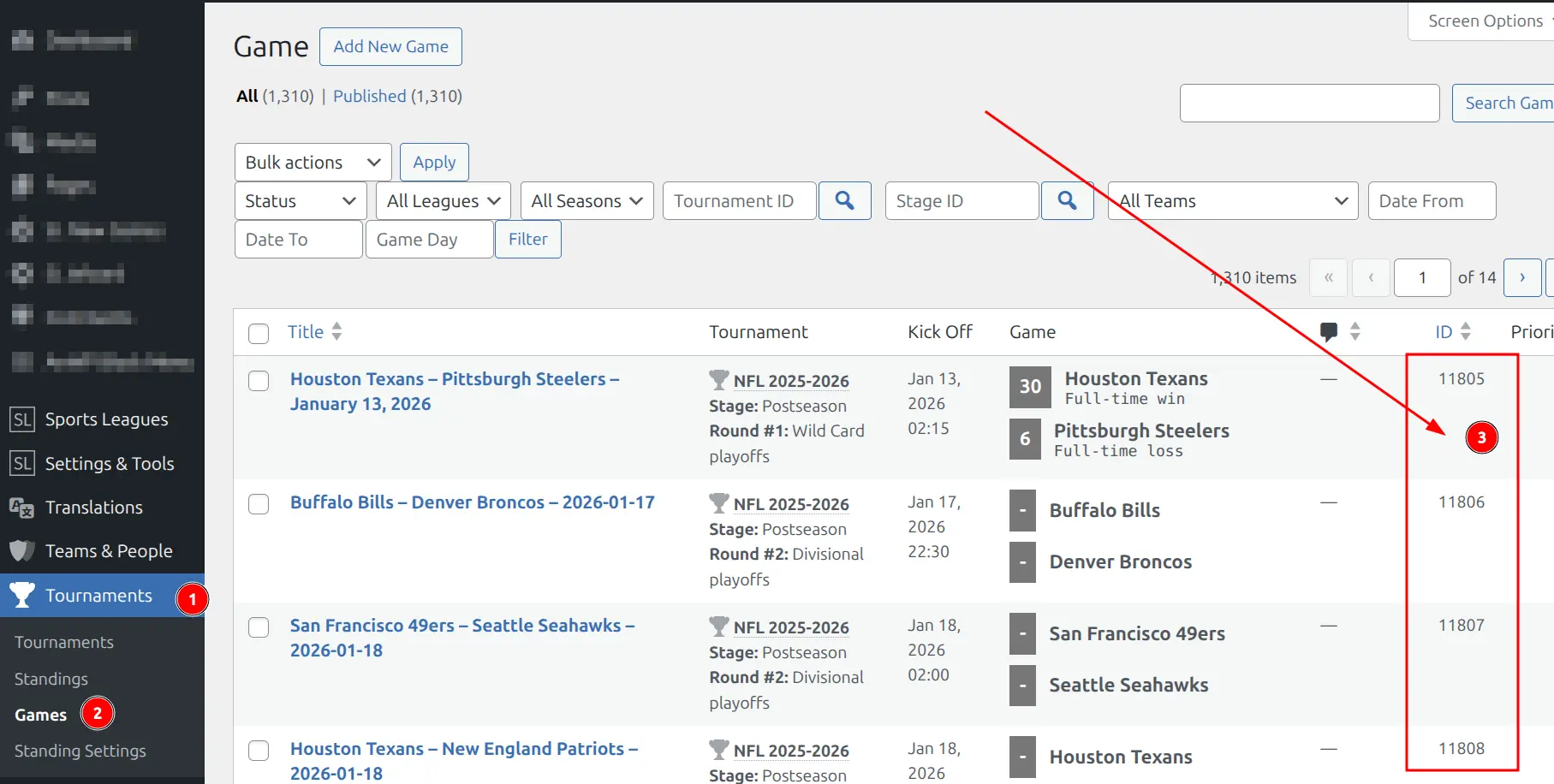
Finding a Game ID: Open the Games list in WordPress admin. The Game ID appears in the rightmost column of each row.
Step 3: Generate Review or Prediction
The interface automatically detects whether your selected game is finished or upcoming, and shows the appropriate options.
Game Reviews (Finished Games)
For completed games, AI Writer generates comprehensive match reviews based on game data.
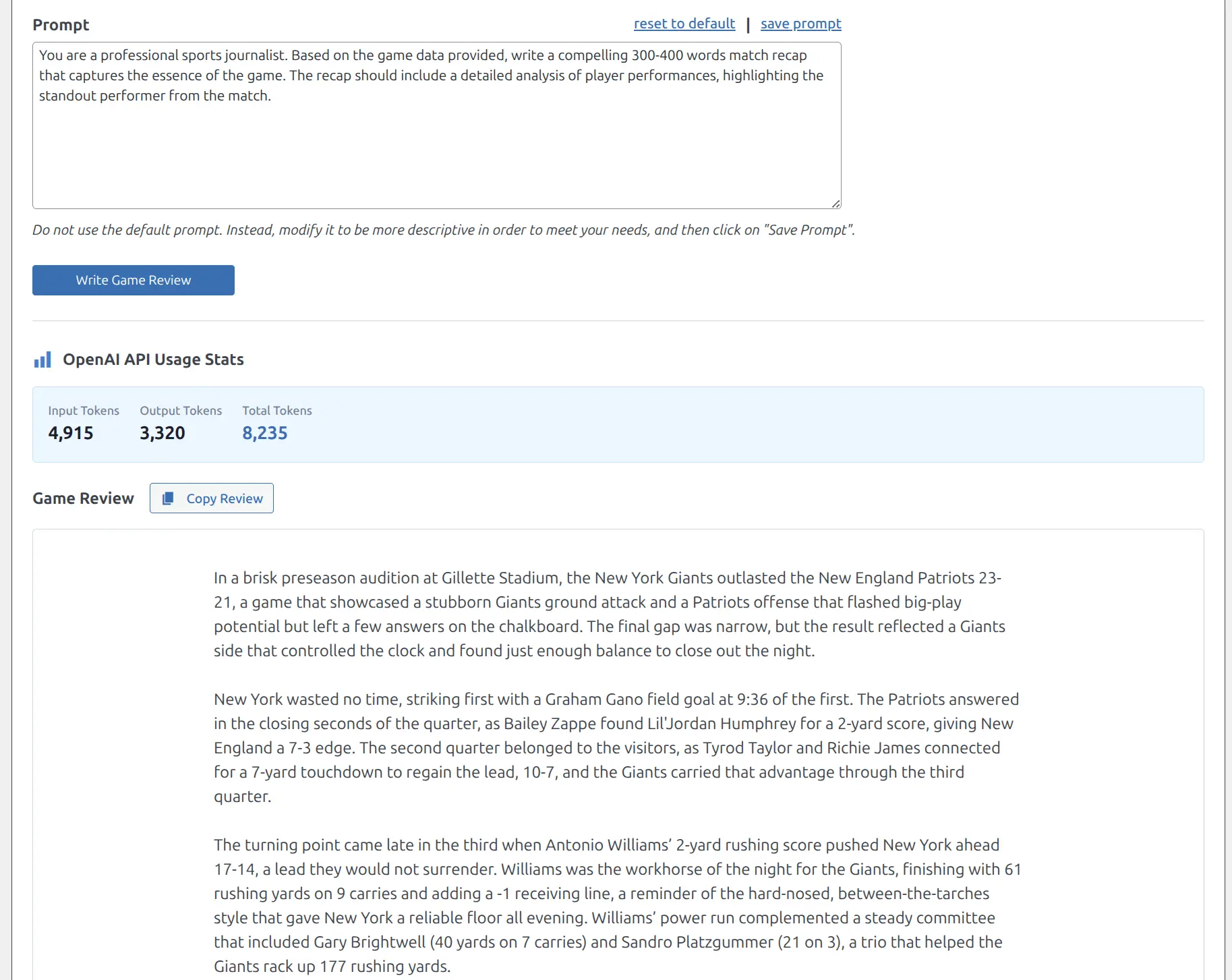
Generate AI Review Mode
- Select Generate AI Review mode
- Choose which data sections to include (Team Stats, Game Events, Player Stats)
- Select an OpenAI model from the dropdown
- Customize the prompt to match your writing style
- Click Write Game Review
- Copy the generated review using the Copy Review button
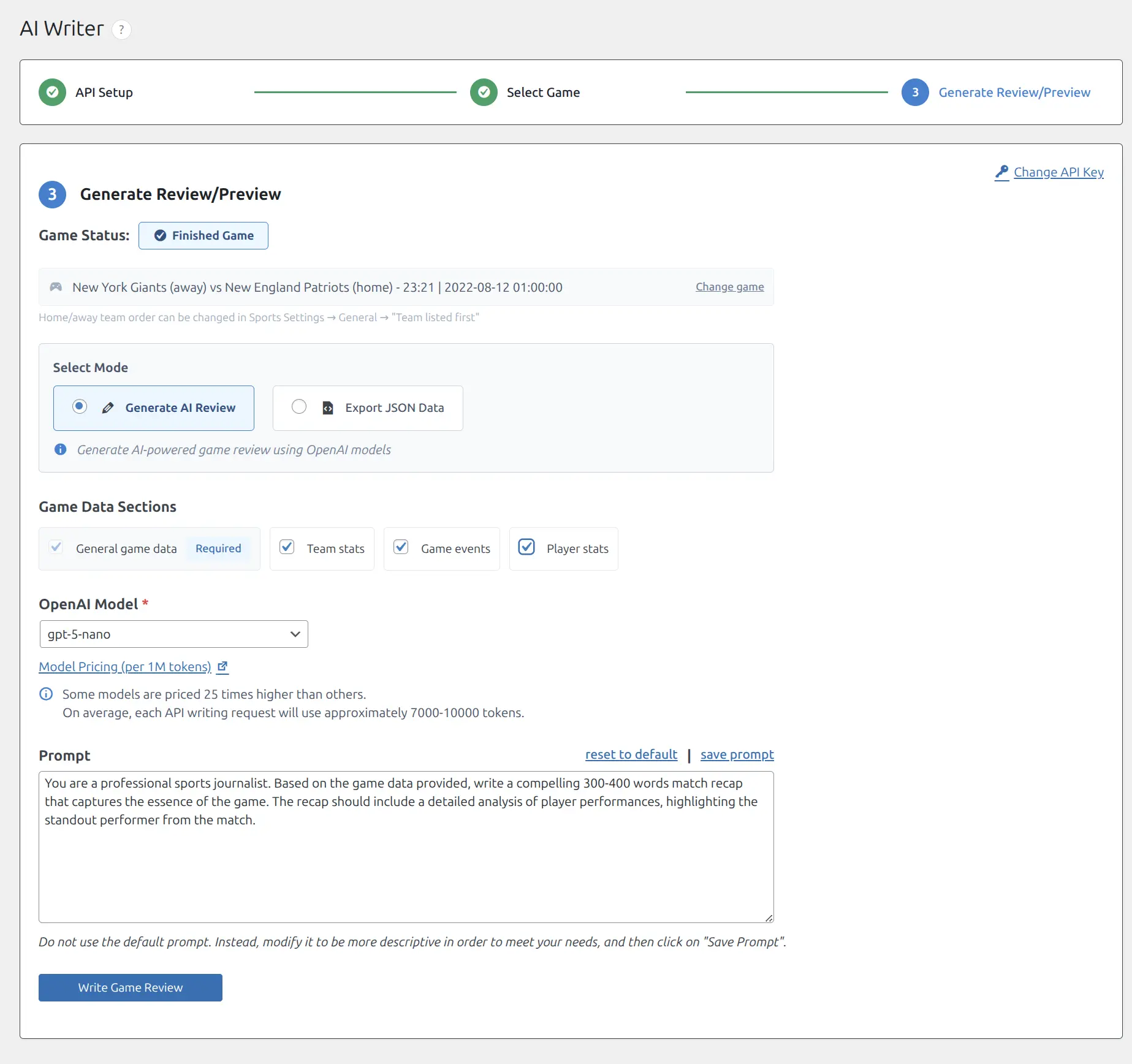
Game Data Sections
| Section | Description | Required |
|---|---|---|
| General game data | Teams, score, date, competition | Yes |
| Team stats | Possession, shots, passes, fouls | Optional |
| Game events | Goals, cards, substitutions with timestamps | Optional |
| Player stats | Individual player performance data | Optional |
Generated Review Output
After generation completes, you will see token usage statistics and the generated review. Use the Copy Review button to copy the text.
Export JSON Mode
If you prefer using external AI tools or want to avoid API costs:
- Select Export JSON Data mode
- Choose which data sections to include
- Click Export Game Data (JSON)
- A JSON file downloads automatically
- Open ChatGPT, Claude, or your preferred AI tool
- Paste the JSON content and add your custom prompt
Match Predictions (Upcoming Games)
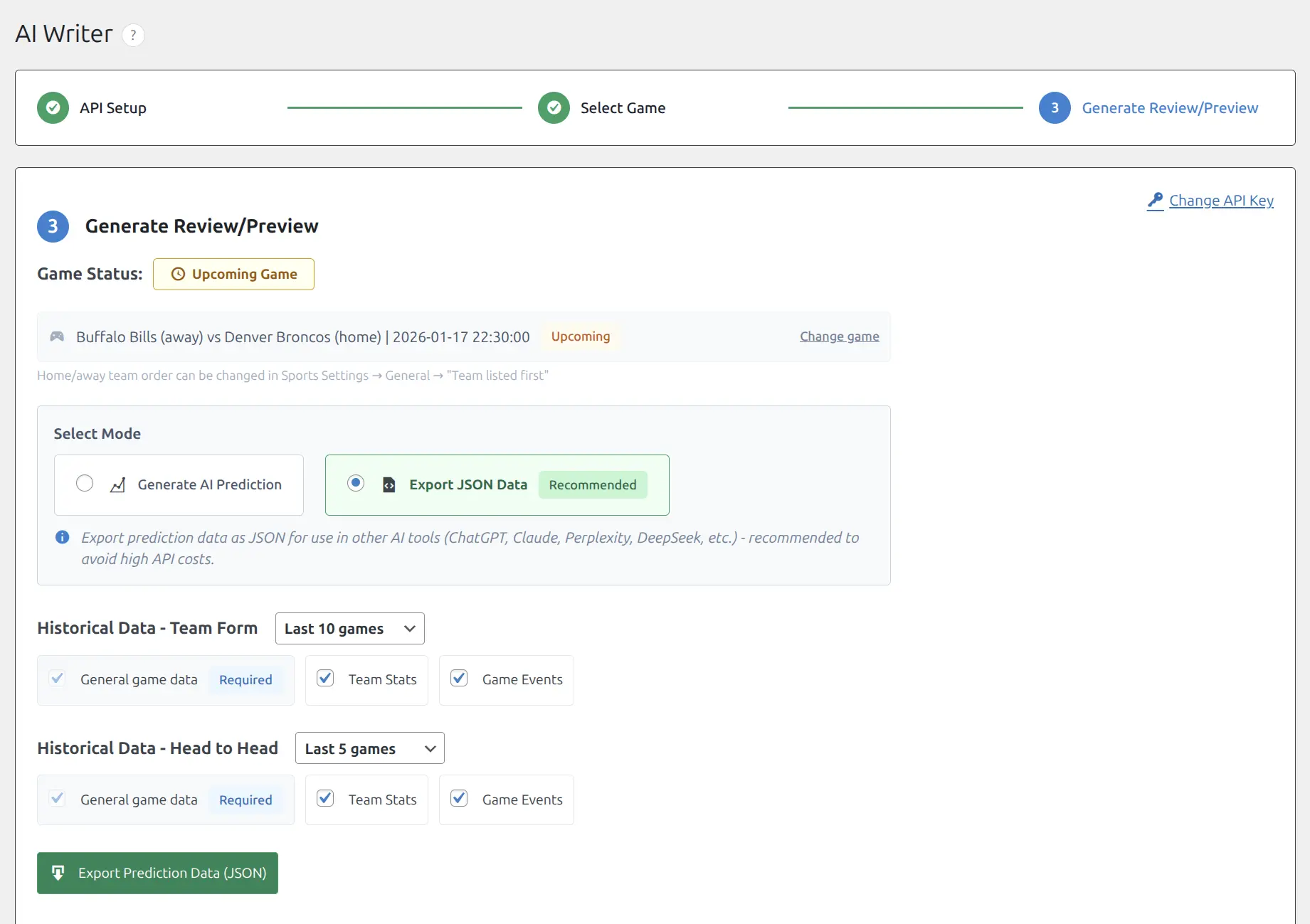
For scheduled games, AI Writer generates predictions based on historical team form and head-to-head data.
Historical Data Configuration
Team Form Data:
- Select number of recent games to include: 10, 20, or 30
- Choose data sections: General game data, Team Stats, Game Events
Head-to-Head Data:
- Select number of H2H games: 5, 10, or 15
- Choose data sections: General game data, Team Stats, Game Events
Important
Predictions use significantly more tokens than game reviews due to historical data. We recommend using Export JSON mode for predictions to avoid high API costs.
Token Usage Comparison
| Content Type | Typical Token Usage |
|---|---|
| Game Review | 7,000 – 10,000 tokens |
| Match Prediction | 15,000 – 50,000+ tokens |
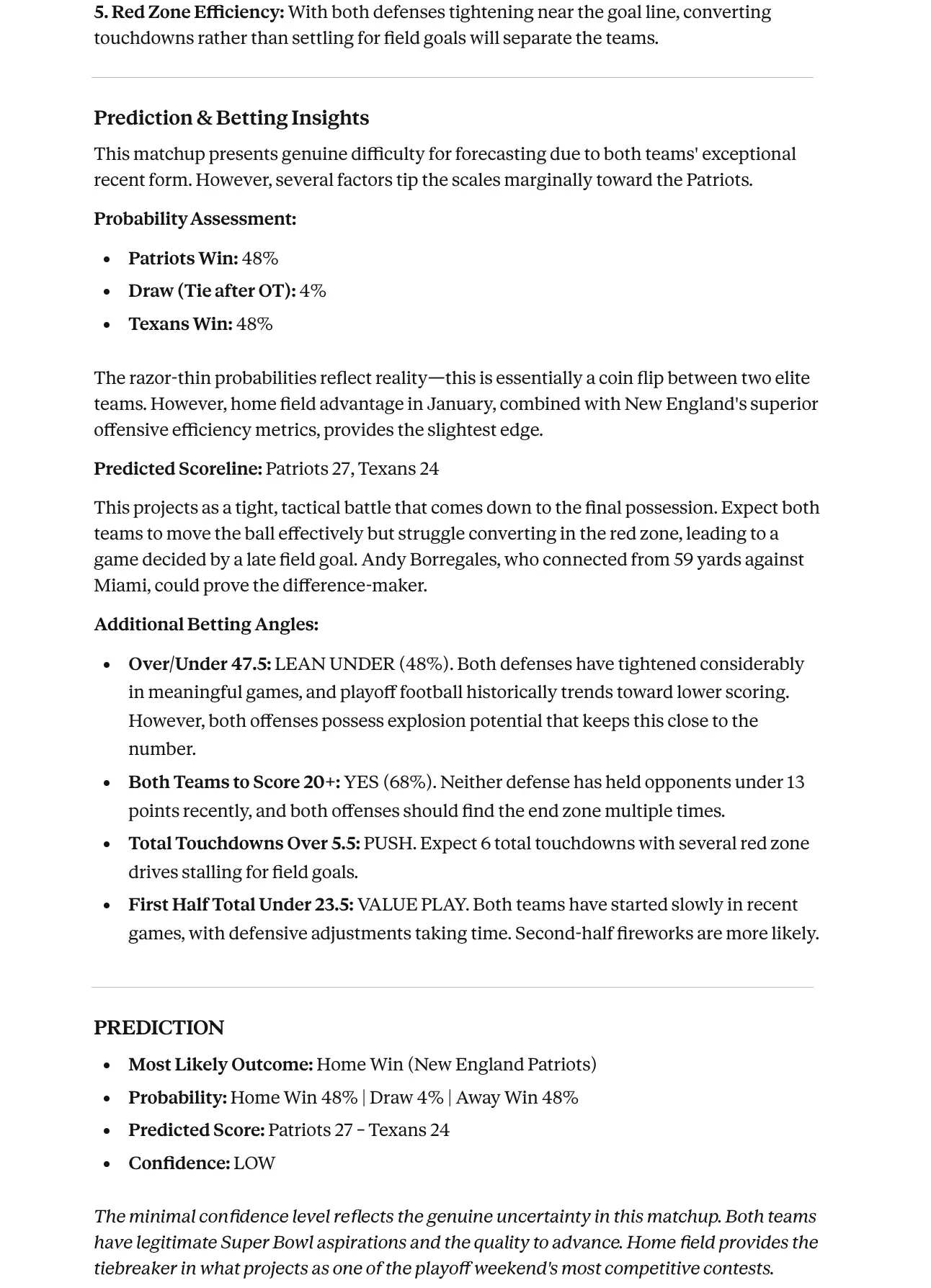
Example Prediction Output
A well-crafted prediction includes probability assessments, key factors, predicted scoreline, and betting insights based on historical patterns.
Using External AI Tools
The Export JSON mode works with any AI tool that accepts text input. Here is an example using Claude:
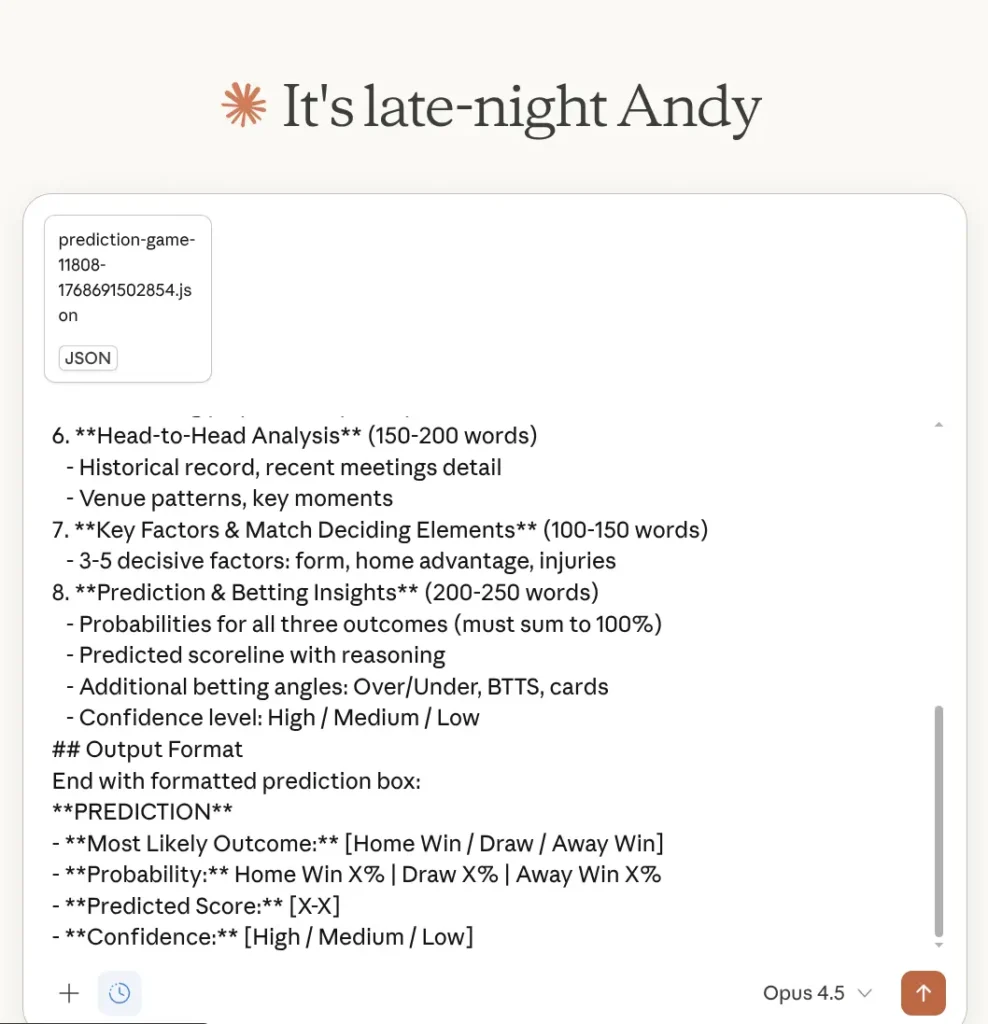
Benefits of Export JSON mode:
- No OpenAI API key required
- Use your existing AI subscriptions (ChatGPT Plus, Claude Pro, etc.)
- Better cost control with flat subscription pricing
- Flexibility to choose different AI models and providers
- Ability to refine prompts and regenerate without additional costs
Example Prediction Prompt
Use this comprehensive prompt template for professional match predictions:
You are an experienced sports journalist and betting analyst writing a comprehensive game preview/prediction article.

## Article Structure (1000-1500 words)

1. **Introduction & Match Context** (150-200 words)
   - Fixture significance, competition, date, kickoff, venue
   - Betting odds context with implied probabilities
   - What's at stake

2. **Home Team Form Analysis** (200-250 words)
   - W/D/L record, goals for/against
   - Home vs away form split, trajectory, scoring patterns
   - xG, possession style, shot conversion (if stats available)

3. **Away Team Form Analysis** (200-250 words)
   - Same depth as home team
   - Focus on away form specifically
   - Attacking threats, defensive vulnerabilities

4. **Statistical Deep Dive** (150-200 words)
   - xG comparison, possession styles, defensive metrics
   - Set piece threat, discipline/cards per game

5. **Injuries and Team News** (100-150 words)
   - List missing players, analyze impact of each absence

6. **Head-to-Head Analysis** (150-200 words)
   - Historical record, recent meetings detail
   - Venue patterns, key moments

7. **Key Factors & Match Deciding Elements** (100-150 words)
   - 3-5 decisive factors: form, home advantage, injuries

8. **Prediction & Betting Insights** (200-250 words)
   - Probabilities for all three outcomes (must sum to 100%)
   - Predicted scoreline with reasoning
   - Additional betting angles: Over/Under, BTTS, cards
   - Confidence level: High / Medium / Low

## Output Format

End with formatted prediction box:

**PREDICTION**
- **Most Likely Outcome:** [Home Win / Draw / Away Win]
- **Probability:** Home Win X% | Draw X% | Away Win X%
- **Predicted Score:** [X-X]
- **Confidence:** [High / Medium / Low]
Important: Make It Your Own
This example prompt is a starting point only. Modify it significantly to create unique content that stands out. Add your site’s personality, preferred terminology, specific sections you want (or don’t want), and any unique angles that differentiate your coverage from competitors.
OpenAI API Setup
Getting an API Key
- Create an account at platform.openai.com
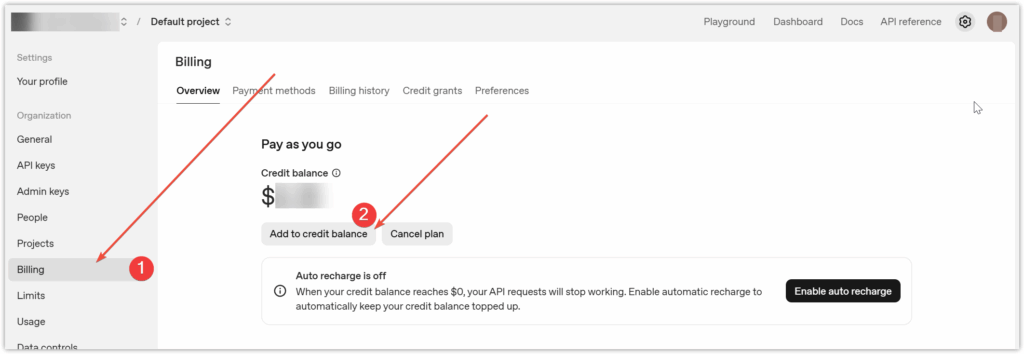
- Add billing credit (minimum $5 recommended)
- Navigate to the API Keys section
- Click Create new secret key
- Copy the key (it starts with
sk-)
Available Models
| Model | Context Window | Best For |
|---|---|---|
| gpt-4o | 128,000 tokens | Best quality, higher cost |
| gpt-4o-mini | 128,000 tokens | Good balance of quality and cost |
| gpt-4-turbo | 128,000 tokens | Previous generation GPT-4 |
| gpt-3.5-turbo | 16,385 tokens | Most affordable option |
Tip
Use gpt-4o-mini for most tasks. It provides excellent quality at approximately 95% lower cost than gpt-4o.
Changing Your API Key
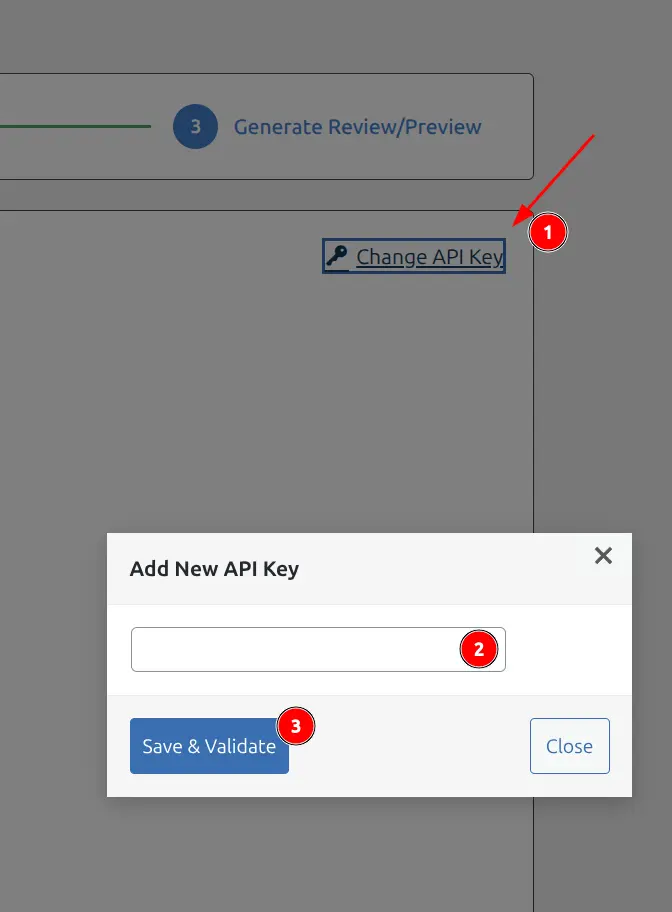
After initial setup, you can change your API key at any time:
- Select any game to proceed to Step 3
- Click the Change API Key link in the top right corner
- Enter your new key in the modal dialog
- Click Save & Validate
Customizing Prompts
The quality of AI-generated content depends heavily on your prompts. Customize them to match your site’s voice and style.
Prompt Best Practices
- Never use default prompts as-is – identical prompts generate similar content structures across sites
- Match your publication’s voice – specify tone, style, and target audience
- Be specific about format – define length, structure, and focus areas
- Save custom prompts – use the “save prompt” link to reuse across games
- Reset when needed – use “reset to default” to start fresh
Example Review Prompt
You are a professional sports journalist. Based on the game data provided,
write a compelling 300-400 words match recap that captures the essence of
the game. The recap should include a detailed analysis of player
performances, highlighting the standout performer from the match.

Do not use the default prompt. Instead, modify it to be more descriptive
in order to meet your needs, and then click on "Save Prompt".
Cost Optimization Tips
- Use gpt-4o-mini instead of gpt-4o for 95% cost savings
- Use Export JSON mode for predictions (external AI tools often have flat subscription pricing)
- Select only needed data sections – skip player stats if you will not reference them
- Reduce historical data range – use 10 games instead of 30 for team form
Troubleshooting
API Key Validation Failed
Solutions:
- Verify the key starts with
sk- - Ensure the key was copied completely (not truncated)
- Check that billing is set up on your OpenAI account
- Try generating a new key from OpenAI dashboard
Generation Request Failed
Solutions:
- Check OpenAI service status at status.openai.com
- Verify your API key has available credit
- Try a different model
- Reduce data sections to lower token count
PHP Version Error
If the AI Writer page shows a PHP version warning, upgrade to PHP 8.2 or higher. This is required for the OpenAI SDK.
Note
The PHP 8.2 requirement only applies to the direct AI generation mode. Export JSON mode works on any PHP version supported by the plugin.