

Live Scores delivers real-time score updates to your visitors while games are in progress. The system has two parts: a backend pipeline that polls the sports API for score changes via WordPress Cron, and a frontend module that pushes those updates to visitors’ browsers without page reloads.
Admin Menu: API & Import > API Config > Live Scores section
How It Works
Live Scores is a two-part system that keeps your site updated in real time:
- Backend (server-side) — A WordPress Cron pipeline detects games about to start, polls the API for score changes during the game, fetches updated stats, and finalizes game data when the game ends
- Frontend (browser-side) — A lightweight JavaScript module (9.5 KB, zero dependencies) polls the plugin’s REST API for updates and swaps in new content when scores change. Visitors see scores update without refreshing the page
Prerequisite
Games must be imported first (at minimum, the Fixtures task) before live scores can track them. The backend pipeline only monitors games that already exist in your database. See Import Workflow for setup steps.
⚙️ Configuration
Configure Live Scores in API & Import > API Config, under the Live Scores section.
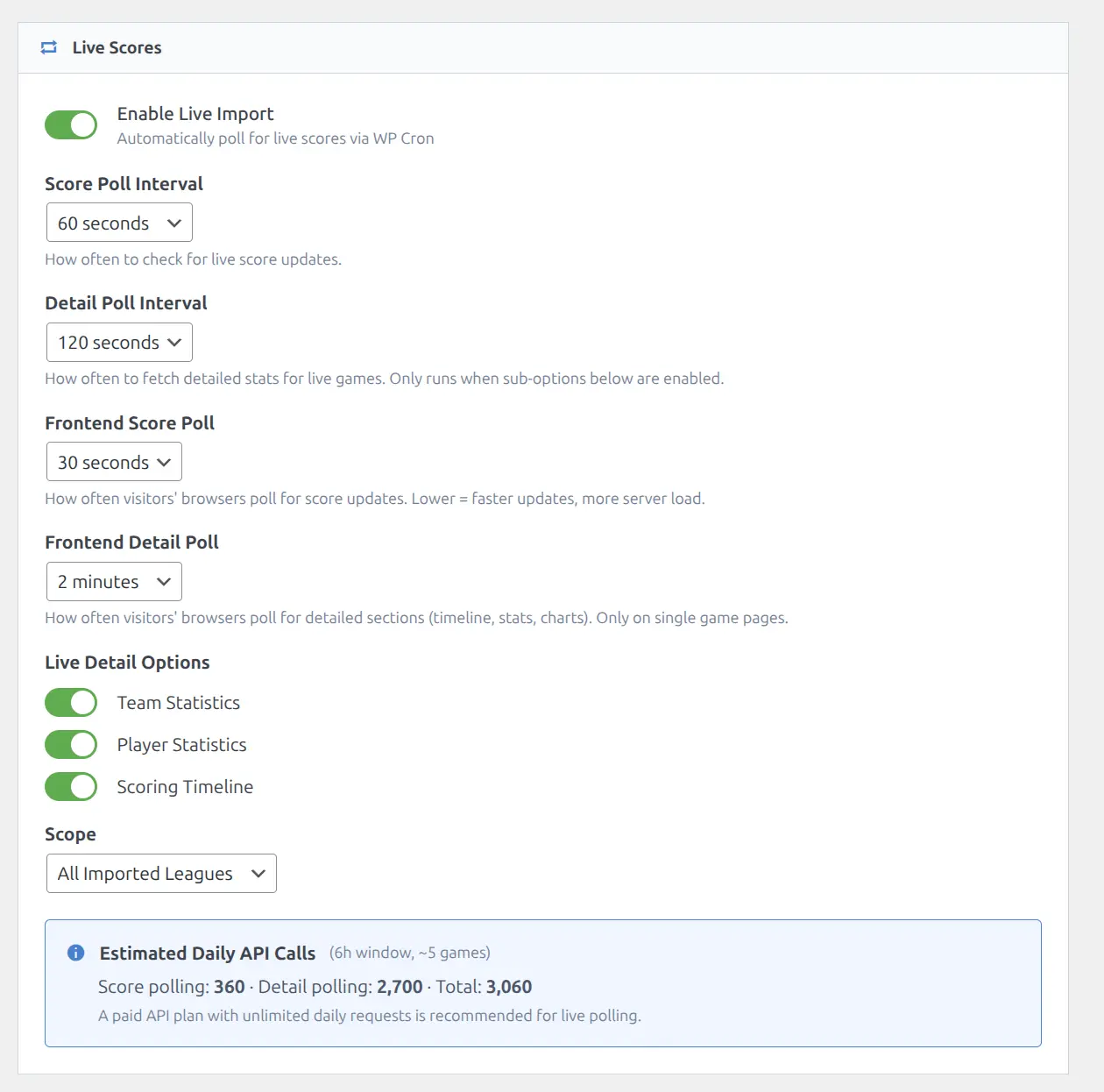
Main Settings
| Setting | Options | Default | Description |
|---|---|---|---|
| Enable Live Scores | On / Off | Off | Master toggle for the entire live system (backend + frontend) |
| Score Poll Interval | 30 / 60 / 120 seconds | 60s | Backend: how often the server checks the API for score changes |
| Detail Poll Interval | 60 / 120 / 300 seconds | 120s | Backend: how often to fetch box scores, team stats, and incidents |
| Scope | All Leagues / Selected | All | Which leagues to include in live polling |
| League Selection | Multi-select | — | Pick specific leagues when Scope is set to Selected |
Live Sub-Options
Control what additional data is fetched during live games. Each sub-option adds API calls per poll cycle:
| Sub-Option | Default | What It Fetches |
|---|---|---|
| Team Statistics | Off | Team stat comparison bars (FG%, rebounds, turnovers, etc.) |
| Player Statistics | Off | Box scores with live player stats (points, assists, etc.) |
| Incidents | Off | Play-by-play timeline events (scoring plays, period breaks) |
Frontend Settings
These control how often visitors’ browsers check for updates:
| Setting | Options | Default | Description |
|---|---|---|---|
| Frontend Score Interval | 15 / 30 / 45 / 60 seconds | 30s | How often the visitor’s browser polls for score changes |
| Frontend Detail Interval | 60 / 120 / 180 / 300 seconds | 120s | How often the browser refreshes stat sections (box scores, timeline) |
Backend Pipeline
The backend runs as a 4-phase WordPress Cron pipeline. Each phase handles a different stage of a game’s lifecycle:
Phase 1: Master Check
- Frequency: Hourly
- What it does: Scans your database for games starting within the next few hours
- Result: Marks those games for live monitoring and schedules the Live Poller to begin
Phase 2: Live Poller
- Frequency: 30–120 seconds (your Score Poll Interval setting)
- What it does: Polls the API for score changes on all games currently in “live” status
- Smart detection: Uses hash-based diff detection — the API response is hashed and compared to the stored hash. If nothing changed, no database writes occur
Phase 3: Detail Poller
- Frequency: 60–300 seconds (your Detail Poll Interval setting)
- What it does: Fetches detailed data (box scores, team stats, play-by-play incidents) for games in progress
- Controlled by sub-options: Only fetches the data types you have enabled in the Live Sub-Options above
- Separate hashes: Stats, incidents, and scores each have their own hash columns — only changed sections trigger database writes
Phase 4: Live Finished
- What it does: Detects when a game has ended and transitions it from live to finished status
- Follow-up: Triggers a full detail import for the completed game (same as the Finished Details import task)
- Retry handling: Games stuck in a “live ended” state are retried up to 3 times. After 3 retries, the game is flagged for manual attention
🎮 Frontend Updates
When a visitor views a page with live or upcoming games, the frontend module automatically activates and begins polling for updates.
Single Game Pages
On a single game page, two types of polling run simultaneously:
- Score polling (every 15–60s) — Updates the score, period grid, and game status text in real time
- Section polling (every 60–300s) — Refreshes detailed sections like box scores, team stats, timeline, and game flow chart
Score changes trigger a brief flash animation (yellow highlight on the updated score) so visitors can instantly spot what changed.
Game List Pages
On pages with multiple game cards (shortcodes, team results, calendar), the module uses batch polling — a single REST request fetches updates for all live games on the page. Scores, status text, and period data update on every card simultaneously.
Visual Indicators
Live games are visually distinct from finished or upcoming games:
- LIVE badge — Appears on game cards and the game header
- Pulsing dot — Animated indicator next to the game status (pauses during halftime and breaks)
- Orange accent color — Scores and borders use orange tones during live games
- Score flash — Brief yellow highlight animation when a score changes
- Sport-aware status text — Automatically shows period-appropriate labels like “Q3” (basketball), “Top 7th” (baseball), “P2” (hockey), or “Halftime”
Smart Activation
The frontend module does not poll unnecessarily:
- Deferred start: Polling begins only 20 minutes before the scheduled kickoff time. If a visitor loads a page hours before game time, no requests are made until the window approaches
- Hash-based updates: The server only sends changed HTML sections. If nothing changed since the last poll, the response is minimal
- Graceful game end: When a game finishes, the module updates the DOM with the final score, runs 2 final detail polls to capture end-of-game stats, then stops polling entirely — no page reload required
Layout Transition
When a game changes state — from upcoming to live, or live to finished — the page layout automatically swaps via AJAX to show the appropriate blocks for that state. For example, an upcoming game page might show team form and matchup history. When the game goes live, the layout transitions to show the live score header, box scores, and timeline. When the game ends, it transitions again to the finished layout with full stats.
This happens without a page reload. The browser fetches the new layout from the server and replaces the content area, then re-initializes any interactive elements (Tabulator tables, ECharts charts) automatically.
Section Update Details
Different page sections use different update strategies during a live game:
| Section | Update Method | Frequency |
|---|---|---|
| Score + period grid | REST poll + DOM swap | Every score poll interval |
| Game status text | REST poll + DOM swap | Every score poll interval |
| Box scores (Tabulator) | JSON data replacement | Every detail poll interval |
| Team statistics | HTML swap | Every detail poll interval |
| Play-by-play timeline | HTML swap | Every detail poll interval |
| Game flow chart (ECharts) | Chart data update | Every detail poll interval |
The server renders updated HTML for each section, and the frontend replaces only the changed sections. This ensures the live view matches exactly what a fresh page load would show.
📈 API Usage During Live Games
Live polling consumes API calls continuously while games are in progress. Understanding the cost helps you choose the right settings for your API plan.
Per Game, Per Hour (Backend)
| Setting | Calls/Hour | Formula |
|---|---|---|
| Score poll at 60s | 60 | 3600 / 60 |
| Score poll at 30s | 120 | 3600 / 30 |
| Detail poll at 120s (1 sub-option) | 30 | 3600 / 120 |
| Detail poll at 120s (3 sub-options) | 90 | 3 × (3600 / 120) |
Real-World Example
Scenario: 4 simultaneous NBA games, score poll at 60s, detail poll at 120s with Player Statistics enabled:
- Score polling: 4 games × 60 calls/hour = 240 calls/hour
- Detail polling: 4 games × 30 calls/hour = 120 calls/hour
- Total: ~360 API calls per hour
A typical NBA game lasts about 2.5 hours. A full evening slate of 4 games would use approximately 900 API calls.
Tip
The Scope setting is your best tool for controlling live API costs. Set it to “Selected” and choose only the leagues you actively display on your site. This prevents the backend from polling games in leagues you do not show to visitors.
Requirements
For Live Scores to work correctly, make sure the following are in place:
- Games imported: Run the Fixtures task for the seasons you want to track live. The backend can only monitor games that exist in your database
- WordPress Cron running: The backend pipeline relies on WP Cron. For best reliability, set up a server-level cron job (see Background Sync for details on server cron setup)
- API key active: Your API subscription must be active with sufficient daily call allowance for live polling
Troubleshooting
Scores are not updating
- Check the master toggle — Verify Live Scores is enabled in API Config > Live Scores
- Verify WordPress Cron is running — The backend pipeline requires WP Cron to be active. If your hosting provider disables WP Cron, set up a server-level cron job (see Background Sync)
- Check your API quota — If the daily API limit has been reached, all polling stops until the limit resets (usually midnight UTC)
- Check the league scope — If Scope is set to “Selected”, the game’s league must be included in the league filter
- Check game timing — Frontend polling does not start until 20 minutes before the scheduled kickoff time
- Verify games are imported — Only games that exist in your database (from the Fixtures import task) can be tracked live
Scores update on page refresh but not in real time
This usually means the backend pipeline is working correctly, but the frontend JavaScript module is not loading or running:
- Open the browser console (F12) and check for JavaScript errors
- Verify no caching plugin is serving stale HTML for the game page. Disable page caching for live game pages, or use the plugin’s cache support settings to handle this automatically
- Ensure the game page is using the plugin’s built-in templates (custom theme templates may not include the live module)
Games stuck in live status
If a game still shows as “live” long after it has ended:
- The backend automatically retries stuck games up to 3 times
- After 3 retries, the game is flagged — you can check the import logs for details
- You can manually finalize the game from Hub Data > Games — hover over the game row and click the Re-update action link
High API usage from live polling
If live scores are using more API calls than expected:
- Narrow the scope: Switch from “All Leagues” to “Selected” and choose only the leagues you display
- Increase poll intervals: Change Score Poll from 30s to 60s, or Detail Poll from 120s to 300s
- Disable unused sub-options: If you do not display box scores or timeline on your live game pages, disable those sub-options to reduce detail polling calls
Note
Frontend polling (browser-side) does not make additional API calls to the sports API. It polls your own site’s REST API, which serves data already fetched by the backend. Only the backend pipeline makes external API calls.
Related
- Import Workflow — Import games before enabling live tracking
- Import Tasks — Detailed breakdown of each import task
- Background Sync — Automatic scheduled updates between game days
- API Config — Full settings reference including live score configuration
- API Usage — Rate limits and cost estimation
- Game Pages — How game data is displayed on the frontend, including live layout transitions
- Caching — Cache configuration for sites with live scores