

Layout Builder v2 renders every competition you have from one layout – single-stage and multistage, a full league with player statistics and a cup that only records results. There’s nothing to configure per competition. Sections with no data hide themselves instead of leaving an empty heading behind, so the same layout works on all of them.
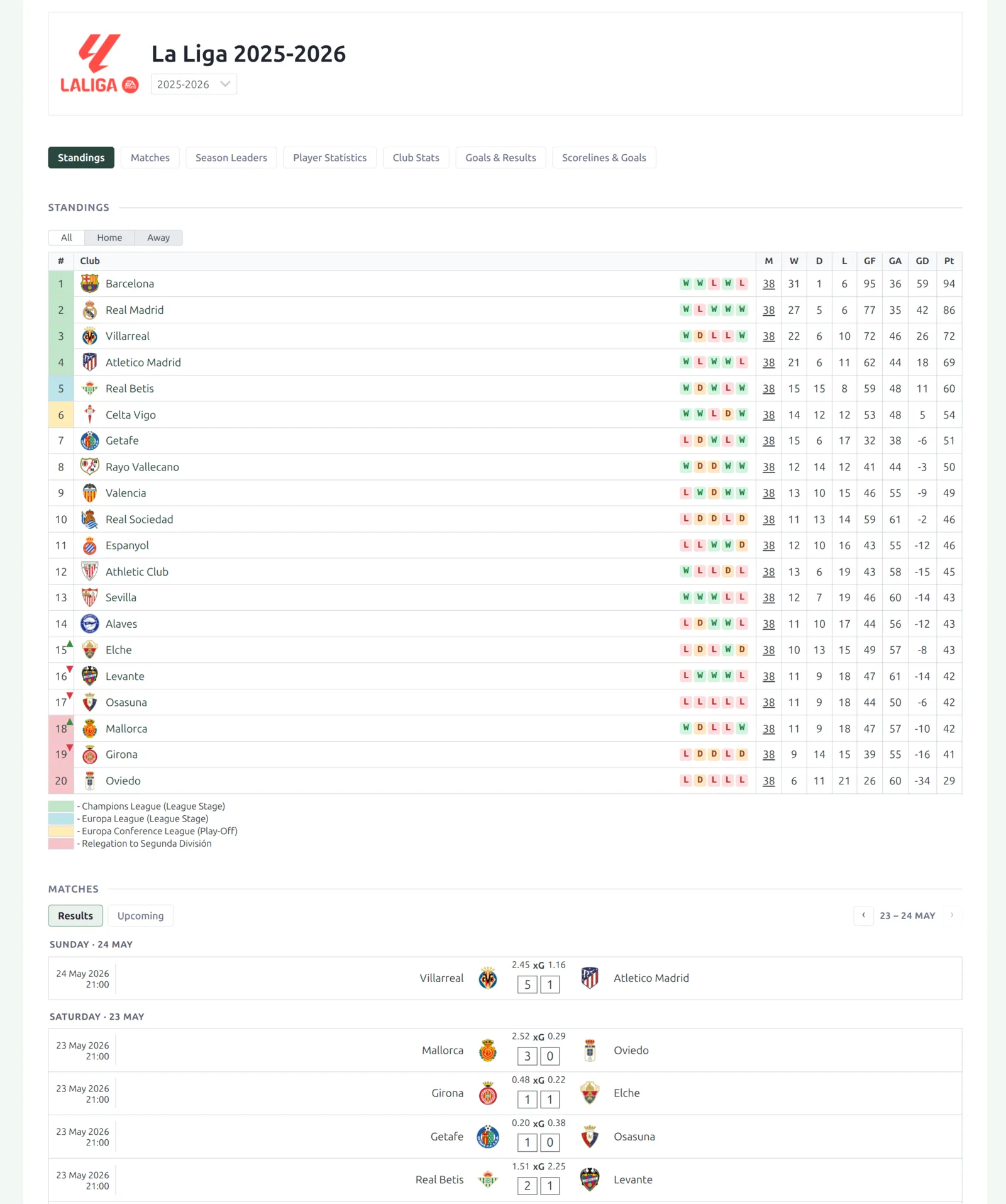
🚀 Turn it on
The new competition layout is off until you activate it. Your classic competition pages and any Layout Builder v1 competition layouts keep rendering until you do.
- In wp-admin, open Layout Builder → Layouts (v2).
- Open the Competition layout.
- Click Activate.
Every competition page now renders the new design – including secondary stages of a multistage competition.
What’s on the page
The default competition layout ships with these blocks, in this order. You can reorder, remove, or regroup any of them in the builder.
| Block | Shows |
|---|---|
| Competition Header | Logo, title, league and season selector. |
| Section navigation | Sticky jump links to the sections below. |
| Standings | The league table, one panel per group. |
| Bracket | The knockout tree, including the self-filling Advanced Bracket. |
| Matches | Compact Results / Upcoming segments with a date-window pager. |
| Season Leaders | Top players grouped into Scoring, Creating, Ratings & Advanced, Goalkeeping and Discipline cards. |
| Player Statistics | The sortable per-player statistics table, plus a separate Goalkeepers table with its own columns. |
| Club Stats | Per-club totals – played, W/D/L, goals, plus the stat columns you pick. |
| Goals & Results | Goals per match, over 2.5, both-teams-scored, and the home/draw/away split. |
| Scorelines & Goals | Most common scorelines, exact goals per match, half-time to full-time outcomes. |
| Bottom Content | The competition’s own description text, at the foot of the page. |
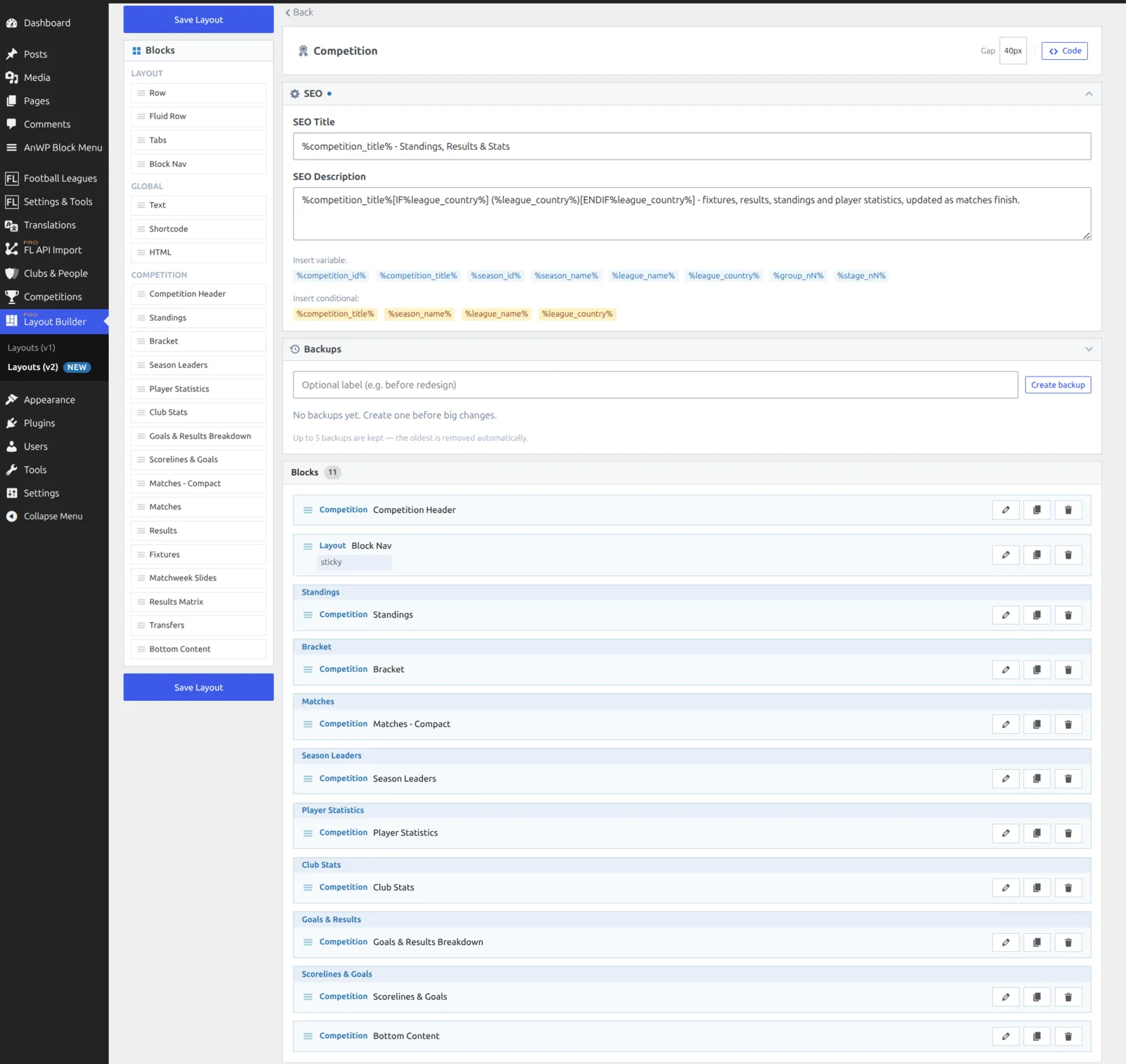
Standings and Bracket sit next to each other on purpose – they’re the structure of the competition, and a cup shows one where a league shows the other. Matches comes straight after them, because “what’s the table” and “what was played” are the two questions a competition page exists to answer.
Sections hide themselves
This is what lets one layout cover every competition. Each section checks its own data at render time and returns nothing when there isn’t any – the heading goes with it, so you never get an empty “Season Leaders” title above blank space.
- A league with full statistics shows everything.
- A cup that only records results drops Standings and the player-level tables. Goals & Results and Scorelines still fill in, because they’re worked out from match scores alone.
- A competition with nothing played yet collapses to the header and the upcoming fixtures.
Rows and tab containers follow the same rule – a row hides completely when every block inside it is empty, and tabs drop empty panes together with their tab buttons.
Keeping an empty section visible
If a section is meaningful even when it’s empty, open the block’s Advanced settings and turn on Always Show. It applies to containers too.
The Matches block
The default layout uses the compact Matches block: Results and Upcoming segments, about 10 games at a time, with a date-window pager instead of the whole season on one page. On a full league that roughly halves the weight of the competition page.
A third Awaiting result segment appears only on competitions that have matches with no result entered yet – past-dated games that are neither a result nor an upcoming fixture. It stays hidden everywhere else, so most sites never see it.
On a multistage competition you get an all-stages view with a small stage tag on each match, plus per-stage views grouped by matchweek. If you’d rather show the whole season at once, the classic full-season Matches block is still in the palette.
Multistage competitions
In Layout Builder v1 a multistage competition needed its own layout type, with stage and group IDs typed into each block. That’s gone. One layout covers both shapes, and the stage resolves when the page renders.
- Standings renders one panel per group automatically.
- Season Leaders, Player Statistics, Club Stats, Goals & Results and Scorelines & Goals get stage filter pills – visitors switch stage in place, without reloading the page.
- Shortcodes you add yourself no longer need a hand-typed
multistageattribute. It’s resolved for you.
Single-stage competitions simply don’t show the pills.
Season Leaders
Season Leaders replaces a long stack of separate top-scorer lists with grouped cards: Scoring, Creating, Ratings & Advanced, Goalkeeping and Discipline. Each card fills itself from the stats that actually have data and hides when there are none.
The cards show the top 5 (top 3 on some lists). Every list has a Show full list link that opens the top 25 with a games-played column, and a Load more button to go further. The list is only fetched when you open it, so it costs nothing until a visitor uses it, and it follows whichever stage pill is selected.
Rate leaderboards (per 90, per game) and fewest-conceded need a minimum share of appearances, so a substitute with one goal in ten minutes doesn’t top the chart.
Show or hide by competition status
Any block, row or tabs group can be shown only for certain competition states. Open the block’s settings and use Show for Competition Status and Show for League Classification. A block with nothing ticked always shows, so existing layouts don’t change.
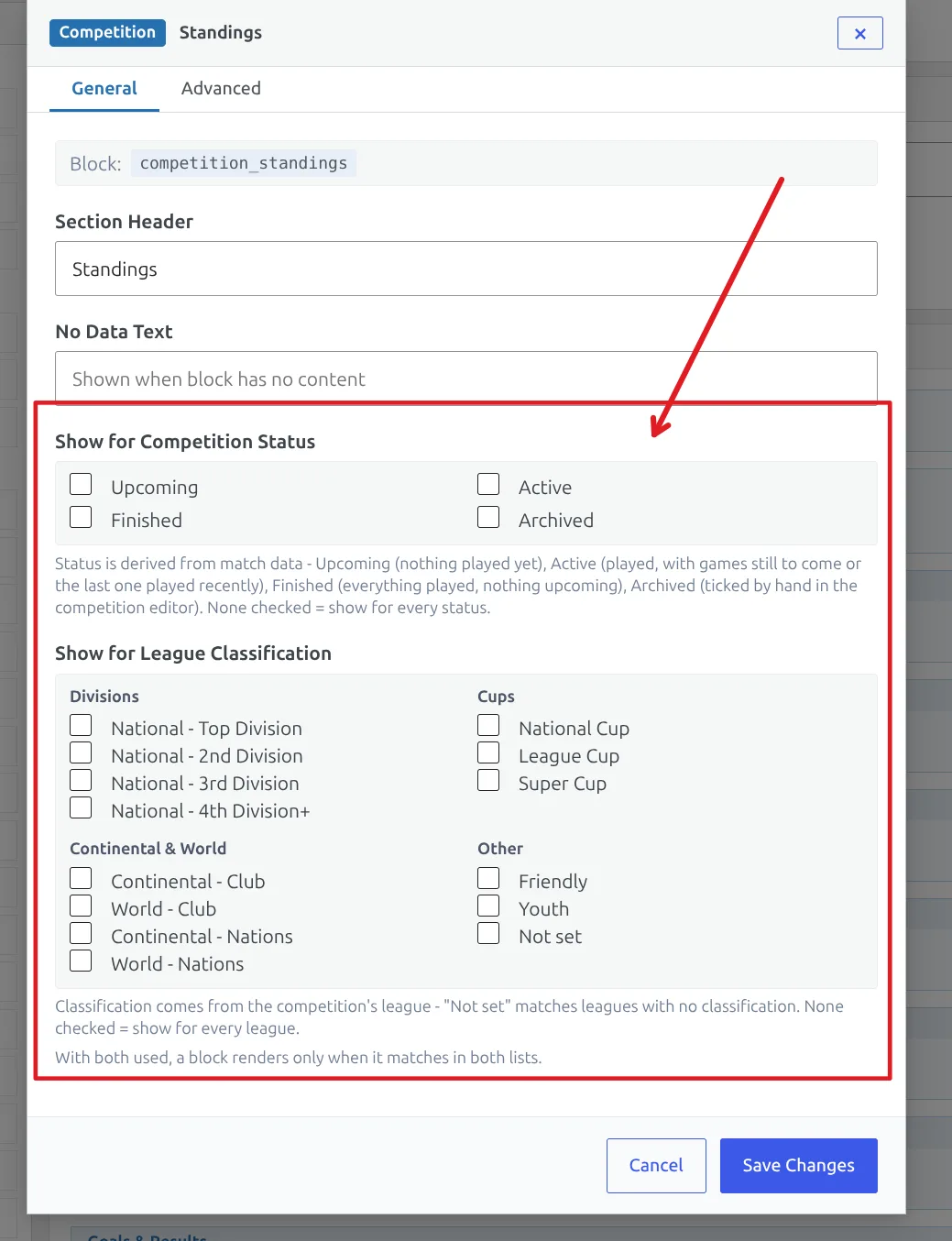
Competition status
Status comes from your match data, so it stays current without anyone maintaining it.
| Status | When it applies |
|---|---|
| Upcoming | Nothing has been played yet. |
| Active | Some games are played and fixtures remain – or the last game was recent (45 days for a league, 100 for a cup, so a long cup break doesn’t read as finished). |
| Finished | Everything is played and the last game is past that window. |
| Archived | The Archived checkbox is ticked in the competition editor. It overrides the other three. |
League classification
The second list matches the classification set on the competition’s league, grouped into Divisions, Cups, Continental & World and Other – National Top Division, National Cup, Continental Club, Friendly, Youth and so on. Use it to show a block on cups but not on leagues, or to keep a sponsor panel off youth competitions. A Not set option covers competitions whose league has no classification.
The two lists work together: a block with both set shows only when the status matches and the classification matches. Hiding a row hides everything inside it.
Adding what the default doesn’t include
The default layout is deliberately a backbone, not everything the plugin can show. Anything else goes in as a Global Shortcode block. Dynamic variables are substituted before the shortcode runs, and multistage resolves on its own, so each of these is a one-line add with nothing to maintain per competition.
| What you want | Put this in a Global Shortcode block |
|---|---|
| Ads or any third-party block | that plugin’s own shortcode |
| Suspension watch | [anwpfl-suspension-risk competition_id="%competition_id%"] |
| Referee statistics | [anwpfl-referees-stats competition_id="%competition_id%"] |
| Goal-timing charts | [anwpfl-charts competition_id="%competition_id%"] |
| Calendar view | [anwpfl-calendar competition_id="%competition_id%"] |
| Filterable full match list | [anwpfl-matches-section competition_id="%competition_id%"] |
| A single stat list, v1 style | [anwpfl-stat-players competition_id="%competition_id%" stat="goals"] |
Two more blocks are in the palette but not in the default layout, because they’re heavy and not every site wants them: Results Matrix (the everyone-versus-everyone crosstable) and Transfers. Drag either one in if you want it.
Dynamic variables
These work in Text, HTML and Shortcode blocks, and in the layout’s SEO title and description.
| Variable | Value |
|---|---|
%competition_id% | Competition ID |
%competition_title% | Competition title |
%season_id% / %season_name% | Season ID / name |
%league_name% / %league_country% | League name / country |
%stage_nN% | Stage ID – replace N with the stage number (%stage_n2% is the second stage) |
%group_nN% | Group ID – replace N with the group number |
Some of these can be empty – a competition with no league has no country. Wrap the surrounding text in [IF%league_country%] … [ENDIF%league_country%] and it’s dropped entirely when the value is missing, instead of leaving stray brackets or punctuation. The same guard works for %competition_title%, %season_name% and %league_name%.
Moving from classic competition layouts
Layout Builder v1 competition layouts aren’t converted automatically – you rebuild once, in the v2 builder, and then you’re done maintaining variants. In v1 a site typically needed several layouts: one for single-stage competitions, another for multistage ones, and often a further copy per data tier (a full-statistics league, a goals-and-assists league, a results-only cup). One v2 layout replaces all of them, because the sections hide themselves and the stage resolves at render time.
The rebuild:
- Open Layout Builder → Layouts (v2) → Competition and look at the default. On most sites it’s already close to the v1 backbone.
- Add your site-specific extras as Global Shortcode blocks, using the table above. This is where v1 ad slots and single-stat lists land.
- Delete the stage and group IDs you were carrying in v1 blocks – don’t recreate them. Stage handling is automatic now.
- Preview a few real competitions: a full league, a cup, and one with nothing played yet. The same layout should look right on all three.
- Click Activate.
Nothing breaks while you work
Your v1 competition layouts keep rendering until you activate the v2 layout, and your v1 layouts aren’t deleted when you do. If you want to go back, deactivate the v2 layout.
If you customized the v2 layout and want the current default back, use Reset in the builder. That replaces your layout with the shipped default, so export or note your changes first.
🆘 Troubleshooting
A section I expected is missing
That’s the hide-when-empty rule doing its job – the block found no data for this competition. Check the underlying data first (are standings calculated, are player statistics recorded for these matches, does the stage have games). If the section should show regardless, turn on Always Show in the block’s Advanced settings.
The page still looks like the old design
The v2 layout isn’t activated yet, or a page cache is serving the old HTML. Activate it in Layouts (v2), then clear your caching plugin.
A block is hidden on some competitions but not others
Check its Display Conditions. A status or classification whitelist hides the block everywhere it doesn’t match, and a condition on a row hides everything inside that row.
Stage pills don’t appear
They only render on multistage competitions, and only on the blocks that support them (Season Leaders, Player Statistics, Club Stats, Goals & Results, Scorelines & Goals). A single-stage competition never shows them.
📚 Related
- Team Pages with Layout Builder v2
- Player Pages with Layout Builder v2
- Advanced Bracket – the self-filling tournament bracket shown by the Bracket block
- Custom Player Statistics shortcode
- All PRO shortcodes