

Deactivate the license on the old site, then activate it on the new one with the same key. If you can still log in to the old site, deactivate it from the plugin’s Account screen. If you can’t, deactivate it from the Freemius Customer Portal. Either way takes about a minute.
This works the same for Football Leagues Premium, Sports Leagues Premium, Sports API Hub and Tennis API Hub.
🚀 How do I move it when I can still log in to the old site?
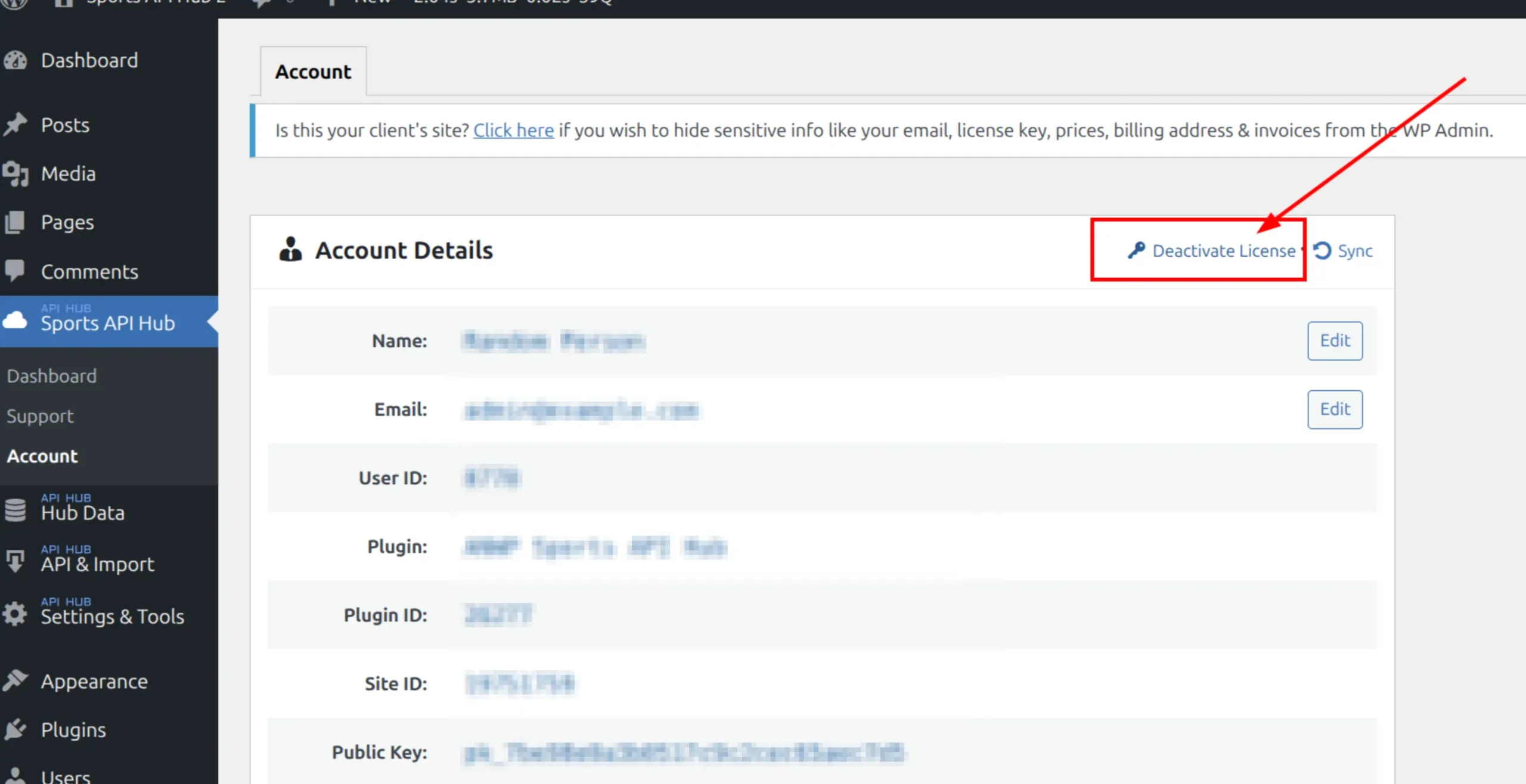
- On the old site, open the plugin’s Account screen: Football Leagues > Account, Sports Leagues > Account, Sports API Hub > Account or Tennis API Hub > Account.
- Click Deactivate License.
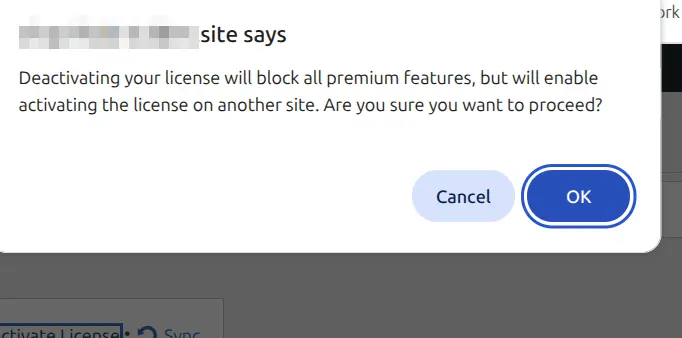
- Confirm the dialog. It reads: “Deactivating your license will block all premium features, but will enable activating the license on another site. Are you sure you want to proceed?”
- On the new site, install the plugin, activate it, and enter the same license key.
Deactivating doesn’t cancel billing
Deactivate License frees one site so you can use it somewhere else. Your subscription keeps renewing. To stop the payments, see Manage Your Subscription.
How do I move it when the old site is gone or I can’t log in?
Deactivate the old site from the Freemius Customer Portal. This is the way when the old site was deleted, the domain expired, the server is down, or you lost the admin login.
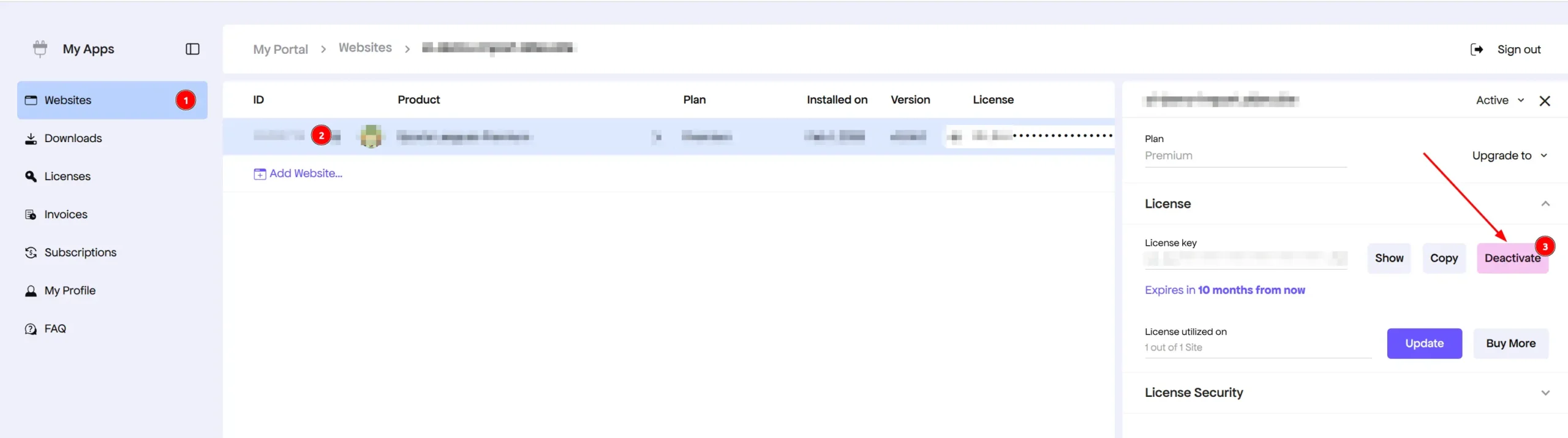
- Sign in at users.freemius.com with the email you bought with.
- Click Websites in the sidebar.
- Click the old site, expand its License section in the right panel, and click Deactivate.
- Activate the plugin on the new site with the same key.
Can’t sign in to the portal either? Contact support for your plugin with the old site address and the email you bought with. Send only the first 8 characters of the key.
I copied the whole site to a new domain. Do I still deactivate first?
No. When you open wp-admin on the copy, the plugin shows a safe mode notice asking whether this is a duplicate, the site’s new home, or a new site. Click Migrate License and the license moves to the new address on its own. If the old site is still online, it goes into safe mode. All three choices are explained on License Won’t Activate.
Does moving the license move my data?
No. The license only controls which site can run the premium plugin. Your competitions, teams, players, games and imported data live in the site’s database, so move them with the site, using your host’s migration tool or a migration plugin. Deactivating the license deletes nothing: if you activate it on the same site again later, everything is still there.
My domain changed but the site stayed on the same server. Do I need to do anything?
Yes. The license is tied to the site address, not the server. After the domain change you’ll usually see the safe mode notice: pick Migrate License. If there’s no notice and premium features stopped, deactivate and activate again on the Account screen.
Moving from staging to the live site
If the staging site used an address Freemius recognizes, like staging.yoursite.com, it never used one of your sites. Just activate on the live site. Any other staging address does use one, so deactivate it first or the live site may hit the site limit. What a License Covers lists the free addresses.
🆘 Troubleshooting
| Problem | Fix |
|---|---|
| “You have already reached the license activations limit” on the new site | The old site is still active. Deactivate it (either way above), then try again |
| Not sure which sites use the license | Check Websites in the Customer Portal |
| No Deactivate License link on the Account screen | The license isn’t active on this site. Check the Customer Portal for where it is |
| Any other activation error on the new site | See License Won’t Activate |
📚 Related
- Transfer a License to a Client or New Owner – a different person, not a different site
- What a License Covers
- Find Your License Key