

Every round robin and every group keeps its own league table. It’s built from the draw’s results and updates the moment a result is saved. You set the points and the tiebreaker order once per competition, in its Match Rules box.
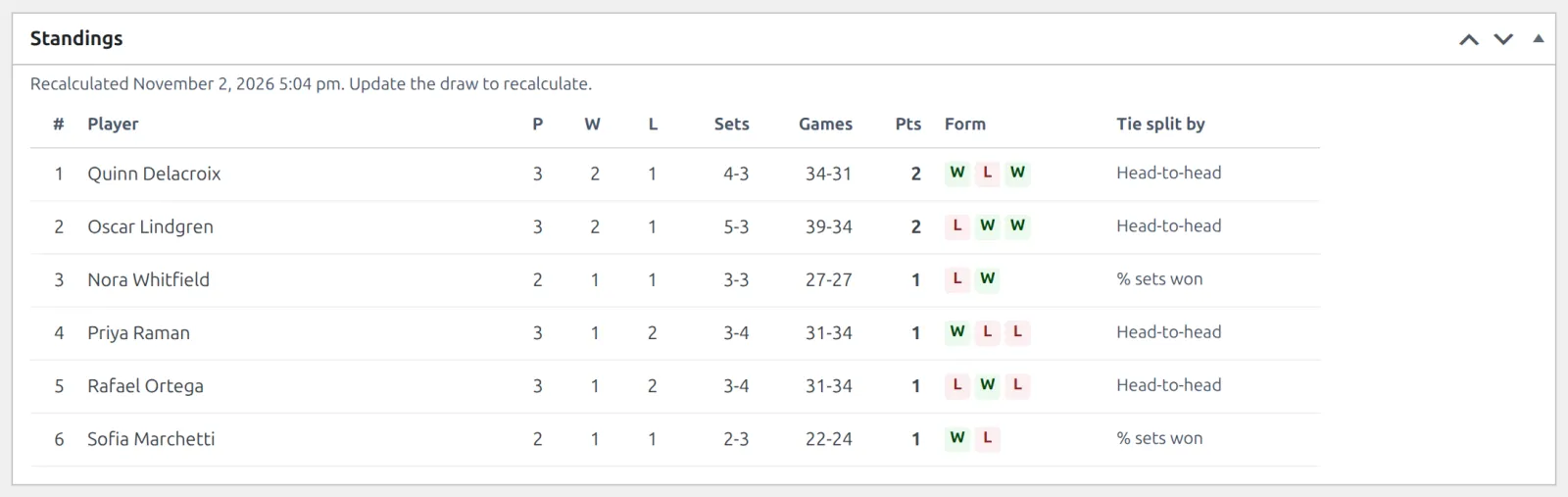
Where tables live
- A Round Robin draw has one table. A Group draw has one per group, in group order: A, B, C. A Knockout draw has none, so its screen shows the Bracket box instead.
- The rows are the draw’s Active entries. Everyone gets a line of zeros as soon as the draw is updated, before a ball is hit. On a Group draw, an entry needs its group first.
- Set an entry to Withdrawn and it leaves the table, and every match against it stops counting for both sides.
- Open a draw from its competition’s Seasons box. The table is in its Standings box, read-only.
Which matches count
| Status | In the table | Points | Sets and games |
|---|---|---|---|
| Finished, Retired | Yes | Points for a win / a loss | Added |
| Walkover | Yes | Points for a walkover win / loss | Not added |
| Default, no score entered | Yes | As a walkover | Not added |
| Default, with a score | Yes | As a win / a loss | Added |
| Scheduled, Cancelled, bye | No | – | – |
- A counted match adds 1 to P for both sides, 1 to W for the winner and 1 to L for the loser. There are no draws in any of the 6 sports.
- The match has to be published and in this draw, and both sides must be active entries of the same table. A draft or a trashed match counts for nothing.
🎯 Points
Open the competition and find the League table group in its Match Rules box. The points grid has a row for matches Played and one for Walkover, each with a Win and a Loss value.
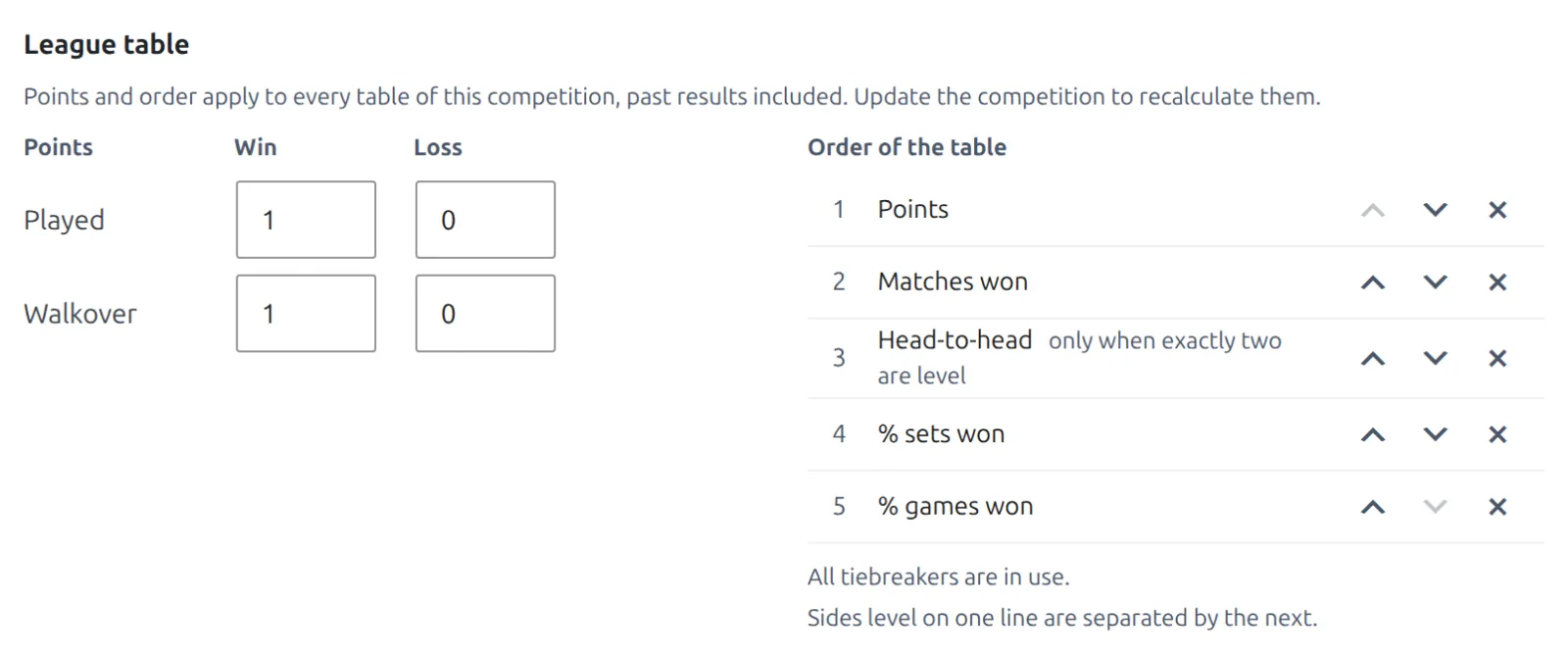
- The standard is the same in every sport: a win is worth 1 point and a loss 0, played or by walkover. Each value is a whole number from 0 to 20.
- Change a value and the group shows a Changed badge with a Reset to standard link.
- Click Update on the competition and every table in it is recalculated with the new points, past results included.
2 points for a win
Some leagues reward turning up: 2 for a win, 1 for a loss, 0 for a walkover loss. Type those into the grid and click Update. The scoring rules above the table (sets, tiebreaks) are different: those only apply to matches created after the change.
Tiebreakers
The Order of the table list ranks the sides. Sides level on one line are separated by the next. Points always come first.
| Criterion | What it compares |
|---|---|
| Points | Table points |
| Matches won | The W column |
| Head-to-head | Who won more of the matches between the two. Only when exactly two are level |
| % sets won | Sets won out of sets played |
| % games won | Games won out of games played |
| % rubbers won | Team leagues only: rubbers won out of rubbers played |
- The standard order is Points, Matches won, Head-to-head, % sets won, % games won. A team league puts % rubbers won after Head-to-head.
- Use the up and down arrows to reorder, the cross to remove one, and the Add: buttons to bring one back. The list can’t be emptied.
- The percentages are worked out exactly, never rounded. A side that hasn’t played scores 0.
Three or more level
Head-to-head is skipped while three or more are level. When a later criterion splits them, the ones still level start again from the top of the list, so head-to-head can then settle a pair. If two players never met, or split their matches, the next criterion decides.
Still level after everything? They’re placed by seed (numbered seeds first, then letter seeds, then the unseeded), then by name, A to Z. The Tie split by column on the draw screen shows which criterion placed each level side, or Level after every tiebreaker. It appears once the first result is in, and only in the admin.
Squash, table tennis, pickleball and badminton
These sports play games of rally points, not sets of games. Their tables call the two columns Games and Points. In the tiebreaker list, % sets won compares games won and % games won compares rally points won.
When the table updates
Straight away, whichever way the change arrives. There’s nothing to schedule and no button to remember. The table is recalculated when:
- a match in the draw is saved, published, moved to draft, trashed, restored or deleted, or moved to another draw
- an entry is added, changed or removed, or the draw is updated
- the competition is updated, which recalculates every draw in it
The line above the table says when it last ran: Recalculated November 2, 2026 5:04 pm. Update the draw to recalculate. If it ever falls behind, a yellow notice says so, the Dashboard lists the draw under Needs attention, and clicking Update on the draw brings it up to date.
On your site
A competition’s public page shows the tables of its current season (or its last one), one per round robin and per group, above the match list. Columns: position, name, P, W, L, Sets, Games, Pts and Form, the last 5 results with the newest first. A pair is shown by its two surnames.
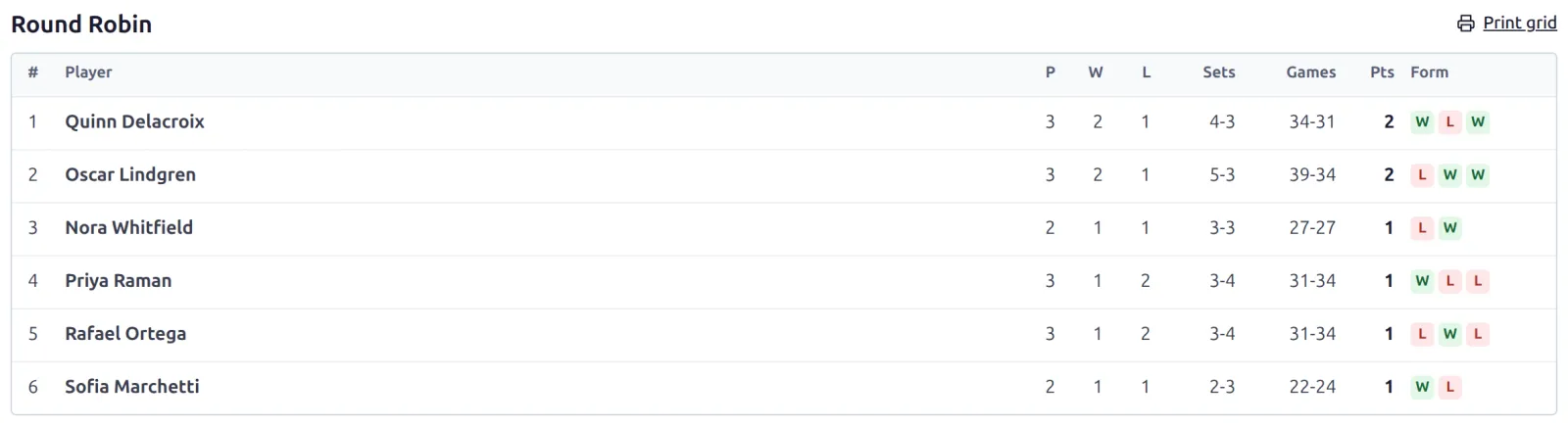
To show one table anywhere else, use the Standings table block or the [anwptl-standings] shortcode with the draw’s ID. The column labels can be renamed under Settings > Text.
🆘 Troubleshooting
| You see | What to do |
|---|---|
| The table is empty. | Add entries and click Update on the draw. On a Group draw, give each entry a group. |
| A result is in but the table ignores it | Check the match is published, in this draw, between two active entries of the same group, and has a counted status. |
| Results changed after the last recalculation. Update the draw to recalculate. | Click Update on the draw. |
| The rule “Points for a win” must be a whole number from 0 to 20. | Fill the box with a number from 0 to 20. |
| A knockout has no table | That’s by design: a bracket ranks by rounds. Use a Round Robin or Group draw for a table. |
📚 Related
- Round Robin & Groups – the fixtures behind every table.
- Entering Results – statuses, walkovers and defaults.
- Team Leagues – tables in rubbers.
- Sports & Scoring – the scoring rules in the same box.