

AnWP Tennis Leagues scores 6 sports by their own rules. Each competition picks its sport, starts on that sport’s standard rules and can switch on the common variations. A score that couldn’t happen under those rules is refused. And every match keeps the rules it was created with, so changing them later never rewrites an old result.
🎾 The 6 sports
Tennis and padel count sets of games. The other four count games of points. The standard rules:
| Sport | Standard rules | Best of | Starts as |
|---|---|---|---|
| Tennis | Sets to 6 games, lead of 2, tiebreak at 6-6 to 7 points (lead 2). The deciding set is played the same way. | 1, 3 or 5 sets (3) | Singles |
| Padel | As tennis, with golden point: at deuce the next point wins the game. | 1 or 3 sets (3) | Doubles |
| Squash | Games to 11 points, lead of 2. Every rally scores. | 3 or 5 games (5) | Singles |
| Table Tennis | Games to 11 points, lead of 2. Every rally scores. | 3, 5 or 7 games (5) | Singles |
| Pickleball | Games to 11 points, lead of 2. Side-out: only the serving side scores. | 1, 3 or 5 games (3) | Doubles |
| Badminton | Games to 21 points, lead of 2, capped at 30: at 29-29 the next point wins. | 1 or 3 games (3) | Singles |
- The number in brackets is where a new competition starts. Only the best-of values a sport uses are offered.
- Starts as is the match format a new competition opens on. Any sport can be played as Singles, Doubles or Mixed Doubles.
- Your site’s sport, set in the wizard or under Tennis Leagues > Settings in the Sport box, is the one a new competition opens on. Each competition can pick another.
Variations
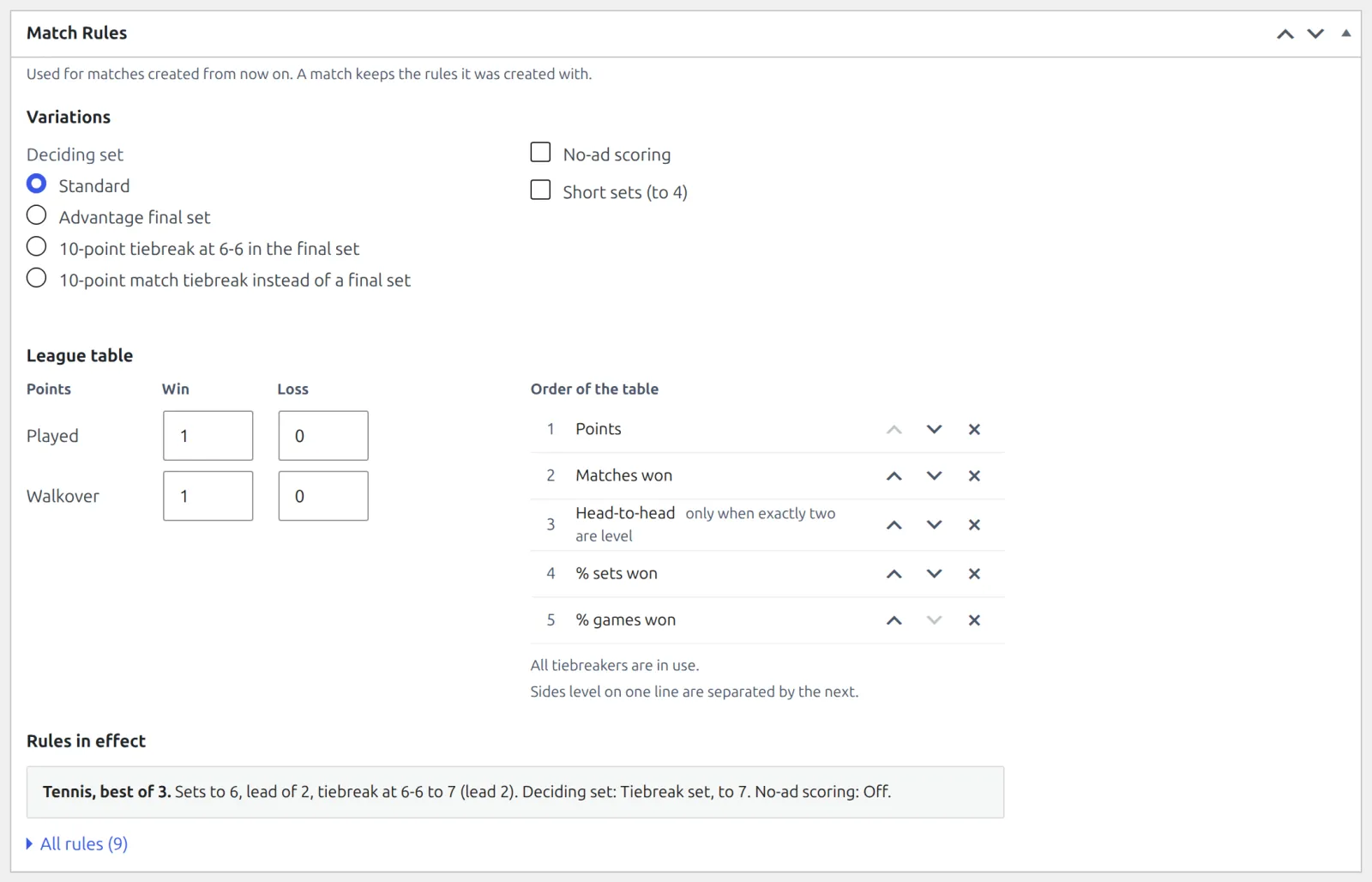
Open the competition and find the Match Rules box. Under Variations, pick from the ones its sport offers:
| Sport | Variations |
|---|---|
| Tennis | Deciding set: Standard, Advantage final set, 10-point tiebreak at 6-6 in the final set, or 10-point match tiebreak instead of a final set. Plus No-ad scoring and Short sets (to 4), with the tiebreak at 4-4. |
| Padel | Advantage scoring (no golden point) and 10-point super tiebreak decider. |
| Squash | Hand-in / hand-out to 9 (legacy). |
| Table Tennis | None – the standard rules apply. |
| Pickleball | Points to win a game: Standard, Games to 15 or Games to 21. Plus Rally scoring (both sides score). |
| Badminton | Classic scoring (to 15, side-out). |
- Rules in effect sums up the result in one line. All rules opens the full list. Once something is changed, Reset to standard rules puts the sport’s standard back, league table included.
- A one-set match has no deciding set, so the deciding-set choice only matters at best of 3 or 5.
- Change the competition’s sport and its match rules go back to that sport’s standard. The box tells you when it happens.
The same box holds the League table settings: points for a win and a loss (played and by walkover), and the order that separates sides level on points. As standard a win is worth 1 point and a loss 0, and level sides are split by Points, Matches won, Head-to-head (only when exactly two are level), % sets won and % games won. A team league adds % rubbers won after head-to-head.
Standings covers the table settings in full.
Match statuses
Every match has one of 6 statuses, set in the Result box on the match:
| Status | Score | Winner |
|---|---|---|
| Scheduled | None yet | – |
| Finished | The full score | Worked out from the score |
| Retired | The score when play stopped | You pick the side that didn’t retire |
| Walkover | None | You pick the side that turned up |
| Default | As far as play got, or none | You pick the side awarded the match |
| Cancelled | None | None |
- In a knockout, the winner of a Finished, Retired, Walkover or Default match moves into the next round.
- A knockout line with no opponent shows Bye. The draw sets it, and there’s no result to enter: that side goes through.
- A team tie takes the rubbers each club won instead of a score, with the status Finished or Default.
Entering Results walks through the Result box score by score.
🔒 Each match keeps its own rules
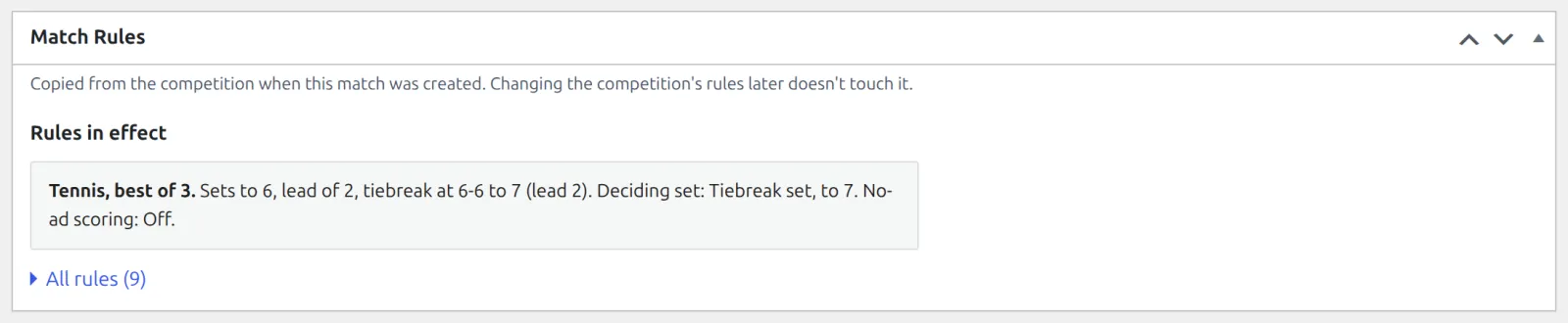
When a match is created, generated or added by hand, it takes a copy of its competition’s sport, match format, best of and scoring rules at that moment. From then on the match only answers to its copy.
- Change a competition’s variations, and only matches created after the change use them.
- Results already in are never judged again. Last season’s 7-5 stays a 7-5 even if this season plays short sets.
- The match’s own Match Rules box shows its copy, read-only: Copied from the competition when this match was created. Changing the competition’s rules later doesn’t touch it.
- One match can still play a different length: change its Best of in Match Details.
- League table points are different. They belong to the competition, and the table is rebuilt when you change them.
Set the rules before you generate
Generated fixtures are matches too, so they keep the rules they were made with even before anyone plays them. Changed the variations after generating? Before any result is in, click Generate again: every match is made anew with the new rules, and kickoffs and courts set on them are lost.
🆘 Troubleshooting
| You see | What to do |
|---|---|
| This competition already has 4 matches, so its sport cannot change. | A competition keeps its sport once it has entries or matches. Create a new competition for the other sport. |
| Set 2: 8-6 isn’t a finished set. A set is won at 6 games by 2 clear, or 7-6 on a tiebreak. | The score doesn’t fit this match’s rules, and the message names the set and the rule. The match’s own Match Rules box shows the rules it was created with. |
| The match isn’t finished: nobody has won 2 sets yet. | A Finished match needs the full score. If play stopped early, use Retired or Default. |
| A retired match needs the score at the time of retirement. With no play at all, use Walkover. | Type the score when play stopped, or switch the status to Walkover. |
📚 Related
- Competitions, Seasons & Draws – where matches come from.
- Your First Competition – enter a first result.