

In a round robin everyone plays everyone. You enter the players, click Generate fixtures, and every match of every round is made at once, laid out round by round. Split the draw into groups and each group plays its own round robin, with its own table.
Round Robin or Group?
| Draw type | Who plays whom | Tables | Size |
|---|---|---|---|
| Round Robin | Everyone in the draw plays everyone | One | 2 to 32 active entries |
| Group | Everyone plays everyone in their own group | One per group | 2 to 32 active entries per group |
- A League or Team League competition starts with a Round Robin draw. Open it from the competition’s Seasons box with Edit.
- For groups, set the draw’s Type to Group in Draw Details and click Update, before it has matches. A box league is built this way: see Competitions, Seasons & Draws.
- Each pair plays sets the legs: Once, or Twice for a second leg with home and away swapped.
🚀 Generate the fixtures
- In the Entries box, add everyone who plays. On a Group draw, type each entry’s group in the Group column, such as A or B. Every active entry needs one.
- Seeds are optional. Typed in the Seed column, they decide who meets in the last round: 1 v 2, then 3 v 4.
- Click Update. The Fixtures box now shows what it will make, for example Active entries: 6. Rounds: 5. Matches: 15.
- Click Generate fixtures.

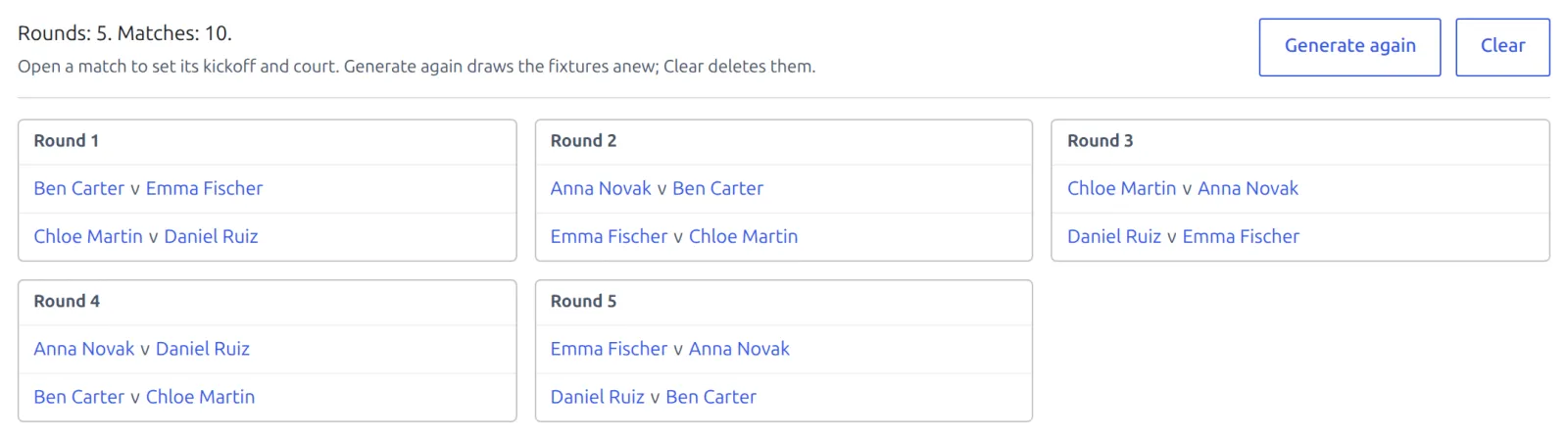
The fixtures appear in the same box, round by round, each match a link. A Group draw lists them under Group A, Group B and so on. Open a match to set its kickoff and court. The draw is a fair shuffle, so who plays whom in round 1 changes every time you generate.
How many rounds and matches
| Active entries | Rounds | Matches | Matches, played twice |
|---|---|---|---|
| 4 | 3 | 6 | 12 |
| 5 | 5 | 10 | 20 |
| 6 | 5 | 15 | 30 |
| 8 | 7 | 28 | 56 |
| 10 | 9 | 45 | 90 |
| 12 | 11 | 66 | 132 |
| 32 | 31 | 496 | 992 |
- With an odd number, one entry sits out each round. 5 players play 5 rounds, and each of them rests once.
- Played twice doubles the rounds as well as the matches.
- A Group draw counts every group together. One generation makes at most 1,000 matches.
Before the first result
Until a match is played, the fixtures are only a plan, and you can start over:
- Generate again deletes every generated match and draws the fixtures anew, with any entries added since. Kickoffs and courts set on them are lost.
- Clear deletes the generated matches and keeps the entries, ready to generate again. Matches you entered by hand stay.
- Each pair plays is fixed while the draw has fixtures. Clear them to change it.
- A group can’t change once its entry has matches in the draw, generated ones included. Set the groups before you generate, or Clear first.
👋 Players who join late
Once results are in, Generate again and Clear are closed. A newcomer can still join: add them in the Entries box (with a group, on a Group draw), click Update, then Add fixtures for new entries.

- Nothing already in the list changes. The newcomer gets a match against each player (two, if the draw is played twice), placed in the existing rounds, so each opponent has an extra match in one round.
- If the draw had an odd number of players, the newcomer takes the free slot in each round instead.
- Someone who already has a match in the draw can’t be added this way. And the draw needs fixtures already: a group with none yet can’t take late entries.
Withdrawals and tables
Every round robin and every group has a table, in the draw’s Standings box and on your site. It updates as results come in.
- A player who leaves mid-season: set their entry to Withdrawn. They drop out of the table, and every match against them stops counting for both sides. Their matches stay in the list.
- A match only counts when both sides are active entries of the same table.
- Groups don’t feed a knockout by themselves. For a playoff, add a Knockout draw to the season and enter the qualifiers in it.
Standings covers points, tiebreakers and the table settings.
One-off matches
A match added by hand under Tennis Leagues > Matches with this draw picked counts in its table too, listed under “Not in a round”. But while one is in the draw, the fixtures can’t be generated, so generate first.
🆘 Troubleshooting
| You see | What to do |
|---|---|
| 2 entries have no group yet. Give every active entry a group, then generate the fixtures. | Fill the Group column for every active entry and click Update. |
| Group B has 1 active entry. A group needs at least 2. | Move another player into that group, or move this one out of it. |
| A round robin holds at most 32 entries. This one has 36 active. | Make it a Group draw and split the field. |
| This draw has 1 match entered by hand. Delete it before generating the fixtures. | Delete the hand-entered match, generate, then add it back if you need it. |
| This draw already has fixtures. Clear them first, then change how often each pair plays. | Clear (before any result), change Each pair plays, then generate. |
📚 Related
- Your First Competition – a 6-player league from start to finish.
- Competitions, Seasons & Draws – box leagues, step by step.
- Knockout Draws – brackets, seeds and byes.
- Entering Results – the Result box on each match.