

Every result goes in the Result box on the match’s edit screen. Pick the status, type the score set by set (or game by game) and click Update. The box checks the score against the match’s own rules, and the rest follows by itself: the winner moves on in a knockout and the table is rebuilt.
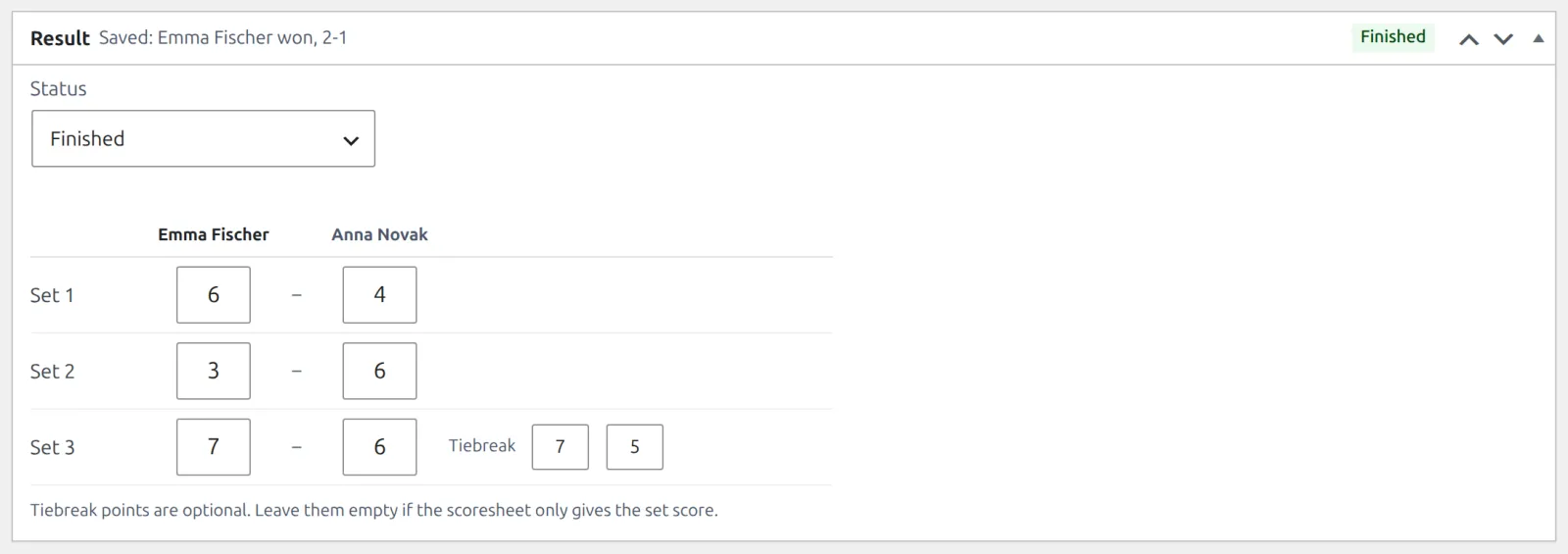
🚀 Enter a result
- Open the match: click it in a draw’s Fixtures box, click Edit on its card in the Bracket box, or find it under Tennis Leagues > Matches.
- In the Result box, set Status to Finished.
- Type each set’s games, home side first. Leave the sets that weren’t played empty.
- Click Update.
- There’s one row per set, or per game in squash, table tennis, pickleball and badminton, as many as the match’s Best of.
- The winner is worked out from the score. The box header then shows the saved result and its status.
- Tiebreak boxes appear on a set’s row when it ends on a tiebreak, such as 7-6. The points are optional: leave them empty if the scoresheet only gives the set score.
- Playing a match tiebreak instead of a final set (a tennis or padel variation)? The last row reads Match tiebreak and takes points, to 10.
Retired, walkover and other statuses
| Status | Score | Winner |
|---|---|---|
| Scheduled | None | None |
| Finished | The full score | From the score |
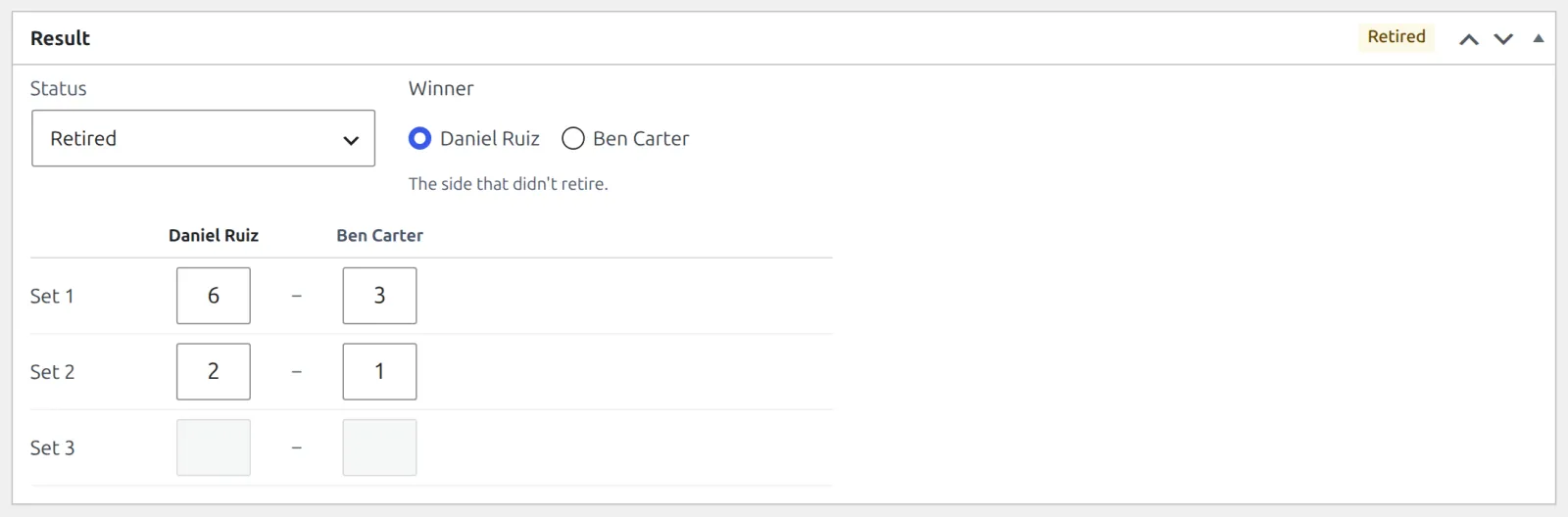
| Retired | Required: the score when play stopped. The last set can be unfinished. | Pick the side that didn’t retire |
| Walkover | None | Pick the side that turned up |
| Default | Optional: as far as play got | Pick the side awarded the match |
| Cancelled | None | None |
- For Retired, Walkover and Default, a Winner choice appears beside the status.
- Switch to a status that takes no score and the score you typed is cleared, with an Undo link until you type again. The same happens when a smaller Best of no longer fits it.
- A retired match with no play at all is a Walkover. And a retired score that already wins the match is a Finished one.
What each status means, sport by sport, is on Sports & Scoring.
⚠️ Scores the box refuses
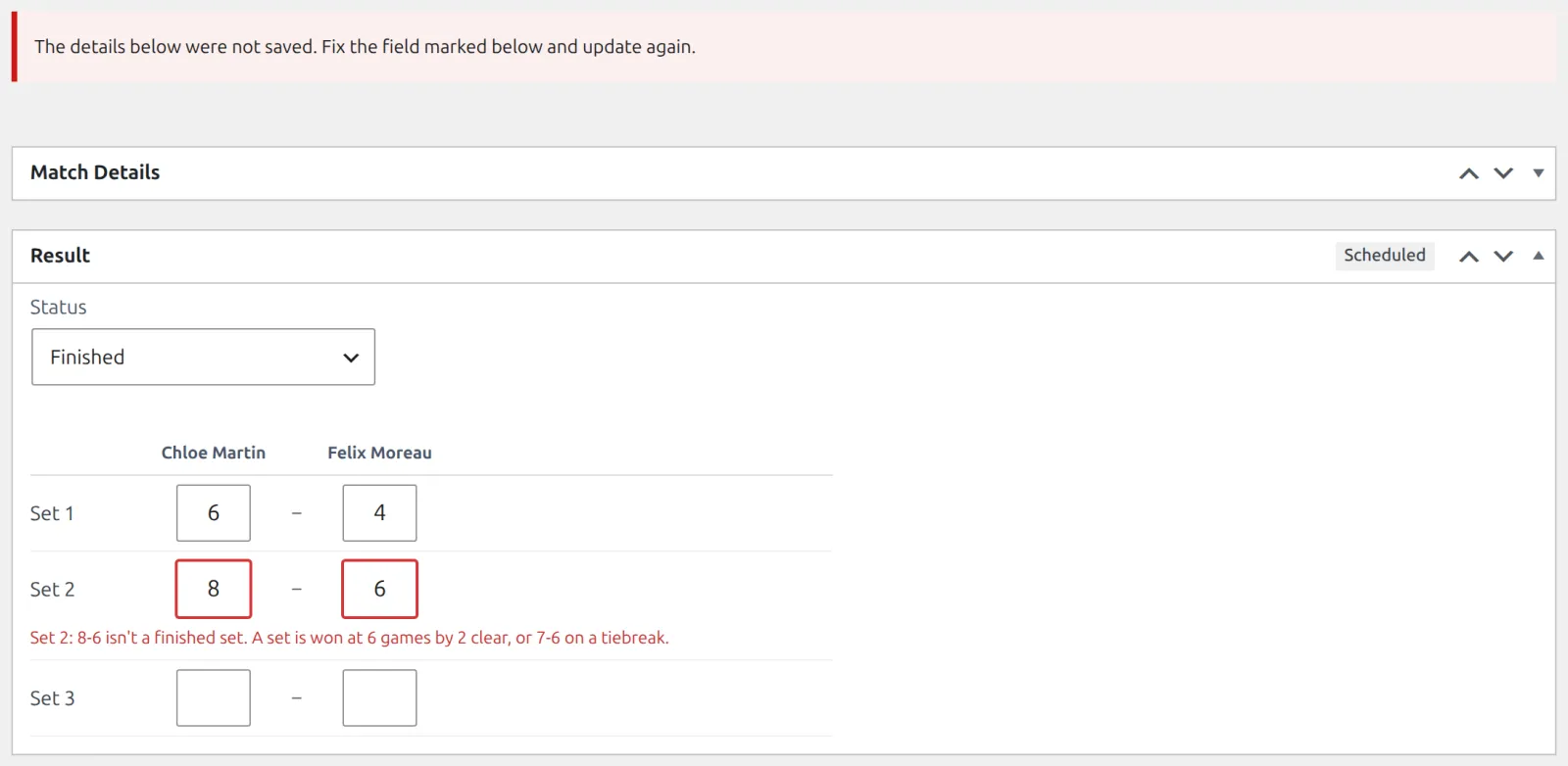
A score that couldn’t happen under the match’s rules isn’t saved. The screen comes back with The details below were not saved. Fix the field marked below and update again. at the top, the reason under the set it’s about, and everything you typed still in place.
| You see | Why |
|---|---|
| Set 2: 8-6 isn’t a finished set. A set is won at 6 games by 2 clear, or 7-6 on a tiebreak. | The set score breaks the match’s rules. The message names the rule. |
| The match isn’t finished: nobody has won 2 sets yet. | Finished needs the full score. If play stopped early, use Retired or Default. |
| Set 3: the match was already won before this. | A set was typed after the match was decided. |
| Set 2: missing. Enter the score in order, with no gaps. | A set was skipped. |
| Pick the winner. | Retired, Walkover and Default need the Winner choice. |
| This match has an undecided side, so it can’t have a result yet. | A knockout match waits for the earlier round. Enter that result first. |
The rules are the ones the match was created with, shown in its own Match Rules box. The rules of each sport are on Sports & Scoring.
What a result changes
- Knockout: the winner of a Finished, Retired, Walkover or Default match moves into their next match, and a semifinal loser into the 3rd place match.
- Round robin and groups: the draw’s table is rebuilt.
- Your site: the match page, the competition page and the player pages show the result.
- A bye has nothing to enter. Its box reads A bye has no result to enter: its side goes through to the next round. The draw owns it.
Knockout Draws covers winners moving on and Standings covers the table. A team tie takes the rubbers each club won instead of a score: see Team Leagues.
Correcting a result
Open the match, fix the score and click Update. The table follows. In a knockout, so does the next round, until that next match is played. After that the earlier result is locked: The winner already played their next match in this draw. Clear that result first.
📚 Related
- Sports & Scoring – the rules of all 6 sports and why old results never change.
- Your First Competition – a first result, start to finish.