

Tennis API Hub covers two sports: tennis and table tennis. It labels its data with the words each sport actually uses, so a tennis page reads Edition, Tournament, and Match, while a table tennis page reads Season and League. This page explains that vocabulary, why it changes by sport, and where you see it across your site and admin screens.
🎾 The two-sport vocabulary
The plugin stores the same kinds of data for both sports. For three of them it shows a different word depending on the sport. The rest read the same either way.
| What it holds | 🎾 Tennis | 🏓 Table tennis |
|---|---|---|
| The recurring competition | Tournament | League |
| One year of that competition | Edition | Season |
| A national or club side | Team | Club |
| A doubles pairing | Doubles Pair | Doubles Pair |
| An individual competitor | Player | Player |
| A single contest | Match | Match |
To make it concrete:
- Australian Open, Men is a Tournament; Australian Open Men Singles 2026 is one Edition of it.
- Bundesliga is a League; Bundesliga 24/25 is one Season of it.
- A Davis Cup nation is a Team; a Bundesliga side like Borussia Düsseldorf is a Club.
- Two players entered together in a doubles draw are a Doubles Pair, in either sport.
A Grand Slam isn’t one tournament in your data. The provider lists each draw separately, so men’s and women’s singles, doubles, mixed doubles, juniors and wheelchair events are tournaments of their own, each with its own editions.
Why the words change by sport
You might expect one tennis-friendly set of names applied everywhere. That does not work, because table tennis is a different shape.
Table tennis has real leagues. The Bundesliga is a genuine league with a 24/25 season and a standings table, exactly like a football league. Calling it a “Tournament,” or its season an “Edition,” would be wrong. So table tennis keeps League and Season.
Tennis is the other way around. The Australian Open is not a league, and a tennis “season” means the whole calendar year, not a single event. So the recurring competition becomes a Tournament, and each year of it becomes an Edition (the name already carries the year, as in Australian Open Men Singles 2026).
Two words are shared, because they are correct for both sports:
- Player is a player in both sports.
- Match is the contest in both sports. A “game” is a scoring unit inside a set: you win games to win a set, and sets to win a match. So the contest itself is always a Match, never a Game.
The short version
Tennis reads Tournament, Edition, and Team. Table tennis reads League, Season, and Club. Player and Match are the same in both. There is no single word that fits both sports, which is why the plugin picks the right one per sport instead of renaming everything.
Where you see it
The sport-correct word shows up everywhere a customer or visitor reads text:
- Front-end pages. On a tennis tournament, match, or player page, the labels read Tournament, Edition, and Match. On a table tennis page they read League and Season.
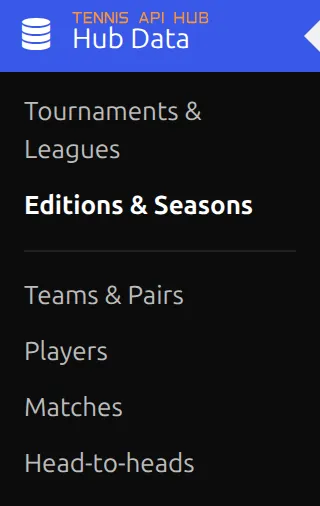
- Admin menus. The Hub Data menu lists your data as Tournaments & Leagues, Editions & Seasons, Teams & Pairs, Players, Matches, and Head-to-heads.
- The shortcode builder. Field labels use the same vocabulary when you set up a shortcode.
- The entity picker. When you link a post to your data, the search box reads “Search Edition,” “Search Tournament,” and so on.
Why some admin labels show both words
A few admin lists hold both sports at once. The Editions & Seasons list, for example, contains your tennis editions and your table tennis seasons in a single table. There the plugin cannot pick one sport’s word, so it shows both joined together: Editions & Seasons, Tournaments & Leagues, Teams & Pairs.
On a single page, where the sport is known, you see just the one correct word.
🔗 Your page URLs
The vocabulary also shapes the default web addresses on a new install:
| Page | 🎾 Tennis | 🏓 Table tennis |
|---|---|---|
| Match | /match/ | /match/ |
| Edition / Season | /edition/ | /season/ |
| Tournament / League | /league/ | /league/ |
| Player | /player/ | /player/ |
| Team, Club or Doubles Pair | /team/ | /team/ |
| Head-to-head | /h2h/ | – |
Players, teams, editions and tournaments also get clean addresses on a new install, like /player/gasquet-richard/ or /league/wimbledon-atp/. Match addresses keep a short code at the end by default, because the same two players meet many times. Tick Match under Clean slugs on the same screen to drop it.
You can change the match, edition or season, player, team and head-to-head bases under Settings > Permalinks, one field per sport. The tennis Edition field even explains itself, so you can set it to /tournament/, /event/, or anything you prefer. The tournament base stays /league/.

Existing sites are never touched
The tennis-friendly URL bases are defaults for new installs only. If you already run the plugin, your existing links stay exactly as they are, so nothing breaks when you update. Behind the scenes the data itself never gets renamed either: only the words you read change, not the way the plugin stores or connects your tournaments, players, and matches.
Changing the words yourself
Every label is yours to rename. If “Edition” is not the word your audience uses, change it.
- Text labels: go to Settings & Tools > Translations to rename any of these words for your site. You could call an Edition a “Draw,” or a Tournament a “Series.”
- URL bases: go to Settings > Permalinks to set the web address for matches, editions, teams, and players.
Tip
Renaming a label is purely cosmetic. It changes what visitors read, not how your data is stored or how your existing URLs resolve, so you can experiment freely.
📚 Related pages
The Permalinks settings page lets you set the URL base for each entity type, per sport.
The Translations page lets you override any text label the plugin displays.