

Tennis API Hub builds player, match and tournament pages out of blocks, and most of them are statistics blocks: a player’s record and rankings, how their matches were won, serve and return numbers, the head to head with an opponent, and how a match is likely to go before it starts. This page lists what each block shows, where its numbers come from, and what you need to turn on before some of them have anything to draw.
🎾 Player page blocks
Seventeen statistics blocks are available on tennis player pages. The default player layout already includes them, so a new tennis player page shows them without any setup.
| Block | What it shows | Numbers from |
|---|---|---|
| Overview | Five tiles: current ranking, season win-loss, titles, tiebreak record and prize money. Every year-scoped tile shares one season and prints it, so you always know which year you’re reading. Set its Layout to Tiles + summary sentence to add a one-line summary under the tiles. | Provider |
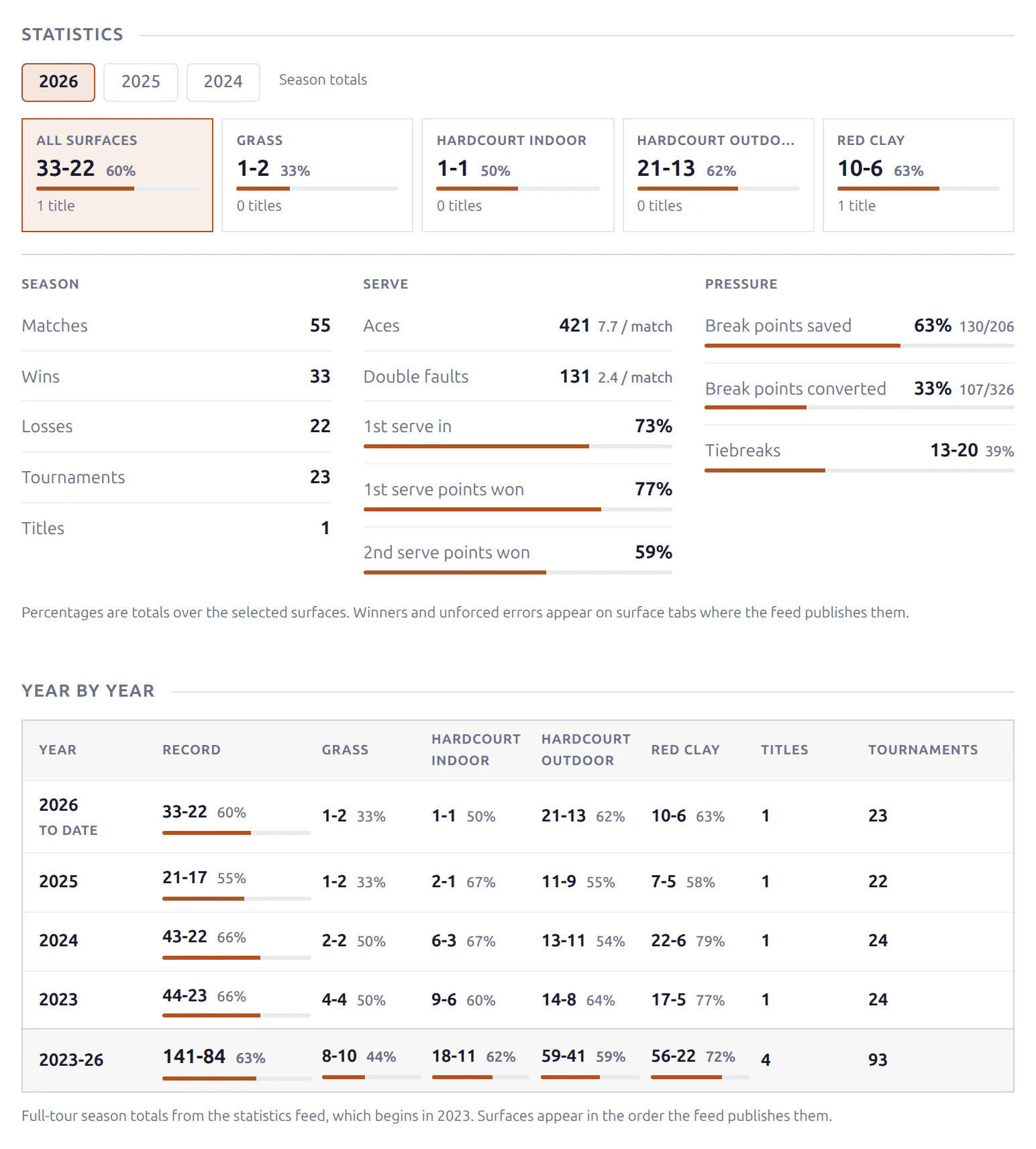
| Statistics | Season numbers by year and surface. Pick a year, then a surface, and read the season, serve and pressure columns underneath. | Provider, or your site (see Choosing a Data Source) |
| Year by Year | A season-by-season grid, one row per stored season with a totals row for those seasons underneath, and one column per surface. | Provider |
| Ranking | One row per ranking list the player appears on (official and live): rank, points, the move since the last update, career-high rank and tournaments played. | Provider |
| Ranking History | A chart of the player’s ranking over time, marking their best rank and where they are now. | Your site |
| Form | The last 10 matches as a run of wins and losses, with the current streak and the newest result spelled out. | Your site |
| Match Profile | How matches were won: straight sets, comebacks from a set down, deciding sets, tiebreaks, distance played, bagels, and retirements and walkovers. | Your site |
| Serve and Return | First and second serve numbers, aces and double faults per match, and a combined serve-plus-return rating. On singles a Service games column adds games held, opponent games broken, break points converted and breaks per match. | Your site |
| Under Pressure | Break points saved and converted, tiebreaks won and deciding sets won, plus a Pressure rating that averages the four when all of them have enough matches behind them. | Your site |
| Streaks | Current streak, longest winning and losing streaks, straight-set wins in a row, the longest match and the most tiebreaks in a match, over a strip of every result from oldest to newest. | Your site |
| Over / Under | How often matches went over or under each line for total games, tiebreaks, aces, double faults and breaks of serve. | Your site |
| Against the Odds | Record as favourite and as underdog, average price, wins at 2.00 or better, and the actual win rate beside the one the market implied. | Your site |
| Rivalries | The opponents this player has met most often, with the score and date of the last meeting, and a Full H2H link where the pair has a head-to-head page. | Your site |
| Head-to-Heads | The player’s head-to-head pages: opponent, career meetings, record and last meeting, most meetings first, each linking to its page. | Your site |
| Doubles Partners | Who this player has partnered, how the pair did together, and when they last played as a pair. | Your site |
| By Level | Record split by tour level: Grand Slam, Tour Finals, Masters 1000, WTA 1000, the 500 and 250 tiers, Challenger, WTA 125, ITF, team events and other events. Year pills switch between seasons. | Your site |
| Matches | The log of this player’s matches on your site, with a win-loss summary and Season and Surface filters. Set its Layout to Grouped by tournament to group the matches under each tournament edition. | Your site |
Several blocks carry pills that re-read the whole block on one slice of the player’s matches. Form, Match Profile and Under Pressure have surface pills: All, then one per surface the player has actually played on, named as the provider names them (Hardcourt outdoor, Red clay, Grass and so on). Serve and Return and Over / Under add Best of pills (best of 3 or best of 5) next to the surface ones. A pill row only appears when there’s something to switch between, and every panel prints how many matches it covers, so a surface with two matches reads as two matches.
Singles, doubles and mixed doubles
Singles, doubles and mixed doubles are never added together. A player with matches in more than one format gets a Singles / Doubles / Mixed doubles bar under their name, and each format has its own page (/player/{name}/doubles/ and /player/{name}/mixed/). Every block counted from your matches follows the format of the page you’re on.
- Rivalries and Head-to-Heads are singles only, so they hide on the doubles and mixed pages.
- Doubles Partners shows the same partners on every page.
- Statistics always reads your imported matches on the doubles and mixed pages, because the provider’s season numbers are singles numbers.
- Overview, Year by Year, Ranking and Ranking History show the player’s singles figures from the provider on every page.
Doubles pairs and table tennis players
Doubles pair pages get a Statistics block of their own, reading the pair’s own season numbers, with the same Data Source options as the singles version.
Table tennis players get one statistics block, Match Statistics: the share of points won overall, on serve and on receive, the most points in a row and the biggest lead in a single match, and service errors and timeouts per match. It reads your imported matches, because the provider has no season totals for this sport at all. The Matches log works on table tennis players too.
Match page blocks
Seven statistics blocks sit on match pages. Most of them look ahead: they compare the two players before the first ball.
| Block | What it shows | Sports |
|---|---|---|
| Preview | The two players side by side before they play: their head to head, the match price, each player’s record on your site, their season numbers and profile, serve and return, service games and recent workload, with each player’s last five results and ranking trend at the top. | Tennis |
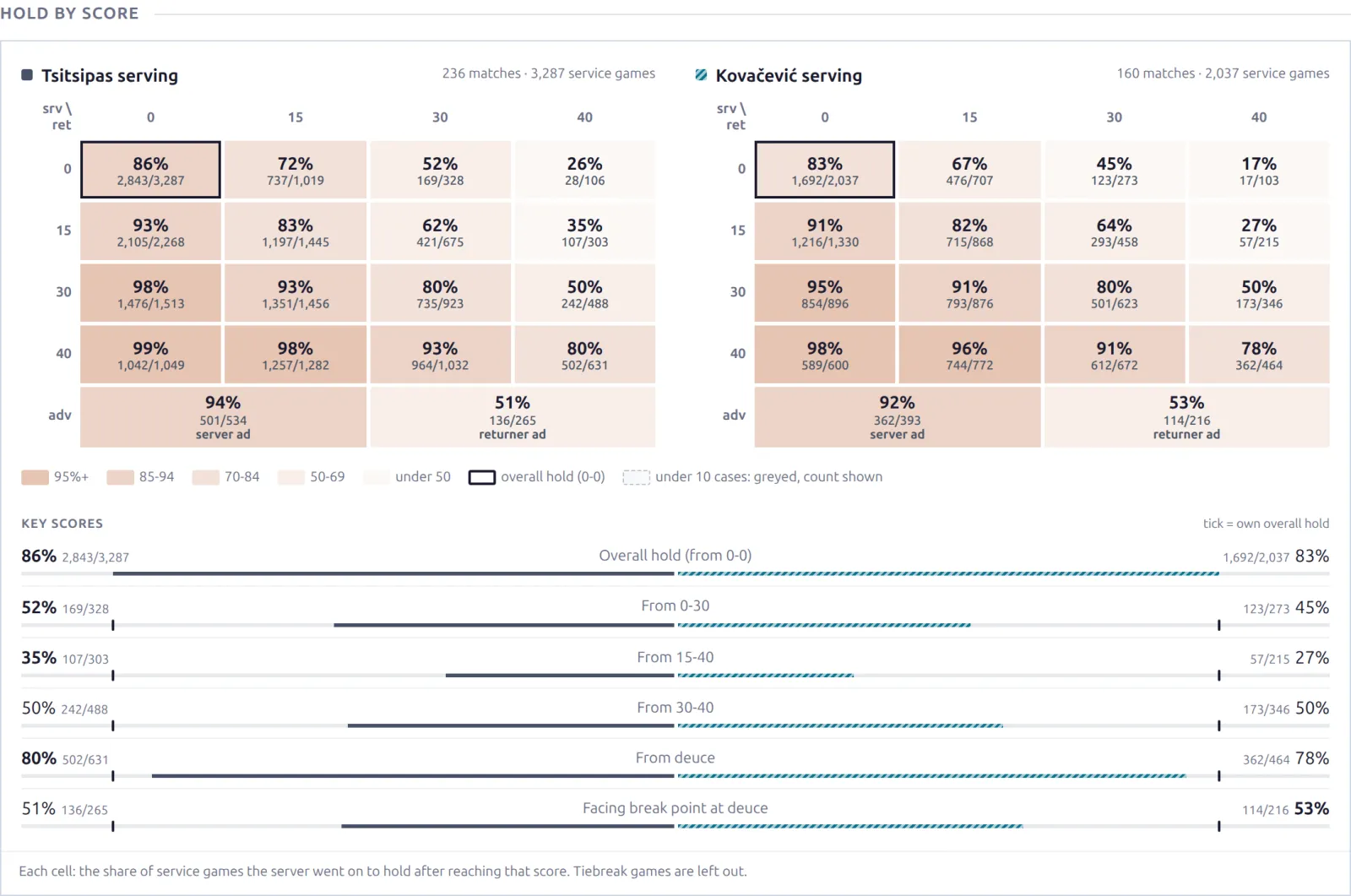
| Hold by Score | One grid per player serving: how often they went on to hold from every score in a game, 0-0 through deuce and advantage. Under the grids, the key scores (0-30, 15-40, 30-40, deuce, advantage out) set against each player’s own overall hold. | Tennis singles |
| Momentum Habits | Four habits inside a set, per player: holding right after a break, breaking straight back, serving for the set and serving to stay in it, each set against that player’s normal hold or break rate. | Tennis singles |
| Head to Head | Past meetings between the two players, with scores oriented so one player stays on the same side down the whole log. On tennis singles it uses the pair’s whole meeting list, the same one the head-to-head page uses. | Both |
| Key Stats | Six headline tiles from a finished match. Tennis: aces, double faults, winners, unforced errors, break points won and total points. Table tennis: points won, service and receiver points won, most points in a row, biggest lead and timeouts. | Both |
| Road to This Match | Each side’s earlier matches in this edition, newest first. | Tennis |
| Common Opponents | Players both sides have met on your site in the last 12 months, with each side’s most recent result against them. | Tennis singles |
Preview disappears once a match is finished, and Common Opponents once it starts. Key Stats only appears once a match is finished and its statistics have been imported. Hold by Score and Momentum Habits read each player’s earlier matches only, up to this match’s start, so they say the same thing before and after it’s played.
Most groups in the Preview need five of each player’s matches on your site: five with a score for the site record and Workload (matches in the last 7 and 14 days, sets played, days since the last match), five with match statistics for Serve and return, and five with point-by-point data for Service games (games held and broken, break points saved and converted). Market shows the price on each side with the implied chance under it, and needs odds for the match plus the Show Odds setting on.
Match pages also carry blocks that describe one match rather than compare two players: the match Statistics table, Point by Point, Momentum, Recent Form and Odds. They need no setup beyond importing the match details.
Tournament page blocks
Two statistics blocks sit on tournament edition pages.
| Block | What it shows | Numbers from |
|---|---|---|
| Tournament Tempo | How this edition played: games per match, tiebreak, straight-set and deciding-set rates, upsets, bagels, retirements and walkovers, and how often the favourite won. A Records column adds the longest match, most tiebreaks, quickest completed win, most aces, double faults and winners, the biggest upset by seed gap and by odds, the lowest seed beaten and the champion. | Your site |
| Stat Leaders | Nine leaderboards for the edition – aces, double faults, first-serve percentage and the rest. | Provider, or your site |
Tournament Tempo is tennis only and reads the main-draw singles matches you imported for that edition. Stat Leaders can read either source – see Choosing a Data Source.
Where the numbers come from
Two different sources feed these blocks, and the difference matters when you read them.
- Provider numbers cover the player’s whole season on tour, whether or not you imported those tournaments. Overview, Year by Year, Ranking and the Preview’s season group read these, and so do Statistics and Stat Leaders by default.
- Your site’s numbers are counted from the matches you actually imported. Every other block on this page reads these, and they say “on this site” so the scope is on the page. Ranking History is the one in between: the rankings are the provider’s, but the weekly history is what your site has recorded.
Why two sets of numbers
You import tournaments, not players. If you run three ATP events, a player’s record on your site covers those three events and nothing else, so it will read lower than their real season. That’s why the season totals come from the provider instead of being counted locally, and why the blocks counted from your own matches label themselves.
Choosing a Data Source
Three blocks can read either source, and let you pick which. Open the block in Settings & Tools > Layout Builder and use the Data Source select.
| Block | Page | Default |
|---|---|---|
| Statistics | Player | Provider first, site fallback |
| Statistics | Doubles pair | Provider first, site fallback |
| Stat Leaders | Tournament | Provider first, site fallback |
The four options:
- Provider totals (synced) – the provider’s figures, synced in the background: player seasons by Hourly Refresh, tournament leaderboards when you import the tournament (and daily, if you turn on Daily Refresh in the Tournament Data settings card). Complete, but only for players and tournaments the provider publishes.
- On this site (imported matches) – computed from the matches you imported, and labelled as such on the page.
- Provider first, site fallback – the default. Shows provider figures where they exist and falls back to your own matches where they don’t.
- Site first, provider fallback – the reverse, for a site that would rather show its own numbers wherever it has them.
Nothing is fetched when the page is viewed. Provider figures are synced in the background and read from your database like everything else, so a fallback option is choosing between two sets of numbers you already have, not a second attempt at the API. The site figures need at least five matches with statistics before a player’s Statistics block uses them.
The fallback default matters most on Stat Leaders: most draws carry no provider leaderboards at all – a Grand Slam does, a small ITF event usually doesn’t – so with the fallback the block draws whenever either source has the data.
Blocks with only one source show it as a fixed label instead of a select.
🚀 Turning on player statistics
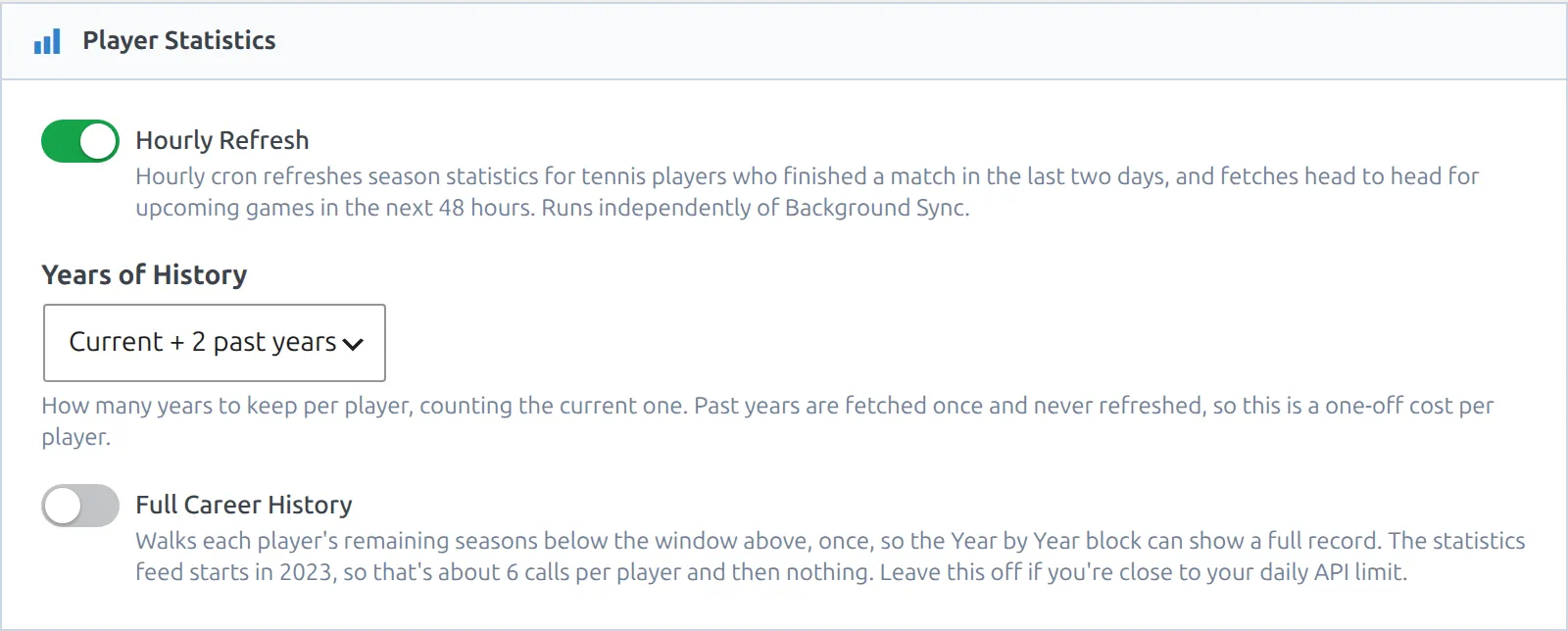
Overview, Statistics and Year by Year need provider season numbers, which aren’t fetched by default. Go to Settings & Tools > Settings, find the Player Statistics card and turn on Hourly Refresh. Without it Overview shows only the ranking and prize money tiles, Statistics falls back to your imported matches, and Year by Year stays hidden.
| Setting | Default | What it does |
|---|---|---|
| Hourly Refresh | Off | Once an hour, fetches season numbers for tennis players who finished a match in the last two days, and head to head for matches starting in the next 48 hours. Runs independently of Background Sync. |
| Years of History | Current + 2 past years | How many seasons to keep per player. Past years are fetched once and never refreshed, so this is a one-off cost per player. |
| Full Career History | Off | Walks each player’s remaining seasons once, so Year by Year can show every season the feed has. The statistics feed starts in 2023, so that’s about 6 calls per player and then nothing. |
Years of History and Full Career History stay greyed out until Hourly Refresh is on.
Watch your API budget
The hourly refresh only looks at players who just played, so it costs little on a quiet site and more during a busy tournament week. Leave Full Career History off if you’re close to your daily limit. You can turn it on later and the walk will pick up where it left off.
Two import options on API & Import > API Config > Import Options feed the rest. Both are on by default and cost one extra call per match:
- Point-by-Point feeds the break-point and service-game numbers in Serve and Return, Under Pressure and the Preview, and all of Hold by Score and Momentum Habits. Leave it on.
- Head to Head brings the past meetings for finished matches with the match details. Upcoming matches get theirs from Hourly Refresh, so turn that on if you want Head to Head and the Preview’s head to head before a match is played.
Ranking History needs a month first
The Ranking History chart is drawn from weekly ranking snapshots the plugin stores as it syncs the official ATP and WTA rankings. Rankings sync with Background Sync (API & Import > API Config, Rankings task, weekly by default), and with Background Sync off no snapshots are recorded. Each sync adds one point per player, and the chart needs four points before it has a line worth drawing.
Nothing to see on a new install
On a new site this block hides itself and stays hidden for about a month, until four weekly snapshots have built up. That’s expected, not a fault. History can’t be backfilled either, because the provider publishes only a player’s current, previous and best rank – the weekly series is something your site builds up over time.
Blocks that hide themselves
Every one of these blocks disappears rather than show a number that would mislead. If a block isn’t on the page, check its threshold before assuming something is broken.
| Block | Hides when |
|---|---|
| Overview | There’s nothing at all to show: no ranking, no provider season numbers and no prize money. |
| Statistics | The provider has no season numbers for the player and fewer than five of their matches on your site carry statistics. On the doubles and mixed pages only the second applies. |
| Year by Year | Fewer than two seasons of provider numbers are stored (needs Hourly Refresh). |
| Ranking History | Fewer than four weekly snapshots exist for that player. |
| Form | The player has no finished match in this format. |
| Match Profile | No imported match has a readable scoreline. Walkovers aren’t counted as matches, but they’re listed in the Retirements / walkovers row. |
| Serve and Return | Fewer than five matches with statistics. Rows the feed never sent drop out, and the Service games column needs five singles matches with point-by-point data. |
| Under Pressure | Fewer than five matches with a score, or on singles fewer than five with point-by-point data. Tiebreaks won and deciding sets won each need three of their own. |
| Streaks | Fewer than five matches with a result. |
| Over / Under | Fewer than five completed matches (retirements and walkovers don’t count). |
| Against the Odds | Fewer than ten completed matches carry a price, or Show Odds is off. Prices are recorded from the day your site starts collecting them, so on a new site this block takes a while to appear. |
| Rivalries | Fewer than three singles opponents have been met at least twice, or you’re on the player’s doubles or mixed page. |
| Head-to-Heads | The player has no published head-to-head page, or you’re on their doubles or mixed page. |
| Doubles Partners | No partner has been played with at least twice. |
| By Level | The player’s matches on your site cover fewer than two tournament levels. |
| Match Statistics (table tennis) | Fewer than five matches with statistics. |
| Preview | The match is finished. Rankings are current-value only, so a finished match would show today’s rank as if it were the rank on the day. |
| Hold by Score, Momentum Habits | It’s a doubles or table tennis match, or either player has fewer than five earlier singles matches with point-by-point data on your site. |
| Road to This Match | Neither side has played an earlier match in this edition. |
| Common Opponents | The two players share no opponent from the last 12 months, the match has started, or it’s a doubles match. |
| Tournament Tempo | Fewer than eight main-draw singles matches with a score in that edition. Favourites won and Biggest upset by odds also need Show Odds on and eight priced matches. |
| Stat Leaders | Neither the provider nor your imported matches have figures for that edition. |
Changing which blocks appear
The default layouts already carry these blocks, so you only need the Layout Builder (Settings & Tools > Layout Builder) if you want to reorder them, drop one, or add one somewhere else. Hold by Score and Momentum Habits, for example, are in the default upcoming match layout only – add them to the finished match layout if you want them after the match too.
Each block has its own header text, which you can rename or blank out. Blocks with more than one look offer a Layout choice in their options: Overview (Tiles, or Tiles + summary sentence), Matches (Flat list, or Grouped by tournament) and the match Statistics block (Compact table, or Comparison bars).
Once you’ve customized a layout, blocks added in later plugin updates won’t appear in it by themselves. Open the layout and add them from the palette.
🆘 Troubleshooting
A statistics block isn’t on the player page
Check the hide table above first – most blocks are waiting on data rather than misconfigured. If you customized the player layout, blocks added in later updates won’t be in it; drag them in from the Layout Builder palette. And apart from Matches and Match Statistics, these blocks are tennis only, so they won’t appear on a table tennis player.
The win-loss record looks too low
Blocks labelled “on this site” count only the matches you imported. Import more of the player’s tournaments and the number rises. For a full-tour season record, read the Overview block, or the Statistics block when its caption doesn’t say “on this site” – those come from the provider.
Against the Odds isn’t showing on any player
This block reads the last price recorded for each match before it started. The provider publishes odds for upcoming matches only, so a match played before your site began fetching odds has no price and can’t be given one. The block appears once ten of a player’s completed matches were priced while your site was collecting.
Prices are collected by Auto-Refresh in the Odds card (Settings & Tools > Settings), which fetches prices for upcoming matches every 6 hours. Show Odds controls whether the block and the other prices are shown. Both are on by default. While Auto-Refresh is off, no prices are recorded, and that gap can’t be filled in later.
Serve and Return, Under Pressure or Hold by Score is empty
Serve and Return, Stat Leaders and Match Statistics read per-match statistics. Under Pressure, Hold by Score, Momentum Habits and the service-game numbers read point-by-point data. Both arrive with the match details, not with the schedule, so a match imported from a list alone has a score but neither. It counts towards Form and Match Profile but not towards these. Import the match details for the tournament, with Point-by-Point on, and the blocks fill in.
Head to Head shows fewer meetings than I expected
On tennis singles, Head to Head lists every meeting the provider has returned for the pair, the same list as the head-to-head page. Walkovers and exhibitions are listed there but not counted in the record. For doubles and table tennis the provider returns the latest 15 meetings, and the block never claims more than it was given.
📚 Related
- Head-to-Head Pages – the rivalry pages that Rivalries and Head-to-Heads link to
- Shortcodes – put stat leaders, matches and rankings on any page
The Terminology page explains why tennis pages say Edition and Tournament while table tennis says Season and League.