

A head-to-head page covers one tennis rivalry: two players, their career record against each other, how it splits by surface and tournament level, every meeting, and the match stats from the meetings you imported. People search for exactly this (“sinner vs alcaraz h2h”), and each page has its own URL, like /h2h/alcaraz-carlos-vs-sinner-jannik/.
You don’t create these pages. Tennis API Hub builds them on its own for every pair of players who met often enough, and keeps them up to date as new meetings come in.
🎯 What’s on the page
The page is made of six blocks. The names below are the ones you see in the Layout Builder.
| Block | What it shows |
|---|---|
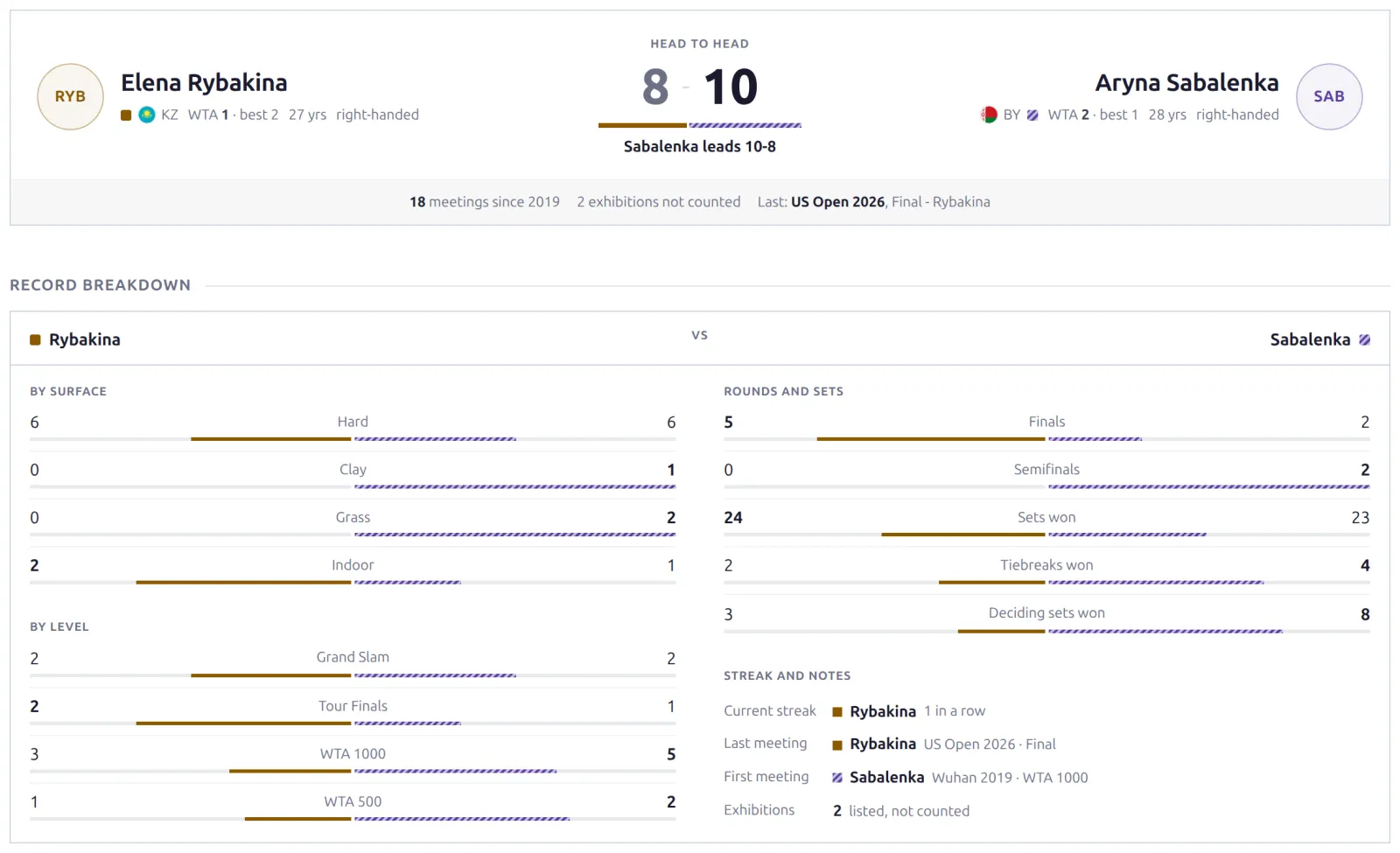
| H2H Header | Both players with photo, flag, ranking, age and plays, and the record between them (“Sinner leads 11-7” or “Tied 5-5”). Each name links to the player page. |
| Record Breakdown | The record by surface (hard, clay, grass, indoor) and by level (Grand Slam, Tour Finals, 1000, 500 and so on), plus finals and semifinals, sets won, tiebreaks, deciding sets, the current streak, and the first and last meeting. |
| Next Meeting | Their next match, when you’ve imported one that’s upcoming or live. Hidden otherwise. |
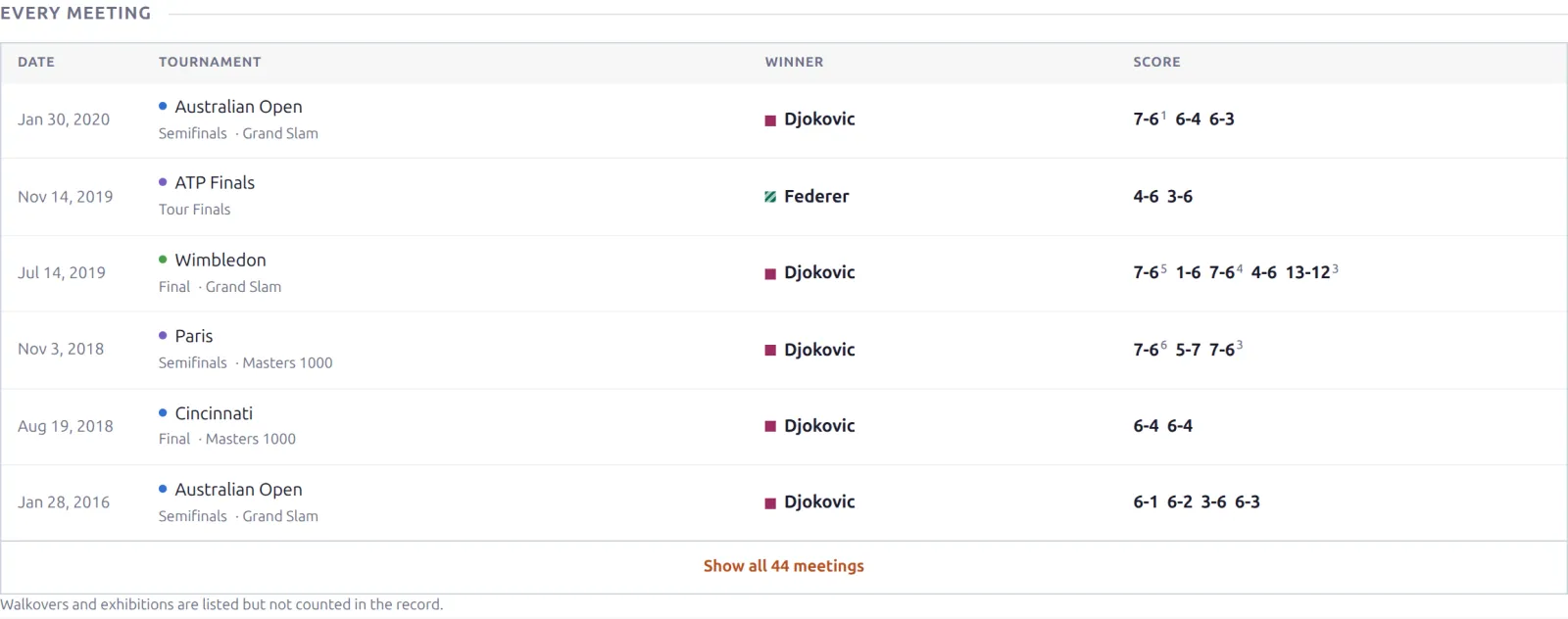
| Every Meeting | Every match they’ve played: date, tournament, level, round, score and winner. Meetings you imported link to their match page. |
| Match Stats in Their Meetings | Each player’s averages across the meetings you imported: aces, double faults, first serve, serve points won and break points. The block says how many meetings the numbers come from. |
| Player Comparison | The two players side by side: recent form, their record in the matches on your site (straight-set wins, comebacks, deciding sets, tiebreaks), profile (age, height, plays, turned pro, prize money) and serve and return numbers. |
The record counts every career meeting the API knows about, not only the matches you imported. A player you follow for one season still gets a full history on the page.
Walkovers, retirements and exhibitions
The page follows the official ATP convention. Walkovers (marked W/O) and exhibitions (marked Exhibition) are listed under Every Meeting, but they don’t count toward the record or the number of meetings. A match one player retired from (marked Ret.) counts as a win for the other.
Which pairs get a page
- Tennis singles only. Doubles, mixed doubles and table tennis don’t get head-to-head pages.
- Enough meetings. The two players must have met at least the Minimum Meetings number of times (4 by default). Walkovers and exhibitions don’t count.
- A checked history. The head-to-head list that comes with a match import can be cut short, so when sync is on, the plugin fetches each pair’s full history once before it builds the page. That’s one API request per pair, 20 pairs an hour, biggest rivalries first.
The head-to-head data comes in with your match imports. Leave Head to Head on under API & Import > API Config > Import Options (it’s on by default), or no pair ever reaches the minimum.
🚀 Turning pages on and setting the minimum
Go to API & Import > API Config and find the Head-to-Head Pages card.
| Option | Default | What it does |
|---|---|---|
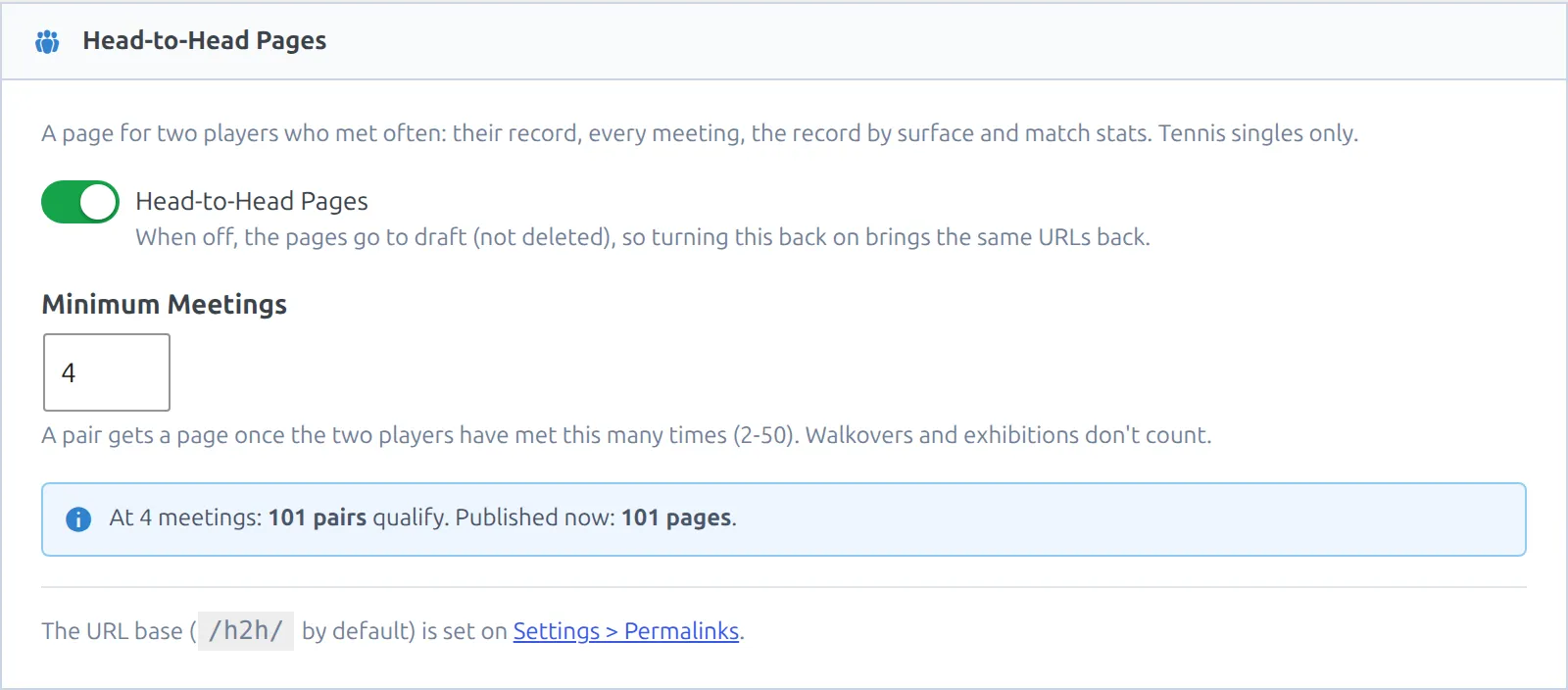
| Head-to-Head Pages | On | Builds and keeps the pages. Turn it off and the pages go to draft. They aren’t deleted, so turning it back on brings the same URLs back. |
| Minimum Meetings | 4 | How many times two players must have met before they get a page (2-50). |
As you change the number, the blue line under the field updates: “At 4 meetings: 101 pairs qualify. Published now: 101 pages.” That tells you how many pages a number will give you before you save. Pages are added or moved to draft in the background after you save.
Start high on a big site
A site that imports years of tour matches can have thousands of pairs at 4 meetings, and each new pair costs one API request for its history check. Start at 10 or more, let those pages fill in, then lower the number step by step. Raising it later moves the pages below it back to draft.
Page URLs
Every page lives at /h2h/{player-a}-vs-{player-b}/, with the two players in alphabetical order so the URL never flips when the rankings do. The reversed spelling (/h2h/sinner-jannik-vs-alcaraz-carlos/) redirects to the page. The URL is set once, so it doesn’t change if a player is renamed later.
To use another word than h2h, go to Settings > Permalinks and change Hub Head-to-Head base (Tennis).
Where visitors find them
- Match pages – the head-to-head block shows a Full head-to-head link when the two players have a page.
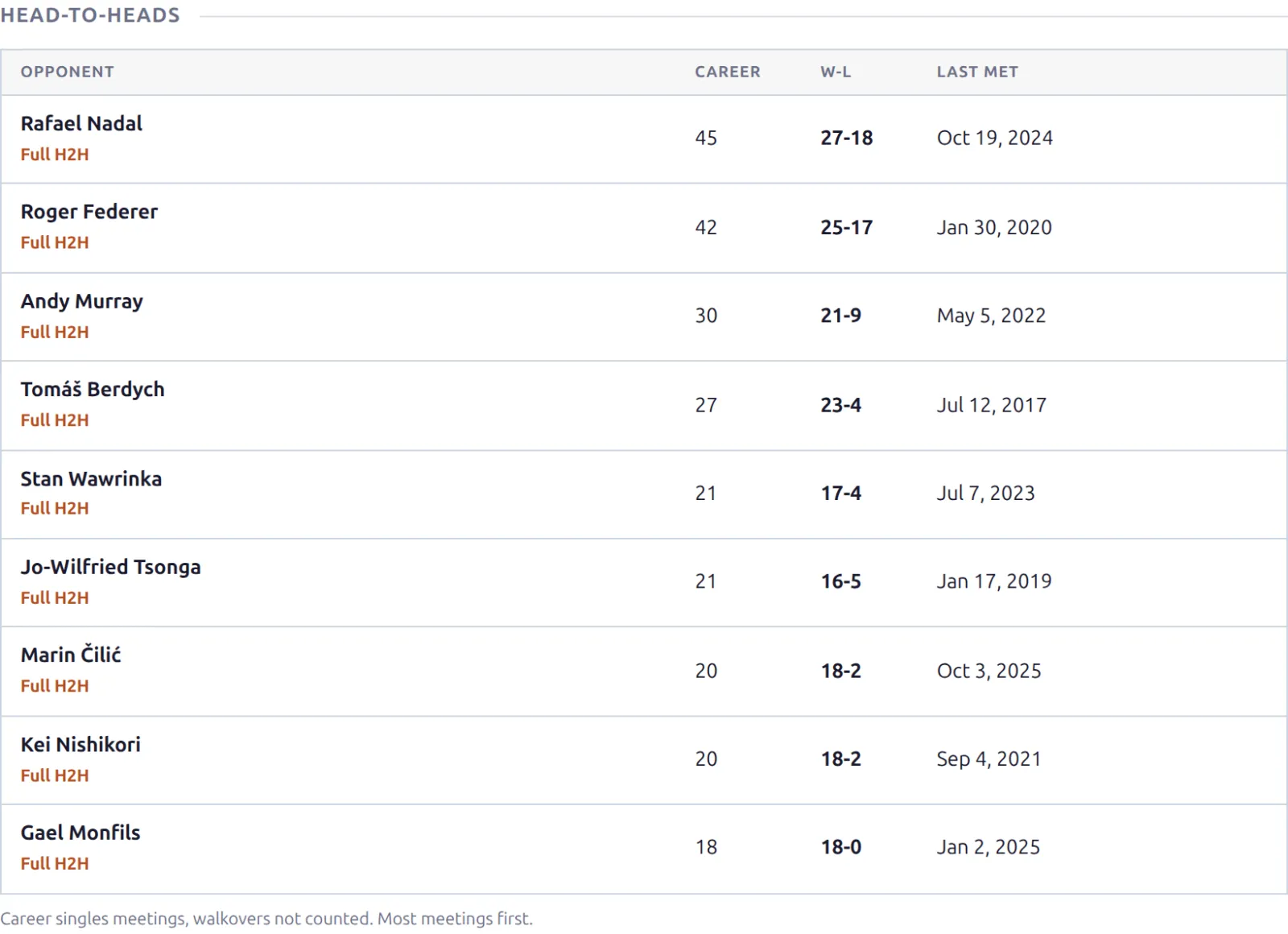
- Player pages – the Head-to-Heads block lists the player’s pages, most meetings first (up to 10), and the Rivalries block gets a Full H2H link on rows that have one.
- Your sitemap – the pages are added to it like player and match pages, so search engines find them.
Changing the layout and the page title
Head-to-head pages have their own layout under Settings & Tools > Layout Builder. Open the Head-to-head layout to reorder, hide or rename the six blocks.
The same screen has the SEO Title and SEO Description. The default title is %player1_name% vs %player2_name% H2H: Head-to-Head Record & Stats. You can use these variables:
| Variable | Becomes |
|---|---|
%player1_name%, %player2_name% | The two players, in the same order as the URL |
%h2h_record% | The record, leader first: “11-7” |
%h2h_leader% | The player who leads (empty when tied) |
%h2h_meetings% | The number of meetings that count |
%h2h_last_year% | The year they last met |
%h2h_has_stats% | “Match stats” when the page shows the stats block, empty otherwise |
🆘 Troubleshooting
No head-to-head pages appear
- Check that Head-to-Head Pages is on and that the blue line shows pairs that qualify. Zero pairs means no two players have met often enough yet. Lower Minimum Meetings, or import more seasons.
- Check that Head to Head is on under Import Options. Without it, matches come in without their head-to-head history.
- With sync on, pages wait for each pair’s history check (20 pairs an hour). The blue line’s “Published now” number grows as they’re done. This needs WP-Cron to run.
A page disappeared
Pages go to draft when you turn the feature off or raise Minimum Meetings above the pair’s count. The URL returns a 404 until the pair qualifies again, and then it comes back at the same address.
The match stats block is missing
Match Stats in Their Meetings needs at least 3 of the pair’s meetings imported with their statistics. Older rivalries, or ones you only imported a season of, often don’t have that, and the block hides instead of showing averages from one or two matches.
The number of meetings is different from another site
Walkovers and exhibitions don’t count here, so a site that counts them shows a higher number. Both are still listed under Every Meeting with their mark.
📚 Related
- Shortcodes – put match lists, draws and rankings anywhere on your site.
- Layout Builder – arrange the blocks that make up player, match, tournament and head-to-head pages.
- Statistics Blocks – the statistics that player, match and tournament pages can show.